DevTools protocol for native UI
CDP
Design, run, debug, and connect serious native software workflows through one open protocol platform.
Overview
A native UI testing, debugging, and authoring platform built on Chrome DevTools Protocol, with Test Studio, headless CI, framework adapters, V8 source debugging, RDP, reusable editors, and test-management integrations.
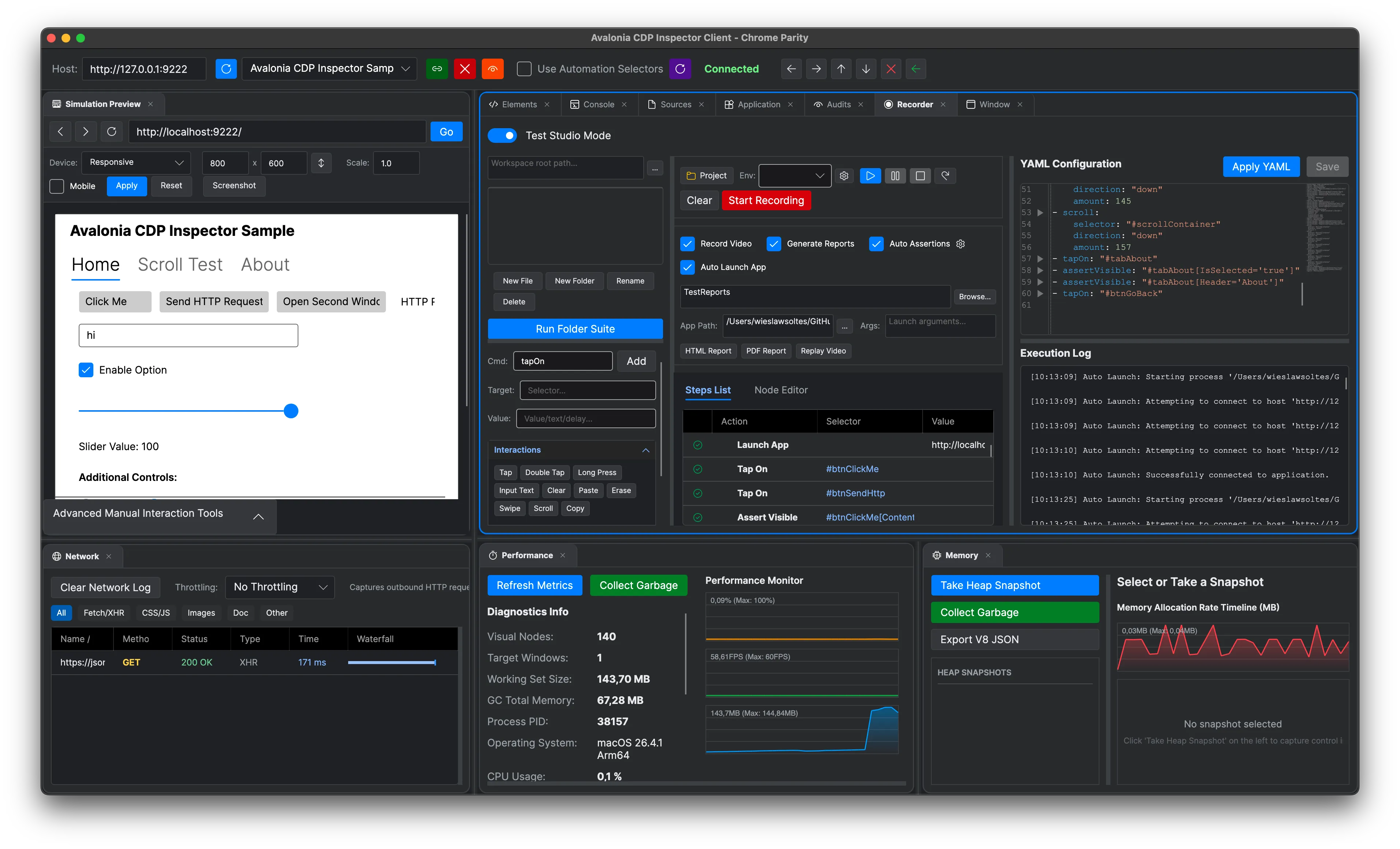
CDP has grown from a framework adapter into a protocol-centered developer platform. Native UI inspection and Test Studio share infrastructure with V8 and WebAssembly debugging, source-map-aware live editing, managed RDP, operating-system automation, reusable authoring controls, and external test-management providers.
Test Studio, YAML flows, integrations, and reports
IDE-style V8, TypeScript, source-map, and WebAssembly debugging
Headless, browser-driver, OS automation, and RDP lanes
Avalonia, WPF, WinUI, Uno, HTML, Markdown, document, and PDF tooling
Built for
Where it fits.
- Desktop teams building repeatable end-to-end and regression suites
- QA engineers authoring visual and YAML-native test flows with external test-management systems
- Framework, runtime, tooling, and agent authors needing inspectable native UI or V8 sessions
Compatibility & status
Visual + YAML flows
Avalonia.Headless
Drivers
Framework parity lane
Debugger + live edit
Managed preview client
In the work
Real output,
not a mockup.
Architecture
Clear layers.
Replaceable seams.
Author
Test Studio, recorder, YAML, node flows, HTML/Markdown/document/PDF editors, and language services define intent.
Run
Desktop, CLI, headless, Playwright, Selenium, Appium, and OS automation drivers execute the same UI operations.
Observe
Screenshots, assertions, network events, CPU, memory, FPS, V8 pause state, source maps, and reports capture evidence.
Protocol
CDP domains, raw V8 Inspector sessions, XAML adapters, OS automation, and RDP translate actions into the target runtime.
Inside CDP
One repository.
Multiple serious systems.
Explore the focused capabilities, their package boundaries, architecture, installation, and smallest useful example.
A complete test-design workspace records interactions, synchronizes step lists with YAML, offers live selector IntelliSense and assertion inference, composes visual node flows, launches apps, runs suites, and publishes evidence to five test-management systems.
3 modules→02 · Headless and repeatable native UI testsTesting & CIHeadless Avalonia execution, a global flow runner, Playwright and Puppeteer compatibility, Selenium and Appium orchestration, OS accessibility automation, screenshots, selectors, waits, assertions, and GitHub Actions support cover local through CI test lanes.
5 modules→03 · Chrome DevTools Protocol coreProtocol ServerA lightweight framework-neutral CDP server, session router, domain model, discovery endpoint, WebSocket transport, and raw V8 Inspector host for exposing native application and JavaScript runtime targets.
1 module→04 · Native UI inspectionFramework AdaptersAvalonia, Uno Platform, WPF, and WinUI adapters map visual trees, properties, styles, input, screenshots, and runtime state into CDP domains.
4 modules→05 · Headless, Selenium, and AppiumAutomation DriversAutomation packages connect CDP-aware applications to headless tests, Selenium, Appium, and cross-platform operating-system accessibility workflows.
4 modules→06 · Human and scripted diagnosticsInspector & CLIInspector controls, shared view models, WYSIWYG tools, command and source palettes, V8 debugging, a desktop client, in-process diagnostics, and CLI commands provide multiple ways to work with CDP targets.
5 modules→07 · Editors, language services, and layoutAuthoring ToolkitsStandalone HTML, Markdown, document, PDF, graph, split-layout, minimap, XAML compiler, JavaScript/TypeScript language-service, and source-debugger packages extract reusable tooling from the inspector workspace.
7 modules→08 · JavaScript, TypeScript, and WebAssemblyV8 Source DebuggerAn IDE-style Sources workspace connects to raw V8 Inspector targets with hierarchical variables, rich breakpoints, source maps, run-to-cursor, live-edit previews, TypeScript navigation, refactoring, and WebAssembly disassembly.
2 modules→09 · Remote desktop protocol and controlManaged RDP ClientManaged RDP protocol, security, virtual-channel, frame, input, and Avalonia control packages connect remote Windows sessions to the same testing and inspection ecosystem.
3 modules→10 · Publish test intent and evidenceTest Management IntegrationsA shared integration facade and focused providers connect Test Studio flows, cases, plans, runs, steps, statuses, folders, and reports to TestMo, TestRail, Xray, Zephyr Scale, and Qase.
6 modules→Quick start
From package
to first frame.
Choose the package workflow used by your repository, then start from the smallest working example. Replace VERSION with the current stable or prerelease version shown on NuGet.
dotnet add package Chrome.DevTools.Avalonia --prerelease<PackageReference Include="Chrome.DevTools.Protocol" Version="VERSION" /><PackageVersion Include="Chrome.DevTools.Protocol" Version="VERSION" />// Register the Avalonia adapter and start the CDP endpoint.// Connect Chrome DevTools, Playwright, or Puppeteer// to the exposed HTTP/WebSocket discovery URL.Package surface
Start focused.
Compose as needed.
Protocol server, sessions, transports, and domain dispatch.
↗02Chrome.DevTools.AvaloniaAvalonia DOM, CSS, input, page, overlay, and runtime domains.
↗03Chrome.DevTools.InspectorDesktop inspector and Test Studio global tool.
↗04Chrome.DevTools.Automation.HeadlessHeadless test driver and CI helpers.
↗05Chrome.DevTools.RunnerHeadless .flow.yaml test runner global tool.
↗06Chrome.DevTools.RdpManaged RDP protocol client, security, virtual channels, input, and frame updates.
↗07Chrome.DevTools.Integration.CoreTest-management contracts and scripting facade for TestMo, TestRail, Xray, Zephyr, and Qase.
↗Source, docs, samples, and releases
The repository is the source of truth.
Use the current documentation and samples, inspect changes, report issues, or support continued open-source maintenance.