ArtSpace
Vector illustration from one C# engine, on desktop and in the browser
ArtSpace is a local-first vector illustration editor built with Uno Platform and SkiaSharp, with an Illustrator-style dark workspace. The document model, transaction engine, geometry, custom controls and workbench are shared C# running natively and on real Uno WebAssembly, with JavaScript confined to file transfer, recovery and input adaptation. It ships as nine reusable .NET libraries, six of which do not depend on Uno.
What makes ArtSpace special
Familiar if you know Adobe Illustrator-style vector illustration tools — but original, local‑first and written end‑to‑end in C#.
Pen, pencil and brush
Draw primitives, cubic pen paths, freehand pencil strokes, fixed-width brush strokes, text, artboards and slices.
Direct contour editing
Edit anchors on native, imported SVG, compound, expanded and glyph paths with exact cubic insertion, reconnecting removal and segment cutting.
Pathfinder and compounds
Boolean union, subtract, intersect and exclude, plus compound paths with nonzero or even-odd fill rules.
Editable opacity masks
Create, invert, disable and release alpha or luminance masks while keeping the mask source fully editable, including nested masks.
Gradients and appearance
Multiple fills and strokes, linear and radial gradients with stop opacity, blends, shadows and on-canvas gradient editing.
Text to outlines
Create Outlines converts text into editable glyph contours using the same glyph runs used for painting.
SVG and PNG interchange
Save native .artspace JSON, import and export a supported SVG subset, and export PNG pixels.
Local-first recovery
Autosave writes to IndexedDB in the browser or local app data on desktop; nothing is uploaded to a service.
28 capabilities, 7 areas
Drawing
- Rectangles, ellipses, lines and cubic pen paths
- Freehand pencil and fixed-width paintbrush strokes
- Text with basic wrapping, tracking and alignment
- Multiple frame-based artboards and slices
Editing
- Selection, marquee, move, resize, rotate and flip
- Duplication, grouping, stacking order, alignment and distribution
- Clipboard and transactional undo/redo
- Linked local symbols/components and bounded editable blends/repeats
Contours
- Multi-anchor selection, marquee, drag and nudge
- Exact cubic anchor insertion and reconnecting removal
- Segment cutting and smooth/corner conversion with the Anchor Point tool
- Make and release compound paths with nonzero/even-odd rules
Geometry
- Shape and stroke expansion
- Positive and negative path offsets
- Boolean union, subtract, intersect and exclude
- Retained affine skew and nested group scaling
Appearance
- Multiple fills and strokes per object
- Linear and radial gradients with stop opacity, focus, radius and spread
- Opacity, blend modes and shadows
- Editable vector clipping and alpha/luminance opacity masks
Files and recovery
- Native versioned JSON (.artspace, schema 3; reads schemas 1–3)
- Supported SVG subset import and export, including gradients and masks
- PNG raster export
- IndexedDB (browser) and native local recovery
Performance
- Retained geometry, text and gradient shader caches
- Indexed stationary-target snapping
- Conservative nested-leaf culling
- Visible-panel-only refreshes and retained inspector sections
Run ArtSpace right here
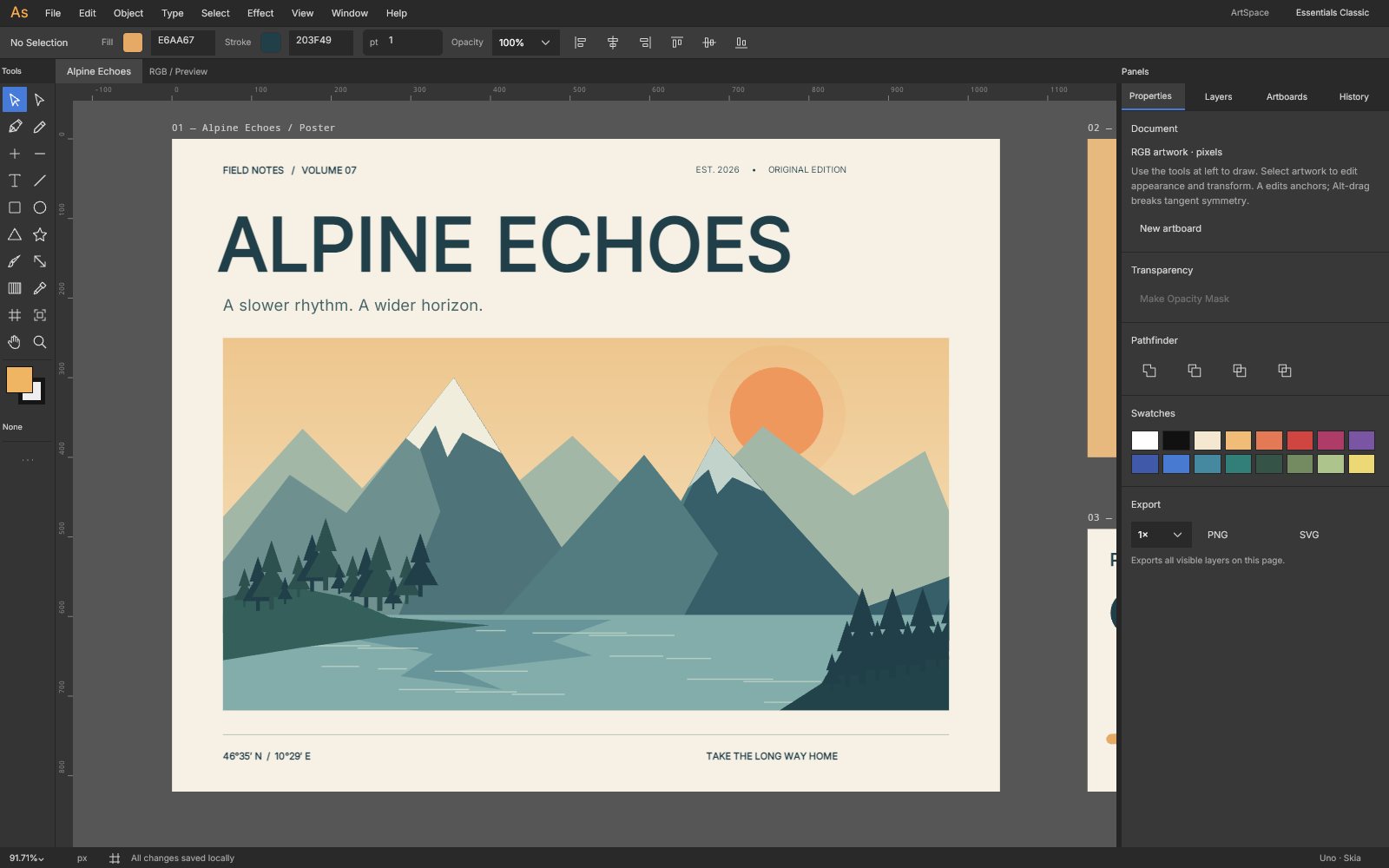
The live browser build opens the editable Alpine Echoes illustration across three artboards, running the same C# engine as desktop. Switch viewports, go fullscreen and tick off the guided tour as you explore.
Try ArtSpace live
The live browser build opens the editable Alpine Echoes illustration across three artboards, running the same C# engine as desktop.
Real C# · Uno WebAssembly · runs locally in your browser9 libraries you can embed
ArtSpace is assembled from independently reusable libraries, each published on NuGet.org. Hover the graph to trace dependencies; click a node to jump to its package, and open a card for install and usage.
ArtSpace.Core
Document, appearance, affine geometry and managed editable contours
ArtSpace.Layout
Constraints, auto-layout, alignment and reference/indexed snapping
ArtSpace.Documents
Validated native JSON schemas, clipboard, SVG subset and storage contracts
ArtSpace.Editing
Selection, transactions, undo/redo history, linked components and viewport services
ArtSpace.Skia
Cached paths/text/shaders, compositing, culling, hit testing, Boolean ops and raster export
ArtSpace.Illustration
Expansion, offsets, compounds, clipping/opacity-mask commands, blends and repeats
ArtSpace.Controls
Custom menus, panels, numeric fields, color spectrum, vector icons and layer rows
ArtSpace.Editor
Embeddable drawing surface with direct manipulation, vector tools, snapping and text editing
ArtSpace.Workbench
Application workspace, layers, inspector, command routing and storage workflows
9 packages on NuGet.org
All nine libraries are MIT-licensed, versioned together with the app and published to NuGet.org on tagged releases, with symbol packages (.snupkg) and SourceLink. The first six packages target net10.0 and do not depend on Uno (only ArtSpace.Skia and ArtSpace.Illustration need SkiaSharp); ArtSpace.Controls, ArtSpace.Editor and ArtSpace.Workbench are Uno Platform libraries targeting net10.0-desktop and net10.0-browserwasm. Hosts own lifetime, fonts and an IWorkspaceStorage implementation. Skia consumers need compatible native assets for the executing platform.
dotnet add package ArtSpace.Core --prerelease<PackageReference Include="ArtSpace.Core" Version="0.4.1-alpha.1" />
<PackageReference Include="ArtSpace.Layout" Version="0.4.1-alpha.1" />
<PackageReference Include="ArtSpace.Documents" Version="0.4.1-alpha.1" />
<PackageReference Include="ArtSpace.Editing" Version="0.4.1-alpha.1" />
<PackageReference Include="ArtSpace.Skia" Version="0.4.1-alpha.1" />
<PackageReference Include="ArtSpace.Illustration" Version="0.4.1-alpha.1" />
<PackageReference Include="ArtSpace.Controls" Version="0.4.1-alpha.1" />
<PackageReference Include="ArtSpace.Editor" Version="0.4.1-alpha.1" />
<PackageReference Include="ArtSpace.Workbench" Version="0.4.1-alpha.1" /><!-- Directory.Packages.props -->
<ItemGroup>
<PackageVersion Include="ArtSpace.Core" Version="0.4.1-alpha.1" />
<PackageVersion Include="ArtSpace.Layout" Version="0.4.1-alpha.1" />
<PackageVersion Include="ArtSpace.Documents" Version="0.4.1-alpha.1" />
<PackageVersion Include="ArtSpace.Editing" Version="0.4.1-alpha.1" />
<PackageVersion Include="ArtSpace.Skia" Version="0.4.1-alpha.1" />
<PackageVersion Include="ArtSpace.Illustration" Version="0.4.1-alpha.1" />
<PackageVersion Include="ArtSpace.Controls" Version="0.4.1-alpha.1" />
<PackageVersion Include="ArtSpace.Editor" Version="0.4.1-alpha.1" />
<PackageVersion Include="ArtSpace.Workbench" Version="0.4.1-alpha.1" />
</ItemGroup> Published with NuGet Trusted Publishing from GitHub Actions, with symbols (.snupkg) and SourceLink. Release v0.4.1-alpha.1 ↗
Dependencies follow the project references: Layout and Documents → Core; Editing → Layout + Documents; Skia → Editing + SkiaSharp; Illustration → Skia; Controls is standalone Uno; Editor → Controls + Skia; Workbench → Editor + Illustration. OpacityMaskOperations, PathOperations and PathEditing are reusable independently of the shell.
The serializable illustration model: pages, artboards and nodes with multiple fills/strokes, gradients, blends, shadows, clipping paths and alpha/luminance opacity masks, plus double-precision affine geometry and EditablePath, a managed multi-contour cubic path used for anchor editing. No dependencies and no UI.
dotnet add package ArtSpace.Core --prereleaseKey types namespace ArtSpace.Core
DesignDocument/DesignPage/DesignNode– node tree withFills,Strokes,ClipPathId,OpacityMaskId,WorldBounds.FillStyle,StrokeStyle,GradientStop– solid and linear/radial gradient paints with spread and transforms.EditablePath– contours ofPathPoints withSplit,Remove,Cut,Reverse,Smooth,HitSegment,ToSvgPathData.Vec2,RectD,Matrix2D,AffineGeometry– immutable geometry and affine validation.
Basic usage
using ArtSpace.Core;

var document = new DesignDocument { Name = "Poster" };
var artboard = new DesignNode { Kind = NodeKind.Frame, Name = "A4", Width = 595, Height = 842, Fill = "#FFFFFF" };
document.Pages[0].Nodes.Add(artboard);
var sun = artboard.Add(new DesignNode { Kind = NodeKind.Ellipse, Name = "Sun", X = 200, Y = 120, Width = 180, Height = 180 });
sun.Fills[0] = new FillStyle { Kind = FillKind.RadialGradient };
sun.Strokes.Add(new StrokeStyle { Color = "#203F49", Width = 3 });

var path = new EditablePath();
var contour = new EditablePath.Contour { Closed = true };
contour.Points.Add(new PathPoint { Position = new Vec2(0, 0) });
contour.Points.Add(new PathPoint { Position = new Vec2(100, 0), ControlIn = new Vec2(60, -40) });
contour.Points.Add(new PathPoint { Position = new Vec2(50, 80) });
path.Contours.Add(contour);
path.Split(new EditablePath.Address(0, 0), 0.5);           // insert an anchor on the first segment
Console.WriteLine($"{path.AnchorCount} anchors: {path.ToSvgPathData()}");Auto-layout, constraints and snapping for artboards and groups, including a prebuilt SnapIndex so repeated drags do not rescan stationary targets. Depends on ArtSpace.Core; no UI.
dotnet add package ArtSpace.Layout --prereleaseKey types
LayoutEngine.Arrange(node)/Arrange(roots)– lays out auto-layout frames.LayoutEngine.Resize(node, width, height)– resizes and applies child constraints.SnapIndex– indexed stationary targets withSnap(moving, tolerance, guides).SnapEngine.Snap(...)– one-shot snapping;SnapResultcarries theCorrectionandSnapLines.
Basic usage
using ArtSpace.Core;
using ArtSpace.Layout;

var row = new DesignNode { Kind = NodeKind.Frame, Name = "Swatches" };
row.Layout = new AutoLayout { Direction = LayoutDirection.Horizontal, Gap = 8, HugWidth = true, HugHeight = true };
for (var i = 0; i < 3; i++) row.Add(new DesignNode { Name = $"Swatch {i}", Width = 40, Height = 40 });
LayoutEngine.Arrange(row);

var index = new SnapIndex(row.Children.Select(c => c.WorldBounds));
SnapResult snap = index.Snap(new RectD(62, 18, 40, 40), tolerance: 4);
Console.WriteLine($"{row.Width} x {row.Height}, correction {snap.Correction}");Native JSON (schema 3, reading 1–3) with validation, node clipboard serialization, the supported SVG subset (paths, gradients, masks and affine transforms, returning warnings for anything skipped), the original sample artwork and the IWorkspaceStorage host contract. Depends on ArtSpace.Core; no UI.
dotnet add package ArtSpace.Documents --prereleaseKey types
DocumentJson–Load,Save,Validate,CloneNode,SaveNodes/LoadNodes.SvgFormat–Export(roots, bounds)andImport(svg)returningSvgImportResult(document + warnings).IllustrationSample/SampleDocument– the editable Alpine Echoes artwork and a basic sample.IWorkspaceStorage– autosave, open and save operations implemented by each host.
Basic usage
using ArtSpace.Core;
using ArtSpace.Documents;

DesignDocument document = IllustrationSample.Create();
File.WriteAllText("alpine.artspace", DocumentJson.Save(document));
var reloaded = DocumentJson.Load(File.ReadAllText("alpine.artspace"));   // validated on load

var artboard = reloaded.Pages[0].Nodes[0];
File.WriteAllText("artboard.svg", SvgFormat.Export([artboard], artboard.WorldBounds));

SvgImportResult imported = SvgFormat.Import(File.ReadAllText("logo.svg"));
foreach (var warning in imported.Warnings) Console.WriteLine(warning);The headless editor: selection, transactional edits with bounded undo/redo, move/duplicate/group/align/distribute, clipboard and linked components, plus a viewport. Depends on Core, Layout and Documents; no UI.
dotnet add package ArtSpace.Editing --prereleaseKey types
EditorSession–Document,Page,Selection,Tool,Edit(label, action),Undo()/Redo(),Changed.EditorSession.MoveSelection,DuplicateSelection,GroupSelection,Align,Distribute,CopySelection/Paste.ComponentService–MakeComponent,InsertInstance,SetOverride,Synchronize(document).Viewport– zoom/pan withWorldToScreen,ScreenToWorld,ZoomAt,Fit.
Basic usage
using ArtSpace.Core;
using ArtSpace.Documents;
using ArtSpace.Editing;

var session = new EditorSession(IllustrationSample.Create());
session.Changed += (_, e) => Console.WriteLine($"{e.Kind}: {e.Label}");

var badge = new DesignNode { Kind = NodeKind.Star, Name = "Badge", Width = 120, Height = 120, Fill = "#E6AA67" };
session.Edit("Add badge", () => session.AddNode(badge));   // one undoable transaction
session.Select(badge);
session.DuplicateSelection(offset: 24);
session.Align("left");

Console.WriteLine($"Undo: {session.UndoLabel}");
session.Undo();The SkiaSharp renderer shared by the editor and headless tools: retained path/text/gradient caches, blending, clipping and opacity-mask compositing, culling, hit testing, glyph outlines, Boolean operations, SKPath ↔ EditablePath conversion and PNG export. Depends on ArtSpace.Editing and SkiaSharp; no Uno dependency.
dotnet add package ArtSpace.Skia --prereleaseKey types
SceneRenderer–Draw(canvas, nodes),HitTest(roots, point),Geometry(node),CreateTextOutline,ExportPng.PathEditing–Read(node, renderer)to anEditablePathandWrite(node, path)back to the node.BooleanOperations.Apply(editor, renderer, BooleanOperation.Union)– union/subtract/intersect/exclude.
Basic usage
using ArtSpace.Core;
using ArtSpace.Documents;
using ArtSpace.Editing;
using ArtSpace.Skia;

var session = new EditorSession(IllustrationSample.Create());
using var renderer = new SceneRenderer();
var artboard = session.Page.Nodes[0];
File.WriteAllBytes("artboard.png", renderer.ExportPng([artboard], artboard.WorldBounds, 2));

if (renderer.HitTest(session.Page.Nodes, new Vec2(200, 150), deep: true) is { } node && PathEditing.CanEdit(node))
{
    EditablePath path = PathEditing.Read(node, renderer);
    path.Reverse();
    session.Edit("Reverse path", () => PathEditing.Write(node, path));
}Illustrator-style commands that operate on an EditorSession selection as single undoable transactions: expand shapes, outline strokes, offset paths, compound paths, clipping and opacity masks, blends, radial repeats, text outlines and anchor editing. Depends on ArtSpace.Skia; no Uno dependency.
dotnet add package ArtSpace.Illustration --prereleaseKey types
IllustrationOperations–ExpandShapes,OutlineStrokes,OffsetPaths,Blend,RadialRepeat.PathOperations–MakeCompound/ReleaseCompound,CreateOutlines,AddAnchors,Reverse,Close.ClippingOperations–Make/Releaseclipping groups, edit mask or contents.OpacityMaskOperations–Make(editor, mode),Release,Invert,ToggleEnabled,SetMode.
Basic usage
using ArtSpace.Core;
using ArtSpace.Documents;
using ArtSpace.Editing;
using ArtSpace.Illustration;
using ArtSpace.Skia;

var document = new DesignDocument();
var back = new DesignNode { Kind = NodeKind.Ellipse, Name = "Back", Width = 120, Height = 120, Fill = "#E6AA67" };
var front = new DesignNode { Kind = NodeKind.Ellipse, Name = "Front", X = 300, Width = 60, Height = 60, Fill = "#203F49" };
document.Pages[0].Nodes.AddRange([back, front]);
var session = new EditorSession(document);
using var renderer = new SceneRenderer();

session.Select([back.Id, front.Id]);
IllustrationOperations.Blend(session, steps: 5);            // each call is one undoable edit
session.Undo();

session.Select([back.Id, front.Id]);
PathOperations.MakeCompound(session, renderer);
IllustrationOperations.OffsetPaths(session, renderer, 6);
Console.WriteLine(string.Join(", ", session.History));Compact dark-theme Uno Platform controls with shared design tokens: a keyboard-navigable command menu bar, tabbed panel dock with resize grips, scrubbable numeric fields, color fields with a spectrum picker, segmented controls, inspector sections, retained inspector bindings, layer rows and original vector icons. It has no document or editor dependency; requires Uno Platform (Skia renderer).
dotnet add package ArtSpace.Controls --prereleaseKey types
Studio– tokens and helpers such asFont,Brush,Text,Input,Columns,Surface.CommandMenuBar/MenuCommand– application menus with shortcuts and enablement.PanelDock/DockResizeGrip– tabbed side panels and drag-resizable docks.NumericField,ColorField,SegmentedControl,InspectorSection,IconButton,LayerRow.
Basic usage
using ArtSpace.Controls;
using Microsoft.UI.Xaml.Controls;

var menu = new CommandMenuBar();
menu.Add("Object", () => [new MenuCommand("Group", () => Console.WriteLine("group"), "Ctrl+G")]);

var stroke = new InspectorSection("Stroke");
stroke.Body.Children.Add(new ColorField("#203F49", hex => Console.WriteLine(hex)));
stroke.Body.Children.Add(new NumericField("Weight", 1, w => Console.WriteLine(w)) { Minimum = 0 });

var dock = new PanelDock();
dock.Add("Properties", stroke);
window.Content = new StackPanel { Children = { menu, dock } };The embeddable drawing surface: an Uno SKCanvasElement-based canvas with selection and direct-selection, pen/pencil/brush/shape/text tools, anchor and handle editing, rulers, snapping and artboard presentation. Bind it to an EditorSession and add your own chrome. Depends on ArtSpace.Controls and ArtSpace.Skia; requires Uno Platform.
dotnet add package ArtSpace.Editor --prereleaseKey types
DesignSurface–Session,Renderer,FillColor/StrokeColor/StrokeWidth,Fit(),ZoomTo,Invalidate(),StatusChanged.DesignSurface.EnterPathEditing,GetPathAnchors,EditSelectedAnchors,RemoveSelectedAnchors– contour editing.AnchorInfo– anchor/handle state exposed for panels and diagnostics.Keyboard– current modifier-key state (Control,Shift,Alt).
Basic usage
using ArtSpace.Documents;
using ArtSpace.Editing;
using ArtSpace.Editor;

var session = new EditorSession(IllustrationSample.Create());
var surface = new DesignSurface { Session = session, FillColor = "#E6AA67", StrokeWidth = 2 };
surface.StatusChanged += message => Console.WriteLine(message);
session.Tool = EditorTool.Pen;
window.Content = surface;The complete ArtSpace workspace as one control: menus, appearance bar, toolbox, rulers, artboards, layers/properties/history panels, command routing, clipboard and storage workflows. The host supplies an EditorSession and an IWorkspaceStorage (browser, desktop or your own). Depends on ArtSpace.Editor and ArtSpace.Illustration; requires Uno Platform.
dotnet add package ArtSpace.Workbench --prereleaseKey types
StudioWorkbench(EditorSession session, IWorkspaceStorage storage)– the workbenchUserControl.StudioWorkbench.Surface– the hostedDesignSurface(renderer, typeface, focus).StudioWorkbench.ShowStatus(message, error)andHandleHostNavigation(key).IWorkspaceStorage– implement for autosave, open and save.
Basic usage
using ArtSpace.Documents;
using ArtSpace.Editing;
using ArtSpace.Workbench;

var session = new EditorSession(IllustrationSample.Create());
// Supply an IWorkspaceStorage implementation for autosave, open and save.
var workbench = new StudioWorkbench(session, storage);
window.Content = workbench;
window.Closed += (_, _) => workbench.Dispose();
window.Activate();From engine to workbench
Layers build bottom‑up: each one depends only on those beneath it.
Platform-independent document, geometry and editable contours, plus validated native JSON schemas and the SVG subset.
ArtSpace.CoreArtSpace.DocumentsConstraints and snapping, transactional editing with undo, and reusable illustration commands, all without Uno.
ArtSpace.LayoutArtSpace.EditingArtSpace.IllustrationSkiaSharp painting with retained caches, compositing, culling, hit testing and raster export.
ArtSpace.SkiaCustom controls and an embeddable SKCanvasElement drawing surface with direct-manipulation gestures.
ArtSpace.ControlsArtSpace.EditorThe full application workspace, which a thin host app supplies with storage, fonts and lifetime.
ArtSpace.WorkbenchEmbed, script, extend
using ArtSpace.Documents;
using ArtSpace.Editing;
using ArtSpace.Workbench;

var session = new EditorSession(IllustrationSample.Create());
window.Content = new StudioWorkbench(session, storage);git clone https://github.com/wieslawsoltes/ArtSpace.git
cd ArtSpace
python3 scripts/fetch-assets.py
dotnet run --project tests/ArtSpace.Tests -c Release
dotnet run --project src/ArtSpace.App -f net10.0-desktop \
-p:ArtSpaceDesktopOnly=truedotnet workload install wasm-tools --skip-manifest-update
dotnet publish src/ArtSpace.App -f net10.0-browserwasm -c Release \
-o artifacts/publish -p:WasmShellWebAppBasePath=/ArtSpace/
python3 scripts/collect-site.py artifacts/publish artifacts/site
python3 scripts/serve-site.py --directory artifacts/siteFile formats
Keyboard essentials
Continuously verified
Each push runs through GitHub Actions. The public browser build is deployed only from successful pipelines.


Toolchain
Third‑party NuGet packages
git clone https://github.com/wieslawsoltes/ArtSpace.git
cd ArtSpace
dotnet workload install wasm-tools
dotnet run --project src/ArtSpace.App -f net10.0-browserwasmWhat it doesn’t claim
The project documents its limits as carefully as its features.
- Functional alpha, not complete or pixel-identical Adobe Illustrator parity
- No AI/EPS/PDF interchange; SVG support is a documented subset, not lossless roundtripping
- No CMYK/ICC/spot color, gradient meshes, image tracing or pressure/pattern brushes
- One active document session; direct contour editing works on one object at a time
- Autosave is local recovery, not durable backup; browser storage can be cleared or evicted