EffectsSpace
A C# motion-design and compositing workbench for desktop and browser
EffectsSpace is an independent motion-design and compositing application built with Uno Platform, .NET and SkiaSharp, operating on a real composition model of layers, nested compositions, keyframes, masks, mattes, effects, video frames and audio samples. The browser app is the same C# Uno workbench compiled to WebAssembly, drawing preview into Uno's existing Skia canvas. It imports Motion JPEG AVI and PCM WAVE media and exports PNG sequences, AVI with sound and high-precision WAVE mixes.
What makes EffectsSpace special
Familiar if you know Adobe After Effects-style motion design tools — but original, local‑first and written end‑to‑end in C#.
Layered compositions
Shapes, Bezier paths, text, images, Motion JPEG video, PCM audio, nulls, guides, adjustment layers and nested pre-comps.
Keyframe animation
Stopwatches, auto-key, linear/hold/Bezier interpolation, Easy Ease and value or signed-velocity graphs.
Multi-key editing
Select, marquee, retime, copy, cut and paste keys across transform, effect and audio channels as single undoable transactions.
Masks and mattes
Independently feathered Add/Subtract/Intersect masks with direct node editing, plus alpha and luma track mattes.
Effects and blend modes
Blur, Glow, Drop Shadow, Exposure, Fractal Noise, Vignette and more, with seventeen blend modes and masked adjustment layers.
Bounded expressions
Side-effect-free scalar expressions with time, clamp, linear, ease, wiggle and loopOut; not JavaScript and no host access.
Real media and audio
Import Motion JPEG AVI and PCM WAVE, remap source time, animate gain/balance and preview on the Web Audio clock.
Precision delivery
Export transparent PNG sequences, Motion JPEG AVI with stereo sound, or PCM16/PCM24/Float32 WAVE with optional TPDF dither.
29 capabilities, 7 areas
Compose
- Solids, rounded rectangles, ellipses, stars, Bezier paths and inline-edited text
- Images, Motion JPEG video, PCM audio, nulls and guides
- Parent chains, nested compositions and pre-compose
- Seventeen blend modes and multi-sample composition motion blur
Viewer
- Fit, zoom and pan
- Move, eight scale handles, rotation and anchor compensation
- Pen tool with symmetric Bezier handles and path node editing
- Direct mask node and tangent editing with cancellation
Animate
- Frame-snapped time, stopwatches and auto-key
- Linear, Hold and Bezier interpolation with Easy Ease
- Value and signed-velocity graph editors
- Multi-key selection, retiming, nudging and session-local clipboard
- Bounded scalar expressions: wiggle, loopOut, linear, ease, clamp
Composite
- Masked adjustment layers that affect only layers below
- Alpha, alpha inverted, luma and luma inverted track mattes
- Add/Subtract/Intersect/None masks with opacity, feather, expansion and inversion
- Time remap, freeze frame and continuous remap-curve reversal
Effects
- Blur, Glow and Drop Shadow
- Exposure, Brightness/Contrast, Hue/Saturation and Tint
- Invert and Posterize
- Fractal Noise fill generator and Vignette overlay
Media and audio
- Classic Motion JPEG AVI with optional PCM audio
- Mono/stereo integer and float WAVE, 8–192 kHz
- Gain and balance automation with source waveform display
- Band-limited windowed-sinc resampling with an exact same-rate path
Projects and delivery
- Versioned, self-contained .effects projects with embedded media
- IndexedDB (browser) and local app-data (desktop) recovery
- Transparent PNG frames and ZIP PNG sequences with a rational manifest
- Motion JPEG AVI with PCM16/48 kHz sound and PCM16/PCM24/Float32 WAVE mixes
Run EffectsSpace right here
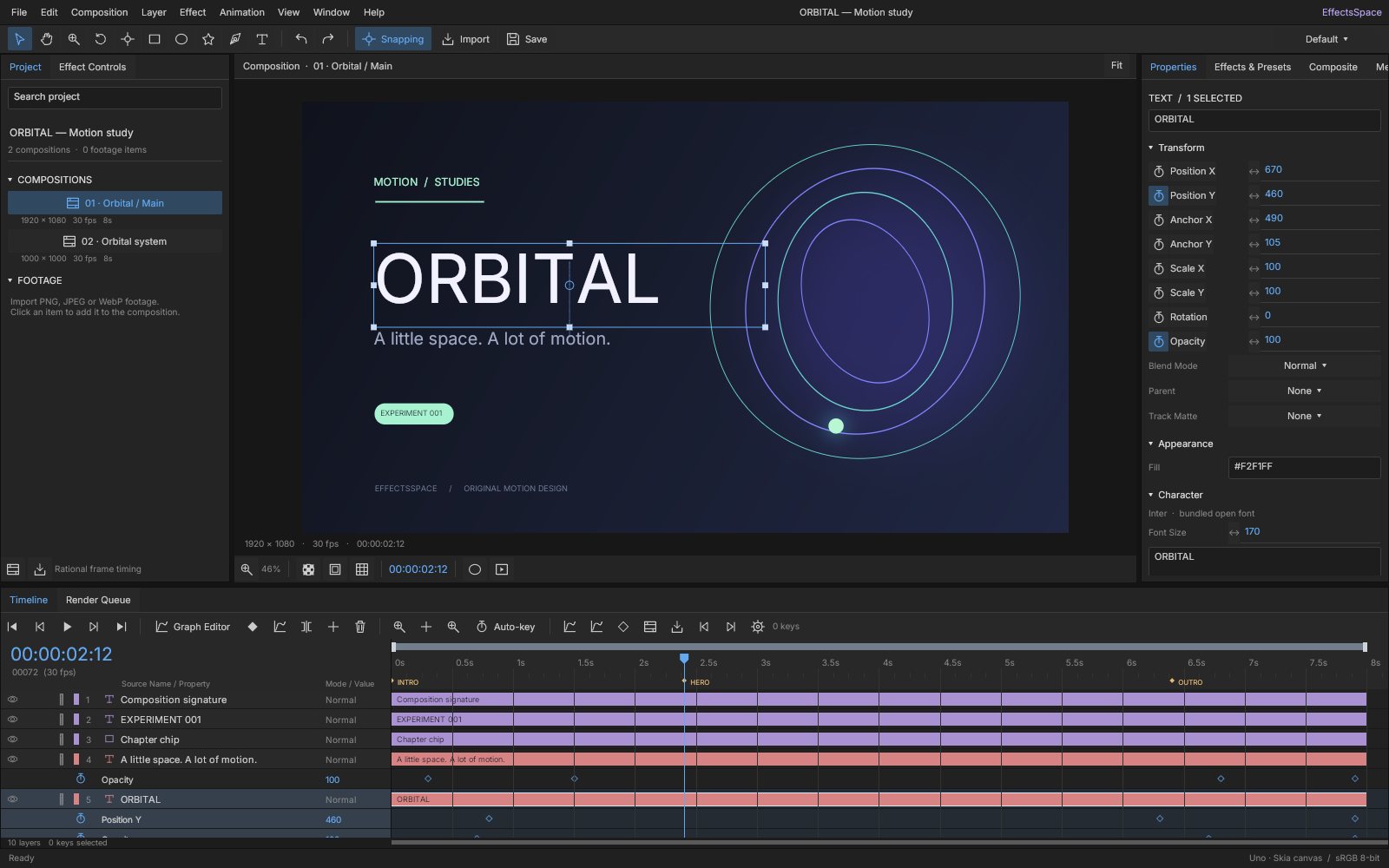
The browser studio opens the editable ORBITAL motion study at its hero frame, running the same C# workbench compiled to WebAssembly. Switch viewports, go fullscreen and tick off the guided tour as you explore.
Try EffectsSpace live
The browser studio opens the editable ORBITAL motion study at its hero frame, running the same C# workbench compiled to WebAssembly.
Real C# · Uno WebAssembly · runs locally in your browser11 libraries you can embed
EffectsSpace is assembled from independently reusable libraries, each published on NuGet.org. Hover the graph to trace dependencies; click a node to jump to its package, and open a card for install and usage.
EffectsSpace.Core
Compositions, layers, paths, effects, channels and rational time
EffectsSpace.Animation
Curves, derivatives, easing, transforms and bounded expressions
EffectsSpace.Documents
Versioned JSON, validation, budgets and storage/audio-output contracts
EffectsSpace.Editing
Transactions, selection-aware history, keyframe clipboard and commands
EffectsSpace.Rendering
Indexed frame evaluation, render plans, hit testing and export schedules
EffectsSpace.Media
RIFF/AVI/WAVE, PCM indexing, sinc resampling, audio mixing and AVI muxing
EffectsSpace.Skia
Compositing, filters and masks, resource caches and PNG/AVI rendering
EffectsSpace.Controls
Original studio chrome, icons, choices, splitters and numeric scrubbing
EffectsSpace.Viewer
Composition viewer with camera, transforms, paths, inline text, masks and waveform
EffectsSpace.Timeline
Row-cached timeline, clip/key editing, marquee and value/velocity graphs
EffectsSpace.Workbench
Panels, media/delivery settings, transport, render queue and document workflows
11 packages on NuGet.org
The studio is built from eleven MIT-licensed packages that are versioned and released together; the app itself is a thin platform host. Seven packages (Core through Skia) target plain net10.0 and have no UI dependency; only EffectsSpace.Skia pulls in SkiaSharp. Controls, Viewer, Timeline and Workbench are Uno Platform libraries targeting net10.0-desktop and net10.0-browserwasm. Every package ships symbols to NuGet.org (.snupkg) with SourceLink.
dotnet add package EffectsSpace.Core --prerelease<PackageReference Include="EffectsSpace.Core" Version="0.1.0-alpha.1" />
<PackageReference Include="EffectsSpace.Animation" Version="0.1.0-alpha.1" />
<PackageReference Include="EffectsSpace.Documents" Version="0.1.0-alpha.1" />
<PackageReference Include="EffectsSpace.Editing" Version="0.1.0-alpha.1" />
<PackageReference Include="EffectsSpace.Rendering" Version="0.1.0-alpha.1" />
<PackageReference Include="EffectsSpace.Media" Version="0.1.0-alpha.1" />
<PackageReference Include="EffectsSpace.Skia" Version="0.1.0-alpha.1" />
<PackageReference Include="EffectsSpace.Controls" Version="0.1.0-alpha.1" />
<PackageReference Include="EffectsSpace.Viewer" Version="0.1.0-alpha.1" />
<PackageReference Include="EffectsSpace.Timeline" Version="0.1.0-alpha.1" />
<PackageReference Include="EffectsSpace.Workbench" Version="0.1.0-alpha.1" /><!-- Directory.Packages.props -->
<ItemGroup>
<PackageVersion Include="EffectsSpace.Core" Version="0.1.0-alpha.1" />
<PackageVersion Include="EffectsSpace.Animation" Version="0.1.0-alpha.1" />
<PackageVersion Include="EffectsSpace.Documents" Version="0.1.0-alpha.1" />
<PackageVersion Include="EffectsSpace.Editing" Version="0.1.0-alpha.1" />
<PackageVersion Include="EffectsSpace.Rendering" Version="0.1.0-alpha.1" />
<PackageVersion Include="EffectsSpace.Media" Version="0.1.0-alpha.1" />
<PackageVersion Include="EffectsSpace.Skia" Version="0.1.0-alpha.1" />
<PackageVersion Include="EffectsSpace.Controls" Version="0.1.0-alpha.1" />
<PackageVersion Include="EffectsSpace.Viewer" Version="0.1.0-alpha.1" />
<PackageVersion Include="EffectsSpace.Timeline" Version="0.1.0-alpha.1" />
<PackageVersion Include="EffectsSpace.Workbench" Version="0.1.0-alpha.1" />
</ItemGroup> Published with NuGet Trusted Publishing from GitHub Actions, with symbols (.snupkg) and SourceLink. Release v0.1.0-alpha.1 ↗
Dependencies (from project references):
Core ← Animation, Documents
Animation + Documents ← Editing
Animation ← Rendering, Media
Rendering + Media (+ SkiaSharp) ← Skia
Core ← Controls (Uno)
Controls + Editing + Skia ← Viewer
Controls + Editing + Rendering ← Timeline
Viewer + Timeline ← Workbench
More integration detail: Embedding and Portable media.
The serializable motion-design model: projects, compositions, layers (shapes, text, media, nested compositions, adjustments), animatable channels, keyframes, masks, paths, effects and markers, plus exact rational frame rates. Use it alone to generate or inspect compositions. No dependencies beyond .NET; no UI.
dotnet add package EffectsSpace.Core --prereleaseKey types
MotionProject/Composition/Layer— the document tree;MotionProject.Empty()creates one composition.Channel/Keyframe/Interpolation— animatable values with Linear, Hold and Bezier keys and optional expressions.AnimatedTransform— position, anchor, scale, rotation and opacity channels.EffectCatalog/LayerEffect/EffectKind— effect definitions and parameter channels.LayerChannels— stable property paths ("X","fx/<id>/Radius") for editors and tooling.FrameRate—Frame,Seconds,Snap,Timecode.
Basic usage
using EffectsSpace.Core;

var comp = new Composition { Name = "Title card", FrameRate = new(30, 1), Duration = 4, WorkEnd = 4 };
var card = new Layer { Kind = LayerKind.Rectangle, Name = "Card", Width = 640, Height = 360, OutPoint = 4 };
card.Transform.X.Value = 960; card.Transform.Y.Value = 540;
card.Transform.AnchorX.Value = 320; card.Transform.AnchorY.Value = 180;
card.Transform.Opacity.SetKey(0, 0);
card.Transform.Opacity.SetKey(1, 100, Interpolation.Linear);
card.Effects.Add(EffectCatalog.Create(EffectKind.DropShadow));
comp.Layers.Add(card);

var project = new MotionProject { Name = "Demo", ActiveCompositionId = comp.Id, Compositions = [comp] };
foreach (AnimatedProperty property in LayerChannels.Enumerate(card))
    Console.WriteLine($"{property.Path}: {property.Name}");
string tc = comp.FrameRate.Timecode(2.5); // "00:00:02:15"Deterministic evaluation of channels: Bezier/linear/hold curves, signed velocity, layer transforms through parent chains, time remapping and a bounded, side-effect-free scalar expression language (not JavaScript). Depends on EffectsSpace.Core; no UI.
dotnet add package EffectsSpace.Animation --prereleaseKey types
CurveEvaluator—Evaluate(channel, time)including expressions;EvaluateKeys,Bezier.CurveVelocity.TryEvaluate— signed derivative for graphs and motion blur.TransformEvaluator—Local,World,ToWorld,ToLocalmatrices/points.ScalarExpression.TryEvaluate— bounded expressions with authoring diagnostics.LayerTime.Evaluate— source time from offsets, stretch or time remap.
Basic usage
using EffectsSpace.Animation;
using EffectsSpace.Core;

var opacity = new Channel(100);
opacity.SetKey(0, 0, Interpolation.Bezier);
opacity.SetKey(1, 100);
double halfway = CurveEvaluator.Evaluate(opacity, 0.5);
bool moving = CurveVelocity.TryEvaluate(opacity, 0.5, out double perSecond);

var rotation = new Channel(0) { Expression = "value + time * 45" };
double angle = CurveEvaluator.Evaluate(rotation, 2);   // 90

if (!ScalarExpression.TryEvaluate("sin(time) * 100", time: 1, value: 0, index: 1, out double result, out string? error))
Console.WriteLine(error);Persistence and host contracts: versioned .effects JSON with validation of schema, references, budgets and embedded media, plus UI-free interfaces that platform hosts implement for recovery, file picking/saving and audio output. Depends on EffectsSpace.Core; no UI.
dotnet add package EffectsSpace.Documents --prereleaseKey types
ProjectJson—Save,Load(validating),Clone,CloneLayer, sharedOptions.ProjectValidator.Validate— throws on invalid or over-budget documents.IWorkspaceStorage/ImportedFile— recovery, import and export boundary used by the workbench.IAudioPreview— optional platform audio output and playback clock.
Basic usage
using EffectsSpace.Core;
using EffectsSpace.Documents;

string json = ProjectJson.Save(MotionProject.Empty());
MotionProject project = ProjectJson.Load(json);   // validates on load

sealed class FolderStorage(string root) : IWorkspaceStorage
{
    string Recovery => Path.Combine(root, "recovery.effects");
    public async Task<string?> ReadRecoveryAsync() => File.Exists(Recovery) ? await File.ReadAllTextAsync(Recovery) : null;
    public Task WriteRecoveryAsync(string json) => File.WriteAllTextAsync(Recovery, json);
    public Task<IReadOnlyList<ImportedFile>> PickFilesAsync(bool projectOnly = false) => Task.FromResult<IReadOnlyList<ImportedFile>>([]);
    public Task SaveFileAsync(string name, string mimeType, byte[] data) => File.WriteAllBytesAsync(Path.Combine(root, name), data);
}The editing model behind the studio: EditorSession owns selection, current time, auto-key and snapshot-based undo/redo; extension methods implement layer, keyframe, masking, precompose and time-remap commands. Also contains the original ORBITAL SampleProject. Depends on Animation and Documents; no UI.
dotnet add package EffectsSpace.Editing --prereleaseKey types
EditorSession—Edit,BeginEdit/PreviewChanged/CommitEdit/CancelEdit,Undo/Redo,SetTime,Select,Changed.EditorCommands—AddLayer,SetProperty,AddKey,AddEffect,AddMask,Precompose,SplitSelection, …KeyframeCommands— multi-key copy/cut/paste, ease, interpolate, nudge.CompositingCommands—EnableTimeRemap,FreezeFrame,ReverseTime,ToggleGuide.SampleProject.Create()— the editable ORBITAL study.
Basic usage
using EffectsSpace.Core;
using EffectsSpace.Documents;
using EffectsSpace.Editing;

var session = new EditorSession(MotionProject.Empty());
Layer layer = session.AddLayer(LayerKind.Rectangle);   // added and selected
session.AutoKey = true;
session.SetProperty("X", 250);
session.SetTime(1);
session.SetProperty("X", 700);
session.AddEffect(EffectKind.GaussianBlur);

session.BeginEdit("Drag");                             // interactive gesture
layer.Transform.Y.Value += 40; session.PreviewChanged();
session.CommitEdit();                                  // one undo step; CancelEdit on Escape

session.Undo();
string json = ProjectJson.Save(session.Project);Renderer-neutral evaluation: resolves which layers are visible at a time, their world matrices, opacity and source time, with shared parent transforms evaluated once. Also provides hit testing, render budgets and deterministic export frame schedules. Depends on EffectsSpace.Animation; no UI or graphics library.
dotnet add package EffectsSpace.Rendering --prereleaseKey types
CompositionFrame— evaluation snapshot for one composition/time;Layers,Find(id).RenderLayer/RenderPlan— layer +Worldmatrix,Opacity,SourceTime, stackingIndex.RenderPlanner—Build,HitTest,ExportTimes.RenderBudget— dimension, pixel and nesting limits.
Basic usage
using EffectsSpace.Core;
using EffectsSpace.Editing;
using EffectsSpace.Rendering;

Composition comp = SampleProject.Create().Compositions[0];

var frame = new CompositionFrame(comp, time: 2.4);
foreach (RenderLayer item in frame.Layers)
    Console.WriteLine($"{item.Layer.Name}: opacity {item.Opacity:0.00}, world {item.World}");

Layer? hit = RenderPlanner.HitTest(comp, 2.4, new Vec2(960, 540));
double[] times = RenderPlanner.ExportTimes(comp).ToArray();   // work-area frame times
RenderBudget.Default.Check(3840, 2160); // throws when over budgetPortable, bounded media without native codecs: RIFF/WAVE and classic Motion JPEG AVI readers, zero-copy PCM indexing, band-limited sinc resampling, a nested-composition audio mixer and AVI/WAVE writers. Runs identically on desktop and WebAssembly. Depends on EffectsSpace.Animation; no Uno or Skia.
dotnet add package EffectsSpace.Media --prereleaseKey types
AviSource—Read,FrameAt,FrameData(JPEG slices), optionalAudio.WaveFile/PcmSource— WAVE parsing and sample access;WaveFile.Encodefor quick output.AudioMixer— prepared composition mix;Mix,WaveAsync.WaveRenderer/WavePcmWriter— PCM16/PCM24/Float32 delivery with optional TPDF dither.MjpegAviWriter— forward-only AVI muxing of JPEG frames and PCM16.MediaCatalog— cached metadata/indexes keyed by asset payload.
Basic usage
using EffectsSpace.Media;

AviSource video = AviSource.Read(aviBytes);                  // MJPEG AVI, optional PCM
ReadOnlyMemory<byte> jpeg = video.FrameData(video.FrameAt(0.5));
PcmSource audio = WaveFile.Read(wavBytes);
float left = audio.Sample(0.25, channel: 0);

var mixer = new AudioMixer(project, composition, quality: AudioResamplingQuality.BandLimited);
var stereo = new float[4096 * 2];
mixer.Mix(startTime: 0, firstFrame: 0, stereo, sampleRate: 48000);
byte[] wave = await WaveRenderer.RenderAsync(mixer, 0, 2, WaveEncoding.Pcm24,
dither: true, cancellationToken: cancellationToken);The compositor: draws a composition at a time into any SKCanvas with blend modes, mattes, masks, effects, motion blur, nested compositions and decoded video frames, using bounded geometry/filter/image caches. Exporters produce PNG frames, PNG sequences and Motion JPEG AVI with sound. Depends on Rendering, Media and SkiaSharp; no UI framework (headless hosts need Skia native assets and a typeface for text).
dotnet add package EffectsSpace.Skia --prereleaseKey types
SkiaCompositor—Render(canvas, project, composition, time),Typeface,Budget,Metrics;IDisposable.FrameExporter—Png,PngSequenceAsync.AviExporter—ExportAsyncto Motion JPEG AVI with mixed PCM audio.EffectPipeline,PathGeometry— Skia filters and paths for layers.MediaStudy.Create— the CLOCKWORK media sample.
Basic usage
using EffectsSpace.Editing;
using EffectsSpace.Skia;
using SkiaSharp;

var project = SampleProject.Create();
var composition = project.Compositions[0];

using var compositor = new SkiaCompositor { Typeface = SKTypeface.Default };
byte[] png = new FrameExporter(compositor).Png(project, composition, time: 2.4, width: 960);
byte[] avi = await new AviExporter(compositor).ExportAsync(project, composition, width: 960);

using var surface = SKSurface.Create(new SKImageInfo(composition.Width, composition.Height));
compositor.Render(surface.Canvas, project, composition, time: 2.4, includeGuides: false);Original compact studio chrome for Uno: vector icons, buttons, drop-down choices, tabbed panels, splitters and scrub-to-edit numeric fields with begin/preview/commit/cancel events. Depends on EffectsSpace.Core; requires Uno Platform (Skia renderer).
dotnet add package EffectsSpace.Controls --prereleaseKey types
NumericField— scrub/type numeric input;EditStarted,ValueChanging,EditCompleted,EditCancelled.StudioButton/StudioIcon/IconKind— icon buttons and standalone vector icons.StudioPanel— tabbed panel;AddTab,Select,TabChanged.StudioChoice,StudioSplitter— compact choice list and draggable splitter.Studio— palette constants,Brush,Text,Input,Rowhelpers.
Basic usage
using EffectsSpace.Controls;

var opacity = new NumericField("Opacity", 100) { Minimum = 0, Maximum = 100 };
opacity.ValueChanging += value => Preview(value);
opacity.EditCompleted += Commit;

var panel = new StudioPanel();
panel.AddTab("Properties", Studio.Row(Studio.Text("Opacity"), opacity));
panel.AddTab("Actions", new StudioButton("Render", () => Render(), IconKind.Render));
window.Content = panel; // your Uno WindowThe interactive composition viewer: draws through SkiaCompositor into Uno's Skia canvas and supports pan/zoom, selection, direct transform/anchor/rotation manipulation, pen paths, inline text, mask editing and an audio waveform view. Depends on Controls, Editing and Skia; requires Uno Platform (Skia renderer).
dotnet add package EffectsSpace.Viewer --prereleaseKey types
CompositionView(EditorSession)—Tool,Fit,SetZoom,ShowGrid,ShowGuides,ShowTransparency,Renderer;IDisposable.ViewerTool— Select, Hand, Zoom, Rotate, Anchor, shapes, Pen, Text.MaskEditView(CompositionView)— transactional mask node/tangent editing overlay.AudioWaveformView—SetSource(PcmSource),Playhead.
Basic usage
using EffectsSpace.Editing;
using EffectsSpace.Viewer;

var session = new EditorSession(SampleProject.Create());
var viewer = new CompositionView(session) { Tool = ViewerTool.Select, ShowGrid = true };
viewer.Error += message => Console.Error.WriteLine(message);
window.Content = viewer;                     // your Uno Window
viewer.Loaded += (_, _) => viewer.Fit();
window.Closed += (_, _) => viewer.Dispose();The composition timeline: row-cached layer bars, trimming, keyframe selection/marquee/drag, property filtering and value/velocity graph editing with Bezier handles, all bound to an EditorSession. Depends on Controls, Editing and Rendering; requires Uno Platform (Skia renderer).
dotnet add package EffectsSpace.Timeline --prereleaseKey types
TimelineView(EditorSession)—Fit,ZoomBy,GraphMode,GraphKind,ShowProperties,RevealProperty;IDisposable.GraphKind—ValueorVelocity.TimelineRow— the laid-out layer/property rows.
Basic usage
using EffectsSpace.Editing;
using EffectsSpace.Timeline;

var session = new EditorSession(SampleProject.Create());
var timeline = new TimelineView(session);
timeline.Error += message => Console.Error.WriteLine(message);
window.Content = timeline;                   // your Uno Window
timeline.Loaded += (_, _) => timeline.Fit();

timeline.RevealProperty("Opacity");           // expand and scroll to a property
timeline.GraphMode = true;                    // curve editor
timeline.GraphKind = GraphKind.Velocity;
CompositionView and TimelineView can share one session and do not require the full workbench.
The complete studio as one UserControl: project bin, viewer, timeline and graph, inspectors, effect/mask panels, media and audio-delivery settings, transport with audio clock, render queue and open/save/import/export workflows. The host supplies an IWorkspaceStorage (and optionally IAudioPreview). Depends on Viewer and Timeline; requires Uno Platform (Skia renderer).
dotnet add package EffectsSpace.Workbench --prereleaseKey types
StudioWorkbench(EditorSession, IWorkspaceStorage)— the studio control;IDisposable.Session,Viewer,Timeline,MaskEditor— access to the embedded parts.SaveAsync,OpenAsync,ImportAsync,ExportFrameAsync,ExportAviAsync,ExportAudioAsync,TogglePlayback,ShowStatus.
Basic usage
using EffectsSpace.Controls;
using EffectsSpace.Documents;
using EffectsSpace.Editing;
using EffectsSpace.Workbench;

protected override void OnLaunched(LaunchActivatedEventArgs args)
{
    var window = new Window { Title = "EffectsSpace" };
    IWorkspaceStorage storage = new MyWorkspaceStorage();   // your platform implementation
    var workbench = new StudioWorkbench(new EditorSession(SampleProject.Create()), storage);
    workbench.Viewer.Renderer.Typeface = Studio.Typeface;
    window.Content = workbench;
    window.Closed += (_, _) => workbench.Dispose();
    window.Activate();
}
src/EffectsSpace.App contains complete desktop (DesktopWorkspaceStorage) and browser (BrowserWorkspaceStorage) implementations.
From engine to workbench
Layers build bottom‑up: each one depends only on those beneath it.
Uno- and Skia-free compositions, layers and rational time, plus validated versioned documents and storage contracts.
EffectsSpace.CoreEffectsSpace.DocumentsCurves, easing and bounded expressions with atomic transactions, selection-aware history and keyframe clipboard.
EffectsSpace.AnimationEffectsSpace.EditingRenderer-neutral frame plans and portable AVI/WAVE media, composited through SkiaSharp.
EffectsSpace.RenderingEffectsSpace.MediaEffectsSpace.SkiaOriginal Uno controls plus Skia-painted viewer and timeline surfaces drawn into SKCanvasElement.
EffectsSpace.ControlsEffectsSpace.ViewerEffectsSpace.TimelinePanels, transport, render queue and document workflows hosted by a thin desktop/WebAssembly app.
EffectsSpace.WorkbenchEmbed, script, extend
# Fetch checksum-verified open typography and retain its license
python3 scripts/fetch-assets.py

# Native desktop: Windows, macOS or Linux
dotnet run --project src/EffectsSpace.App -f net10.0-desktop \
  -p:EffectsSpaceDesktopOnly=true

# Real Uno WebAssembly application
dotnet workload install wasm-tools
dotnet publish src/EffectsSpace.App -f net10.0-browserwasm -c Release \
  -o artifacts/publish -p:WasmShellWebAppBasePath=/EffectsSpace/
python3 scripts/collect-site.py artifacts/publish artifacts/site
python3 scripts/serve-site.py --directory artifacts/site --port 4173# Engine and media regression executables
dotnet run --project tests/EffectsSpace.Tests -c Release
dotnet run --project tests/EffectsSpace.Animation.Tests -c Release
dotnet run --project tests/EffectsSpace.Skia.Tests -c Release
dotnet run --project tests/EffectsSpace.Compositing.Tests -c Release
dotnet run --project tests/EffectsSpace.Media.Tests -c Release
dotnet run --project tests/EffectsSpace.Media.Skia.Tests -c Release
dotnet run --project tests/EffectsSpace.Audio.Tests -c Release
# Independent media validation: requires test-only FFmpeg/ffprobe
python3 scripts/verify-media.py
python3 scripts/verify-audio.py
# Real keyboard, pointer, file-picker and download interactions
npm ci --ignore-scripts
npx playwright install chromium
npm run test:browserFile formats
Keyboard essentials
Continuously verified
Each push runs through GitHub Actions. The public browser build is deployed only from successful pipelines.
animation.yml Audio Fidelity
audio.yml Build
Buildbuild.yml Desktop
desktop.yml Portable Media
media.yml Pages
Pagespages.yml Release
release.yml
Toolchain
Third‑party NuGet packages
git clone https://github.com/wieslawsoltes/EffectsSpace.git
cd EffectsSpace
dotnet workload install wasm-tools
dotnet run --project src/EffectsSpace.App -f net10.0-browserwasmWhat it doesn’t claim
The project documents its limits as carefully as its features.
- Development alpha of 2D editing, not complete Adobe After Effects parity
- No MP4/H.264/WebM, 3D, tracking, Adobe formats/plugins or dedicated WebGPU renderer
- Native timeline preview is silent; browser audible preview is limited to 60 seconds
- 8-bit sRGB workflow: no HDR, linear-light or color management; AVI export has no alpha
- Embedded media limited to 32 MiB per asset and 64 MiB total; exports capped at 3600 frames