ImageSpace
A local-first layered image studio in C#, on desktop and the web
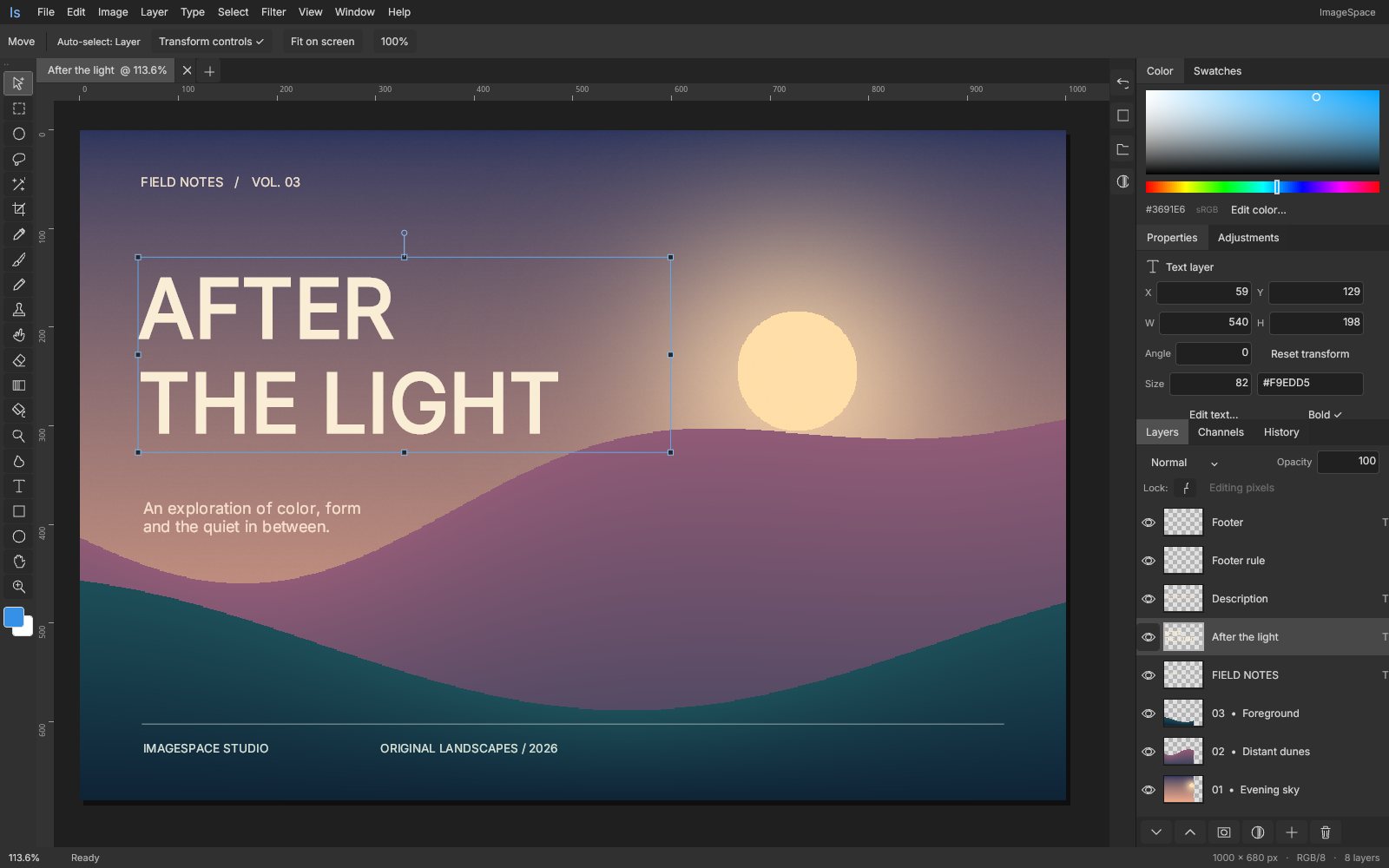
ImageSpace is an independent layered image editor built with Uno Platform, SkiaSharp and an optional WebGPU compute backend. Its photo-editing workspace runs as a genuine Uno WebAssembly application and shares its C# editor with Windows, Linux and macOS hosts. Eleven reusable .NET libraries separate the tile-based document model, brushes, selections, filters, transactions, file formats, rendering, controls, viewport and workbench.
What makes ImageSpace special
Familiar if you know Photoshop-style image editors — but original, local‑first and written end‑to‑end in C#.
Genuine Uno WebAssembly
The browser workspace is a real Uno app sharing its C# editor with desktop hosts — not a monolithic canvas or an HTML mockup.
Layers, type and shapes
Sparse pixel layers, editable multiline type and rectangle/ellipse shapes with sixteen blend modes, opacity, locks and reordering.
Pressure-aware painting
Brush, pencil, eraser and clone with size, hardness, opacity and flow, plus basic smudge, dodge and burn.
Non-destructive Curves & Levels
Adjustment layers with composite RGB and per-channel graphs, numeric and keyboard editing, presets and live undoable previews.
Independent masks
Pixel, type, shape and adjustment masks with density, feather, unlinked affine placement and a separate Apply layer mask workflow.
Rich selections
Rectangle, ellipse, lasso and contiguous color with add/subtract/intersect, feather, expand, contract, border and smooth.
Optional WebGPU compute
A reusable browser WebGPU module accelerates eight color kernels, with an explicit CPU fallback and the tile model as source of truth.
Copy-on-write tiles
Sparse 128-pixel RGBA tiles with copy-on-write snapshots power transactional undo without copying every pixel per stroke.
29 capabilities, 6 areas
Paint
- Pressure-aware brush, pencil and eraser with size, hardness, opacity and flow
- Clone from an Alt-click source on the active layer
- Basic smudge, dodge and burn
- Fill and linear gradient on the active pixel layer
- Color spectrum, hex dialog and foreground/background swatches
Selection
- Rectangle, ellipse, lasso and contiguous color selection
- Add, subtract and intersect with Shift, Alt and Shift+Alt
- Invert, feather and alpha selection
- Expand, contract, border and smooth that preserve soft coverage
Layers and masks
- Pixel, editable multiline type and rectangle/ellipse shape layers
- Sixteen blend modes, opacity, visibility, locks, duplicate, reorder and rasterize
- Masks on pixel, type, shape and adjustment layers with density and feather
- Unlink masks to move, rotate and resize coverage; relink without a jump
- Grayscale and red-overlay mask inspection views
- Apply layer mask bakes coverage into pixel alpha as one undoable edit
Tone and effects
- Curves with 2–16 points per channel and shape-preserving cubic interpolation
- Levels with input black/white, gamma and output endpoints
- Live adjustments: brightness/contrast, saturation, invert, grayscale, sepia, blur
- Fourteen CPU color/convolution filters that respect selections
- Eight optional WebGPU kernels with CPU fallback
Geometry and navigation
- Eight-handle scaling, rotation and constrained motion
- Numeric X/Y/W/H/Angle properties
- Non-destructive crop with thirds guides that preserves off-canvas pixels
- Canvas size and image size; wheel zoom, Space to pan, rulers and pixel grid
Files and recovery
- Editable .imagespace archives (reader accepts versions 1–4)
- Bounded PSD v1 RGB/8 import and export, including placed user masks
- PNG, JPEG and WebP import and composite export
- Up to twelve document tabs
- Local IndexedDB or atomic desktop recovery of the active document
Run ImageSpace right here
Open the live WebAssembly workspace and edit the original After the light sample — pixel, type and shape layers are ready to explore. Switch viewports, go fullscreen and tick off the guided tour as you explore.
Try ImageSpace live
Open the live WebAssembly workspace and edit the original After the light sample — pixel, type and shape layers are ready to explore.
Real C# · Uno WebAssembly · runs locally in your browser11 libraries you can embed
ImageSpace is assembled from independently reusable libraries, each published on NuGet.org. Hover the graph to trace dependencies; click a node to jump to its package, and open a card for install and usage.
ImageSpace.Core
Colors, copy-on-write tiles, layers, document invariants and tone curve/levels math
ImageSpace.Imaging
Pressure-aware brushes, selections, flood fill, raster geometry and histograms
ImageSpace.Filters
Selection-aware color/convolution filters and sparse tone-lookup processing
ImageSpace.Editing
Transactions, bounded tile history, rollback, mask application and editor commands
ImageSpace.Documents
Versioned native archives and bounded 8-bit RGB PSD codec
ImageSpace.Skia
Compositor, revision-cached tile images, live adjustments, mask baking and image codecs
ImageSpace.WebGpu
WebGPU compute contracts and standalone JavaScript/WGSL RGBA kernels
ImageSpace.Storage
Host-independent file and recovery contracts
ImageSpace.Controls
Custom icons, buttons, menus, numeric fields, spectrum, histograms, curve and levels editors
ImageSpace.Editor
Embeddable viewport with camera, paint, selection, transform and crop gestures
ImageSpace.Workbench
Workspace, panels, tonal inspector, menus, commands and multi-document tabs
11 packages on NuGet.org
All eleven libraries are MIT-licensed and published on NuGet.org. The first eight (Core, Storage, Imaging, Filters, WebGpu, Editing, Documents, Skia) target net10.0 and have no Uno dependency; only ImageSpace.Skia needs SkiaSharp. ImageSpace.Controls, ImageSpace.Editor and ImageSpace.Workbench target net10.0-desktop and net10.0-browserwasm on Uno Platform with the Skia renderer. All packages are versioned together (currently prereleases), and symbols ship on NuGet.org as .snupkg with SourceLink.
dotnet add package ImageSpace.Core --prerelease<PackageReference Include="ImageSpace.Core" Version="0.3.2-alpha.1" />
<PackageReference Include="ImageSpace.Storage" Version="0.3.2-alpha.1" />
<PackageReference Include="ImageSpace.Imaging" Version="0.3.2-alpha.1" />
<PackageReference Include="ImageSpace.Filters" Version="0.3.2-alpha.1" />
<PackageReference Include="ImageSpace.WebGpu" Version="0.3.2-alpha.1" />
<PackageReference Include="ImageSpace.Editing" Version="0.3.2-alpha.1" />
<PackageReference Include="ImageSpace.Documents" Version="0.3.2-alpha.1" />
<PackageReference Include="ImageSpace.Skia" Version="0.3.2-alpha.1" />
<PackageReference Include="ImageSpace.Controls" Version="0.3.2-alpha.1" />
<PackageReference Include="ImageSpace.Editor" Version="0.3.2-alpha.1" />
<PackageReference Include="ImageSpace.Workbench" Version="0.3.2-alpha.1" /><!-- Directory.Packages.props -->
<ItemGroup>
<PackageVersion Include="ImageSpace.Core" Version="0.3.2-alpha.1" />
<PackageVersion Include="ImageSpace.Storage" Version="0.3.2-alpha.1" />
<PackageVersion Include="ImageSpace.Imaging" Version="0.3.2-alpha.1" />
<PackageVersion Include="ImageSpace.Filters" Version="0.3.2-alpha.1" />
<PackageVersion Include="ImageSpace.WebGpu" Version="0.3.2-alpha.1" />
<PackageVersion Include="ImageSpace.Editing" Version="0.3.2-alpha.1" />
<PackageVersion Include="ImageSpace.Documents" Version="0.3.2-alpha.1" />
<PackageVersion Include="ImageSpace.Skia" Version="0.3.2-alpha.1" />
<PackageVersion Include="ImageSpace.Controls" Version="0.3.2-alpha.1" />
<PackageVersion Include="ImageSpace.Editor" Version="0.3.2-alpha.1" />
<PackageVersion Include="ImageSpace.Workbench" Version="0.3.2-alpha.1" />
</ItemGroup> Published with NuGet Trusted Publishing from GitHub Actions, with symbols (.snupkg) and SourceLink. Release v0.3.2-alpha.1 ↗
Dependencies: Core ← Imaging, Filters, Documents, Skia, Controls; Filters ← WebGpu; Imaging + Filters ← Editing; Editing + Skia + Controls ← Editor; Editor + Documents + Storage ← Workbench. Storage has no dependencies. CI also produces the standalone npm tarball @wieslawsoltes/imagespace-webgpu (from packages/webgpu); it is not a NuGet package, and its npm publication is separate.
The document model shared by every other package: ImageDocument with raster, text, shape and adjustment Layers, sparse copy-on-write PixelSurface tiles (128×128, straight-alpha RGBA), masks with affine placement, and immutable Curves/Levels settings with lookup-table math. Use it standalone for headless image generation or processing. No dependencies and no UI.
dotnet add package ImageSpace.Core --prereleaseKey types
ImageDocument: size, DPI, orderedLayers,ActiveLayerId, optionalSelectioncoverage,Snapshot()andValidate().Layer: kind, blend, opacity, transform,Pixels,Maskand mask placement,Curves/Levels;Layer.Raster(...)factory.PixelSurface: tiled pixels withGet/Set/Fill, row copies,FromRgba/ToRgbaand per-tile revisions (limit 8192 px per side, 16 MP).Rgba32: 8-bit sRGB color withParse,LerpandOver.ToneCurve,CurvesAdjustment,LevelsChannel,LevelsAdjustment: immutable, validated tone settings.RgbLookupTables:FromCurves/FromLevels(with strength) andMap(Rgba32).
Basic usage
using ImageSpace.Core;

var document = new ImageDocument(1600, 1000, "Poster");
var paint = Layer.Raster("Paint", document.Width, document.Height);
paint.Pixels!.Fill(Rgba32.Parse("#1E2A3A"));
paint.Pixels.Set(10, 10, new Rgba32(255, 128, 0));
document.Layers.Add(paint);
document.ActiveLayerId = paint.Id;
document.Validate();

// Pure tone math: immutable settings become 8-bit lookup tables.
var curves = new CurvesAdjustment
{
    Rgb = new ToneCurve { Points = [new(0, 0), new(64, 38), new(192, 218), new(255, 255)] }
};
Rgba32 mapped = RgbLookupTables.FromCurves(curves).Map(paint.Pixels.Get(10, 10));
See the Curves/Levels reuse guide for interpolation and compatibility details.
The contract a host implements so the workbench can open, save and recover files without knowing about browsers, pickers or file systems. No dependencies and no UI.
dotnet add package ImageSpace.Storage --prereleaseKey types
IEditorStorage:OpenAsync,SaveAsync(returnfalseon cancel),ReadRecoveryAsync,WriteRecoveryAsync,ClearRecoveryAsync.OpenedFile(Name, Bytes): a file chosen by the user.
Basic usage
using ImageSpace.Storage;

sealed class FolderStorage(string folder) : IEditorStorage
{
    private string Recovery => Path.Combine(folder, "recovery.imagespace");

    public Task<OpenedFile?> OpenAsync(CancellationToken cancellationToken = default) =>
        Task.FromResult<OpenedFile?>(null); // show a host file picker here

    public async Task<bool> SaveAsync(string name, byte[] bytes, string contentType, CancellationToken cancellationToken = default)
    {
        await File.WriteAllBytesAsync(Path.Combine(folder, name), bytes, cancellationToken);
        return true; // return false when the user cancels
    }

    public async Task<byte[]?> ReadRecoveryAsync(CancellationToken cancellationToken = default) =>
        File.Exists(Recovery) ? await File.ReadAllBytesAsync(Recovery, cancellationToken) : null;

    public Task WriteRecoveryAsync(byte[] bytes, CancellationToken cancellationToken = default) =>
        File.WriteAllBytesAsync(Recovery, bytes, cancellationToken);

    public Task ClearRecoveryAsync(CancellationToken cancellationToken = default)
    {
        File.Delete(Recovery);
        return Task.CompletedTask;
    }
}Raster editing primitives: a pressure-aware brush engine (brush, pencil, eraser, clone, dodge, burn, smudge), rectangle/ellipse/polygon/contiguous selections with add/subtract/intersect, O(n) selection morphology, fills and gradients that honor selection coverage, histograms, resize/crop/rotate/flip and the original sample document. Depends on Core; no UI.
dotnet add package ImageSpace.Imaging --prereleaseKey types
BrushEnginewithBrushSettings(Size, Hardness, Opacity, Flow, Spacing, Pressure)andPaintMode.Selections:Rectangle,Polygon,Contiguous,Combine,Invert,Bounds.SelectionMorphology.Apply(...): expand, contract, border and smooth;SelectionContours.Tracefor exact outlines.PixelEdits:Fill,Gradient,Clear;MaskOperationsfor mask/selection conversion.RasterOperations:Resize,Crop,Rotate90,Flip,Histogram,Sample.
Basic usage
using System.Numerics;
using ImageSpace.Core;
using ImageSpace.Imaging;

var document = new ImageDocument(800, 600);
var layer = Layer.Raster("Paint", 800, 600);
document.Layers.Add(layer);
document.ActiveLayerId = layer.Id;

// Edits respect the document selection's coverage.
var ellipse = Selections.Rectangle(800, 600, new Vector2(100, 100), new Vector2(500, 400), ellipse: true);
document.Selection = SelectionMorphology.Apply(ellipse, SelectionModification.Smooth, radius: 4);
PixelEdits.Gradient(document, layer, new(100, 100), new(500, 400), Rgba32.Parse("#FF8A3D"), Rgba32.Parse("#3D7BFF"));

var brush = new BrushEngine();
brush.Begin(layer.Pixels!, Vector2.Zero);
foreach (var x in new[] { 150f, 250f, 350f })
    brush.Paint(document, layer, new Vector2(x, 250), 0.8f, new BrushSettings(Size: 24), Rgba32.White, PaintMode.Brush);
brush.End();

int[] histogram = RasterOperations.Histogram(layer.Pixels!);Deterministic, allocation-conscious pixel filters on PixelSurface: invert, grayscale, sepia, brightness/contrast, saturation, gamma, threshold, posterize, Gaussian blur, sharpen, emboss, edges, pixelate and noise, plus sparse tone-lookup processing for Curves/Levels. Source surfaces are never modified. Depends on Core; no UI.
dotnet add package ImageSpace.Filters --prereleaseKey types
FilterEngine.Apply(source, kind, amount, secondary, seed)andFilterEngine.Blur(source, sigma).FilterKind: the fourteen supported kernels.ToneFilterEngine.Apply(source, RgbLookupTables, cancellationToken): cancellable lookup-table processing that preserves alpha.
Basic usage
using ImageSpace.Core;
using ImageSpace.Filters;

PixelSurface blurred = FilterEngine.Blur(source, sigma: 3);
PixelSurface sepia = FilterEngine.Apply(source, FilterKind.Sepia);
PixelSurface punchy = FilterEngine.Apply(source, FilterKind.BrightnessContrast, amount: 10, secondary: 20);

var levels = new LevelsAdjustment
{
    Rgb = new LevelsChannel { InputBlack = 16, InputWhite = 240, Gamma = 1.2 },
    Blue = new LevelsChannel { Gamma = 0.95 }
};
PixelSurface toned = ToneFilterEngine.Apply(source, RgbLookupTables.FromLevels(levels), cancellationToken);Contracts for optional GPU compute plus the standalone WebGPU JavaScript/WGSL kernels (WebGpu.js, shipped as an embedded resource and as contentFiles/any/any/ImageSpace/WebGpu.js). Eight color kernels are accelerated (invert, grayscale, sepia, brightness/contrast, saturation, gamma, threshold, posterize); everything else, and any unavailable adapter, falls back to the CPU. Depends on Filters; no UI. The host (for example a browser interop layer) implements IComputeFilterBackend.
dotnet add package ImageSpace.WebGpu --prereleaseKey types
IComputeFilterBackend:GetCapabilitiesAsyncandApplyAsync(returnsnullfor unsupported kernels; never mutates the source).GpuCapabilities(Available, Backend, MaximumBufferSize, Reason).GpuKernels.Supports(FilterKind): which kernels have a GPU implementation.
Basic usage
using ImageSpace.Core;
using ImageSpace.Filters;
using ImageSpace.WebGpu;

static async Task<PixelSurface> ApplyAsync(IComputeFilterBackend gpu, PixelSurface source, FilterKind kind, float amount)
{
    if (GpuKernels.Supports(kind))
    {
        GpuCapabilities caps = await gpu.GetCapabilitiesAsync();
        if (caps.Available && await gpu.ApplyAsync(source, kind, amount, 0) is { } output)
            return output;
    }
    return FilterEngine.Apply(source, kind, amount); // deterministic CPU fallback
}The transactional EditorSession: every edit runs against a snapshot, commits as one history entry or rolls back on failure, and undo/redo stays within a memory budget. It also hosts layer, mask, selection, filter and canvas commands. Depends on Imaging and Filters; no UI.
dotnet add package ImageSpace.Editing --prereleaseKey types
EditorSession:Document,Execute(name, action),Begin/Commit/Cancel,Undo/Redo,History,HistoryBudget,Changed.- Layer and canvas commands:
AddLayer,DuplicateLayer,MoveLayer,AddMask,ApplyFilter,Crop,ResizeImage,RotateCanvas. - Mask commands:
SetMaskProperties,SetMaskLinked,InvertMask,ApplyLayerMask/CanApplyLayerMask. PixelFilterPipelineandHistoryEntry.
Basic usage
using ImageSpace.Core;
using ImageSpace.Editing;
using ImageSpace.Filters;

var session = new EditorSession(new ImageDocument(1600, 1000, "Untitled"));
session.Changed += (_, _) => Console.WriteLine($"Revision {session.Revision}");

session.AddLayer("Paint");                             // one history entry
session.FillPixels(new Rgba32(54, 145, 230));
session.ApplyFilter(FilterKind.GaussianBlur, amount: 4);

session.Execute("Add Curves", document =>              // arbitrary edit, one undo step
{
    var adjustment = new Layer
    {
        Name = "Contrast", Kind = LayerKind.Adjustment, Adjustment = AdjustmentKind.Curves,
        Width = document.Width, Height = document.Height,
        Curves = new CurvesAdjustment { Rgb = new ToneCurve { Points = [new(0, 0), new(64, 38), new(192, 218), new(255, 255)] } }
    };
    document.Layers.Add(adjustment);
    document.ActiveLayerId = adjustment.Id;
});
session.Undo();File formats: the versioned native .imagespace archive (manifest versions 1–4, minimal version written) for lossless roundtrips, and bounded RGB/8 PSD import/export (raw, PackBits, ZIP and predicted ZIP channels, Unicode names, resolution and user masks). Archive size, dimensions and layer counts are bounded. Depends on Core; no UI.
dotnet add package ImageSpace.Documents --prereleaseKey types
DocumentArchive.Save(ImageDocument)/DocumentArchive.Load(ReadOnlyMemory<byte>).PsdCodec.Load(bytes, name): returnsPsdCodec.ImportResult(Document, Warnings).PsdCodec.Save(document, rasterize, composite, compression)withPsdCompression.
Basic usage
using ImageSpace.Core;
using ImageSpace.Documents;
using ImageSpace.Skia;

PsdCodec.ImportResult imported = PsdCodec.Load(File.ReadAllBytes("artwork.psd"), "artwork");
foreach (var warning in imported.Warnings)
    Console.WriteLine(warning);

// Lossless native archive (.imagespace) roundtrip.
byte[] archive = DocumentArchive.Save(imported.Document);
ImageDocument reopened = DocumentArchive.Load(archive);

// PSD export needs rasterized layers and a composite, e.g. from ImageSpace.Skia.
using var renderer = new ImageRenderer();
byte[] psd = PsdCodec.Save(reopened, layer => renderer.RasterizeLayer(reopened, layer),
    renderer.Rasterize(reopened), PsdCompression.Zip);
PSD is bounded raster interchange, not lossless Photoshop editing; see Files and limits.
The shared compositor: draws revision-cached tiles, text, shapes, sixteen blend modes, masks and live adjustments (including Curves/Levels lookup filters) into any SKCanvas, rasterizes and exports PNG/JPEG/WebP, decodes images and bakes masks. The host picks the Skia backend (GPU or software). Depends on Core and SkiaSharp 3.119; no UI framework.
dotnet add package ImageSpace.Skia --prereleaseKey types
ImageRenderer:Draw,DrawLayer,Rasterize,RasterizePreview,RasterizeLayer,Export,Decode,SetTypeface,BakeLayerMask.MaskPreviewRendererwithMaskPreviewMode(composite, grayscale, red overlay).DocumentPreviewCache: bounded, reusable document previews for thumbnails and histograms.
Basic usage
using ImageSpace.Core;
using ImageSpace.Skia;
using SkiaSharp;

using var renderer = new ImageRenderer();

// Composite into any SKCanvas (an Uno SKCanvasElement, an SKSurface, ...).
using var surface = SKSurface.Create(new SKImageInfo(document.Width, document.Height));
renderer.Draw(surface.Canvas, document);

File.WriteAllBytes("poster.webp", renderer.Export(document, SKEncodedImageFormat.Webp, quality: 90));
PixelSurface preview = renderer.RasterizePreview(document, maximumEdge: 256);
PixelSurface decoded = ImageRenderer.Decode(File.ReadAllBytes("photo.jpg"));
Use a renderer on its owning thread. To apply a layer mask destructively, pass the renderer to the session: if (session.CanApplyLayerMask) session.ApplyLayerMask(renderer.BakeLayerMask);. See the rendering guide for ownership rules.
Self-contained, dark-themed Uno controls used by the workbench and reusable without it: Skia-drawn icons, buttons and menus, numeric fields, an HSV color spectrum, histograms, and the Curves/Levels graph editors with begin/change/complete/cancel semantics. Depends on Core; requires Uno Platform (Skia renderer).
dotnet add package ImageSpace.Controls --prereleaseKey types
CurveEditor:Curve(ToneCurve),CurveChanged,EditCompleted,EditCanceled,SetHistogram,TryBeginEdit.LevelsControl:Value(LevelsChannel),ValueChanged,EditCompleted,EditCanceled,SetHistogram.NumericField(label, value, minimum, maximum),ColorSpectrum(ColorChanged),HistogramView(Values).StudioButton(text, action, icon),IconView(icon),Studio(theme brushes,Font,Menu),AdaptivePanelGrid.
Basic usage
using ImageSpace.Controls;
using ImageSpace.Core;
using Microsoft.UI.Xaml.Controls;

var curve = new CurveEditor { Curve = new ToneCurve { Points = [new(0, 0), new(128, 150), new(255, 255)] } };
curve.CurveChanged += value => ShowPreview(value);     // live, uncommitted
curve.EditCompleted += () => Commit(curve.Curve);
curve.EditCanceled += RevertPreview;

var levels = new LevelsControl { Value = new LevelsChannel { InputBlack = 12, Gamma = 1.1 } };
levels.ValueChanged += channel => ShowPreview(channel);

var opacity = new NumericField("Opacity", 100, 0, 100);
opacity.ValueChanged += value => SetOpacity((float)(value / 100));

window.Content = new StackPanel
{
    Spacing = 8,
    Children = { curve, levels, opacity, new StudioButton("Reset", ResetAll, icon: "undo") }
};ImageViewport, the embeddable canvas: Skia compositing with a separate overlay layer, rulers, grid, transform handles, pan/zoom, and pointer gestures for every tool (move, marquee, lasso, wand, crop, brushes, gradient, fill, text, shapes, eyedropper). Each gesture becomes one EditorSession transaction. Depends on Editing, Skia and Controls; requires Uno Platform.
dotnet add package ImageSpace.Editor --prereleaseKey types
ImageViewport(EditorSession):Tool,Brush,Foreground,BackgroundColor,Tolerance,ShowRulers,ShowGrid,Renderer.- Navigation:
Fit,SetZoom,Zoom,Pan,ToDocument/ToScreen. - Events:
Status,ColorPicked,TextEditRequested,ViewChanged;SetMaskPreview(MaskPreviewMode). EditorTool: the 21 tools.
Basic usage
using ImageSpace.Core;
using ImageSpace.Editing;
using ImageSpace.Editor;
using ImageSpace.Imaging;

var session = new EditorSession(new ImageDocument(1600, 1000, "Untitled"));
session.AddLayer("Paint");
var viewport = new ImageViewport(session)
{
    Tool = EditorTool.Brush,
    Brush = new BrushSettings(Size: 24, Hardness: 0.9f),
    Foreground = new Rgba32(54, 145, 230)
};
viewport.ColorPicked += color => viewport.Foreground = color;
window.Content = viewport;
Dispose the viewport when its window closes.
The complete ImageSpace workspace as one control: menus, tool bar and options, layers/channels/history/properties panels, the tonal inspector, mask editing, multi-document tabs, filter dialogs and open/save/export commands through IEditorStorage. Depends on Editor, Documents and Storage; requires Uno Platform.
dotnet add package ImageSpace.Workbench --prereleaseKey types
StudioWorkbench(EditorSession, IEditorStorage):Session,Surface(theImageViewport),Documents,AddDocument,SelectTool,OpenAsync,SaveAsync,ShowStatus.StudioWorkbench.GpuFilter: optional GPU filter delegate (for example anIComputeFilterBackend.ApplyAsync); CPU kernels are used otherwise.- Reusable panels:
LayerPanel,PropertyPanel,ToneAdjustmentEditor,MaskPropertiesEditor.
Basic usage
using ImageSpace.Documents;
using ImageSpace.Editing;
using ImageSpace.Imaging;
using ImageSpace.Storage;
using ImageSpace.Workbench;

IEditorStorage storage = new FolderStorage(dataFolder); // see ImageSpace.Storage
var document = await storage.ReadRecoveryAsync() is { } saved
    ? DocumentArchive.Load(saved)
    : SampleDocument.Create();

var workbench = new StudioWorkbench(new EditorSession(document), storage);
window.Content = workbench;
window.Closed += (_, _) => workbench.Dispose();From engine to workbench
Layers build bottom‑up: each one depends only on those beneath it.
Straight-alpha RGBA8 pixels in sparse 128×128 copy-on-write tiles, layers and tone math.
ImageSpace.CoreBrushes, selections and filters operate on the tile model; native archives and PSD are read and written here.
ImageSpace.ImagingImageSpace.FiltersImageSpace.DocumentsTransactional history over tiles, a revision-cached Skia compositor and an optional parallel WebGPU compute service.
ImageSpace.EditingImageSpace.SkiaImageSpace.WebGpuCustom controls and an embeddable viewport drawing into Uno's SKCanvasElement.
ImageSpace.ControlsImageSpace.EditorPanels, menus and multi-document workflows, with hosts injecting file and recovery storage.
ImageSpace.WorkbenchImageSpace.StorageEmbed, script, extend
using ImageSpace.Core;
using ImageSpace.Editing;
using ImageSpace.Editor;

var session = new EditorSession(new ImageDocument(1600, 1000, "Untitled"));
session.AddLayer("Paint");
window.Content = new ImageViewport(session)
{
    Tool = EditorTool.Brush,
    Foreground = new Rgba32(54, 145, 230)
};dotnet workload install wasm-tools --skip-manifest-update
python3 scripts/fetch-assets.py
# Native desktop host.
dotnet run --project src/ImageSpace.App -f net10.0-desktop -p:ImageSpaceDesktopOnly=true
# Genuine Uno browser application, with the GitHub Pages project prefix.
dotnet publish src/ImageSpace.App -c Release -f net10.0-browserwasm \
-p:WasmShellWebAppBasePath=/ImageSpace/ -o artifacts/publish
python3 scripts/collect-site.py artifacts/publish site
python3 scripts/serve-site.py --root site --port 4173File formats
Keyboard essentials
Continuously verified
Each push runs through GitHub Actions. The public browser build is deployed only from successful pipelines.
build.yml Desktop
desktop.yml Format source
format.yml Mask regressions
masks.yml GitHub Pages
pages.yml Release
release.yml
Toolchain
Third‑party NuGet packages
git clone https://github.com/wieslawsoltes/ImageSpace.git
cd ImageSpace
dotnet workload install wasm-tools
dotnet run --project src/ImageSpace.App -f net10.0-browserwasmWhat it doesn’t claim
The project documents its limits as carefully as its features.
- Follows familiar Photoshop conventions but is not pixel-identical or at full Photoshop parity
- PSD is bounded RGB/8 raster interchange: no smart objects, groups, clipping chains or ICC profiles
- No layer groups, pen/path editor, layer styles, healing/content-aware tools or Camera Raw
- Working limits: 8192 px per side, 16 megapixels per surface, 128 layers and twelve documents
- WebGPU accelerates eight color kernels only; it is not a GPU-only engine