DataSpace
An Access-style database studio running natively in the browser
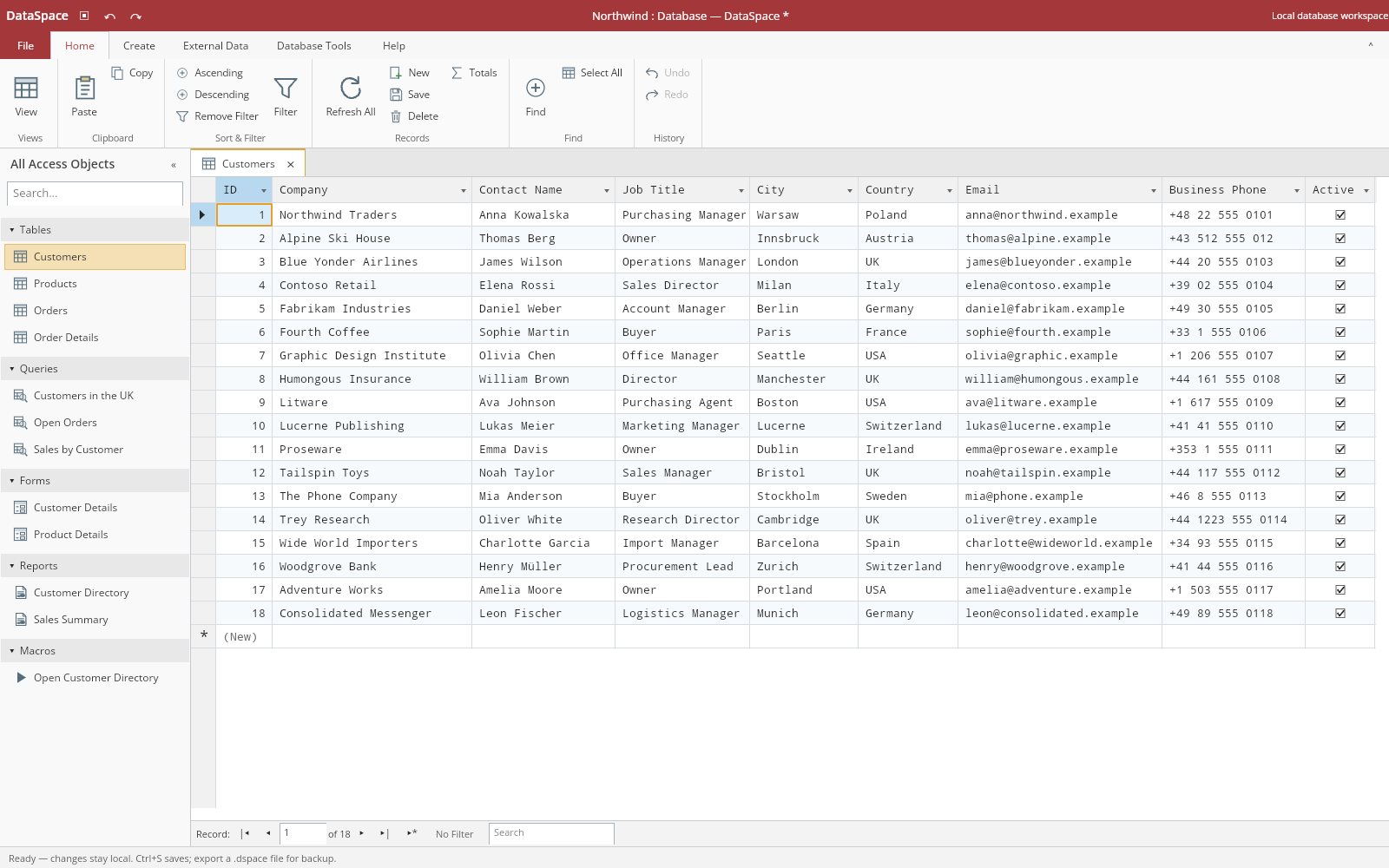
DataSpace is a modular database studio with an Office-style ribbon, editable datasheets, graphical queries, form design, report previews and relationship diagrams. The browser build is the actual Uno/Skia application compiled to WebAssembly, backed by a managed SQL engine with subqueries, crosstabs and transactional undo — all split into five independently reusable libraries.
What makes DataSpace special
Familiar if you know Microsoft Access-style desktop databases — but original, local‑first and written end‑to‑end in C#.
Office-style workspace
Ribbon, quick-access commands, File backstage, searchable object navigation and tabbed objects in one shell.
Skia-drawn datasheets
Visible-cell drawing with lazy row materialization, range selection, TSV clipboard, sorting, filtering and cached totals.
Visual query design
A native QBE grid with draggable source cards, join properties and criteria rows that round-trips SELECT SQL.
Real SQL engine
Managed parser and executor with hash joins, UNION, correlated subqueries, TRANSFORM/PIVOT crosstabs and SELECT INTO.
Forms and reports
Bound record-entry forms with snapped drag/resize design, plus paginated report previews with Skia PDF export.
Transactional undo
Every edit is validated and published as one atomic, undoable revision; failed edits leave the live document untouched.
Safe browser storage
Transactional IndexedDB saves with cross-tab version checks, so a conflicting tab fails instead of silently overwriting.
Reusable libraries
Core, Query, Storage, Rendering and Controls ship as separate packages; the engine runs without Uno at all.
31 capabilities, 7 areas
Shell
- Ribbon with quick-access commands and a File backstage
- Searchable object navigation with tabbed objects
- Record navigation and explicit error reporting
- Northwind-style demonstration workspace on first launch
Tables and datasheets
- Typed fields with required, default, primary and unique constraints
- Detached field design and ordered single/composite index editing
- Visible-cell Skia drawing with lazy row materialization
- Range selection, keyboard navigation, native text editing and TSV clipboard
- Sorting, resizing, filtering, debounced search and cached totals
Queries
- Design View, SQL View and Datasheet View for every query
- Native QBE grid with draggable source cards, joins, criteria and OR rows
- Crosstab Builder with fixed column headings and row totals
- Find Duplicates and Find Unmatched builders that generate ordinary SQL
- Parameter editing and read-only result grids
Query engine
- Streaming SELECT/TOP with bounded ordered TOP selection
- INNER/LEFT/CROSS joins with transient equality hash joins
- UNION/UNION ALL, GROUP BY/HAVING and saved queries as sources
- Correlated scalar, EXISTS, IN, ANY/SOME and ALL subqueries
- Atomic INSERT/UPDATE/DELETE, SELECT INTO and constraint-index DDL
- TRANSFORM/PIVOT crosstab execution
Forms and reports
- Bound text and Yes/No controls with record navigation
- Snapped control drag/resize, creation, deletion and property sheet
- Reports from table or query sources with title, orientation and field selection
- Pagination, zoom and Skia PDF export through the same page renderer
Relationships and macros
- Referential checks and cascades
- Draggable relationship diagrams
- Explicitly invoked, ordered workspace macro actions; imported macros never auto-run
Files and storage
- Versioned .dspace JSON documents
- CSV import and export via External Data → Text File
- Transactional IndexedDB with cross-tab version conflict detection
- Explicit .dspace backup exports and desktop file adapters
Run DataSpace right here
The live build opens a Northwind-style demonstration database you can browse, query and edit entirely in the browser. Switch viewports, go fullscreen and tick off the guided tour as you explore.
Try DataSpace live
The live build opens a Northwind-style demonstration database you can browse, query and edit entirely in the browser.
Real C# · Uno WebAssembly · runs locally in your browser5 libraries you can embed
DataSpace is assembled from independently reusable libraries, each published on NuGet.org. Hover the graph to trace dependencies; click a node to jump to its package, and open a card for install and usage.
DataSpace.Core
Typed document model, validation, relational constraints, transactions, history, snapshots and document codec
DataSpace.Query
Managed SQL parser, expression evaluation, relational execution, QBE/Find/crosstab models and lazy table views
DataSpace.Storage
CSV interchange, versioned optimistic persistence contracts and asynchronous save sessions
DataSpace.Rendering
UI-independent Skia datasheet, form, relationship, report and icon renderers
DataSpace.Controls
Office-style Uno ribbon, navigation, datasheet, object designers, query builders and optional workspace shell
5 packages on NuGet.org
DataSpace ships as five MIT-licensed packages on NuGet.org, versioned together and published by version tags with symbol packages (.snupkg) and SourceLink. All five target net10.0. DataSpace.Core, DataSpace.Query and DataSpace.Storage have no UI or graphics dependency, DataSpace.Rendering needs only SkiaSharp 4.152, and DataSpace.Controls is an Uno Platform (Skia renderer) library that ships one portable net10.0 asset and is compiled through both the desktop and WebAssembly app heads. None depends on DataSpace.App; the thin app only injects platform file dialogs and browser interop. Current versions are previews, so pass --prerelease.
dotnet add package DataSpace.Core --prerelease<PackageReference Include="DataSpace.Core" Version="0.2.0-preview.3" />
<PackageReference Include="DataSpace.Query" Version="0.2.0-preview.3" />
<PackageReference Include="DataSpace.Storage" Version="0.2.0-preview.3" />
<PackageReference Include="DataSpace.Rendering" Version="0.2.0-preview.3" />
<PackageReference Include="DataSpace.Controls" Version="0.2.0-preview.3" /><!-- Directory.Packages.props -->
<ItemGroup>
<PackageVersion Include="DataSpace.Core" Version="0.2.0-preview.3" />
<PackageVersion Include="DataSpace.Query" Version="0.2.0-preview.3" />
<PackageVersion Include="DataSpace.Storage" Version="0.2.0-preview.3" />
<PackageVersion Include="DataSpace.Rendering" Version="0.2.0-preview.3" />
<PackageVersion Include="DataSpace.Controls" Version="0.2.0-preview.3" />
</ItemGroup> Published with NuGet Trusted Publishing from GitHub Actions, with symbols (.snupkg) and SourceLink. Release v0.2.0-preview.3 ↗
Dependencies follow the real project references: Core ← Query, Core ← Storage, Core ← Rendering, and Core + Query + Storage + Rendering ← Controls.
Only mutate live data through DatabaseWorkspace.Edit or UpdateRecords. Public models remain mutable for construction/serialization, but direct mutation bypasses history, validation and cache guarantees. Virtual-view records are detached display snapshots, not backing storage. Dispose owned views, renderers and sessions when their host is finished.
The database document and its transactional workspace: tables with typed fields, records, indexes, relationships with referential checks and cascades, saved queries, forms, reports and macros. Every edit runs against a draft, is validated (required/default/primary/unique constraints, indexes, relationships) and becomes one undoable step. Use it on its own as an embeddable in-memory relational document. No dependencies and no UI.
dotnet add package DataSpace.Core --prereleaseKey types
DatabaseWorkspace— currentDocument,Edit,UpdateRecords,Undo/Redo,Replace,Changed.DatabaseDocument,TableDefinition,FieldDefinition(FieldType),Record— the model.RecordOperations—Insert,Update,Delete,AddField,RenameFieldinside an edit.ObjectFactory— creates tables, queries, forms, reports and macros with unique names.DocumentCodec— versioned.dspaceJSONSerialize/Deserialize;SchemaValidatorfor explicit checks.SampleDatabase.Create— the Northwind-style demonstration database.
Basic usage
using DataSpace.Core;

var workspace = new DatabaseWorkspace(new DatabaseDocument { Name = "Inventory" });
workspace.Edit("Create table", document =>
{
    var table = ObjectFactory.CreateTable(document);   // "Table1" with ID (AutoNumber) and Title
    RecordOperations.AddField(table, new FieldDefinition { Name = "Price", Type = FieldType.Currency });
});
workspace.Edit("Add record", document => RecordOperations.Insert(
    document.Table("Table1"), new Dictionary<string, string?> { ["Title"] = "Notebook", ["Price"] = "4.50" }));

var record = workspace.Document.Table("Table1").Records[0];
workspace.UpdateRecords("Edit title", "Table1", [new RecordEdit(record.Id, "Title", "Drawing pad")]);
workspace.Undo();                                       // Title is "Notebook" again

string json = DocumentCodec.Serialize(workspace.Document);
var reopened = new DatabaseWorkspace(DocumentCodec.Deserialize(json));A managed SQL engine over a DatabaseDocument: streaming SELECT/TOP, joins (with transient hash joins), grouping and aggregates, UNION/UNION ALL, saved queries as sources, parameters, correlated scalar/EXISTS/IN/ANY/ALL subqueries, TRANSFORM crosstabs, and atomic INSERT/UPDATE/DELETE/SELECT INTO action queries through the workspace. It also contains the graphical QBE, crosstab and Find Duplicates/Unmatched designs that round-trip to SQL, and lazy datasheet views. Explicit QueryOptions limits bound the work. Depends on DataSpace.Core; no UI. See query analytics and subqueries.
dotnet add package DataSpace.Query --prereleaseKey types
QueryEngine—Select(document, sql, parameters),Execute(workspace, sql)for undoable action queries,IsReadOnly.QueryResult/QueryStatistics— resultFields/Records, affected rows, duration and work counters.QueryOptions— limits and optimizations (subquery cache, hash joins, row caps).TableView.Open→VirtualTableView— lazily materialized, filtered/sorted rows withReadPage.QueryDesign,CrosstabDesign,FindQueryDesign— designer models that generate SQL (ToSql).
Basic usage
using DataSpace.Core;
using DataSpace.Query;

var workspace = new DatabaseWorkspace(SampleDatabase.Create());
var engine = new QueryEngine();

QueryResult sales = engine.Select(workspace.Document,
    "SELECT c.[Company], Count(o.[ID]) AS [Orders] FROM [Customers] AS c " +
    "INNER JOIN [Orders] AS o ON c.[ID] = o.[Customer ID] WHERE c.[Country] = [Country?] GROUP BY c.[Company]",
    new Dictionary<string, object?> { ["Country?"] = "UK" });
foreach (var row in sales.Records)
    Console.WriteLine($"{row["Company"]}: {row["Orders"]}");

var products = TableView.Open(workspace.Document, "Products", sortField: "Product Name");
IReadOnlyList<Record> firstPage = products.ReadPage(0, 50);   // only these rows are materialized

engine.Execute(workspace, "UPDATE [Products] SET [Unit Price] = [Unit Price] * 1.1 WHERE [Category] = 'Beverages'");
workspace.Undo(); // action queries are one undo stepPersistence around the workspace: quoted CSV parsing, import with type inference and export with spreadsheet-formula protection, an optimistic IWorkspaceStore contract (compare the expected version and replace atomically) with memory and file adapters, and WorkspaceSession, which loads once, tracks the saved snapshot and saves only that snapshot. Depends on DataSpace.Core; no UI. The browser app implements the same contract over IndexedDB.
dotnet add package DataSpace.Storage --prereleaseKey types
CsvCodec—Parse,Import(to aTableDefinition) andExport;CsvOptionsfor delimiter, headers, inference and limits.IWorkspaceStore/StoredWorkspace— version-checked load/save contract.MemoryWorkspaceStore,FileWorkspaceStore— in-memory and atomic file adapters.WorkspaceSession—InitializeAsync,IsDirty,SaveAsyncfor aDatabaseWorkspace.
Basic usage
using DataSpace.Core;
using DataSpace.Storage;

TableDefinition contacts = CsvCodec.Import("Contacts", "Name,Age\nAda,36\nAlan,41\n");  // types inferred
string csv = CsvCodec.Export(contacts.Fields, contacts.Records, new CsvOptions { Delimiter = ';' });

var workspace = new DatabaseWorkspace(new DatabaseDocument { Name = "Contacts" });
using var session = new WorkspaceSession(workspace, new FileWorkspaceStore("data/contacts.store"));
await session.InitializeAsync();                   // replaces the document if one is stored

workspace.Edit("Import contacts", document => document.Tables.Add(contacts));
if (session.IsDirty)
await session.SaveAsync(); // fails instead of overwriting a newer versionFramework-independent SkiaSharp renderers for the database views: a viewport-only datasheet with selection, a new-record row and cached totals; a relationship diagram; form layouts; report pages shared by preview and PDF export; and Office-style vector icons, all with deterministic hit testing. Use it to draw or export DataSpace objects without Uno. Depends on DataSpace.Core and SkiaSharp 4.152; no UI framework.
dotnet add package DataSpace.Rendering --prereleaseKey types
DatasheetRenderer+DatasheetViewState—Draw,HitTest(→GridHit),CellBounds, content size.RelationshipRenderer+RelationshipViewState— table cards and relationship lines withHitTest.FormLayoutRenderer— form design surface with control hit testing.ReportRenderer/ReportPageLayout—DrawPageandExportPdf.OfficeTheme,DrawingResources,IconRenderer— colors, cached paints/fonts and icons.
Basic usage
using DataSpace.Core;
using DataSpace.Rendering;
using SkiaSharp;

var document = SampleDatabase.Create();
var products = document.Table("Products");

using var datasheet = new DatasheetRenderer();
var state = new DatasheetViewState { ShowTotals = true, ReadOnly = true };
using var surface = SKSurface.Create(new SKImageInfo(900, 400));
datasheet.Draw(surface.Canvas, 900, 400, products.Fields, products.Records, state);
GridHit hit = datasheet.HitTest(products.Fields, products.Records.Count, state, 200, 60);   // Kind, Row, Column

var report = document.Reports.First(r => r.Name == "Customer Directory");
var source = document.Table(report.Source);
using var reports = new ReportRenderer();
File.WriteAllBytes("customer-directory.pdf", reports.ExportPdf(report, source.Fields, source.Records));Reusable Office-style Uno Platform controls: ribbon, navigation pane, tab strip and record navigator; the virtualized DatasheetControl; table, index, query (SQL and QBE), crosstab, Find, form, report, relationship and macro designers; resource styles; and the optional full DatabaseWorkspaceView shell. Individual controls and designers do not require the shell. Depends on Core, Query, Storage, Rendering and SkiaSharp.Views.Uno.WinUI; requires Uno Platform with the Skia renderer. Merge ms-appx:///DataSpace.Controls/Themes/OfficeResources.xaml into your application resources for the supplied styling.
dotnet add package DataSpace.Controls --prereleaseKey types
DatabaseWorkspaceView— the complete studio; injectSaveDatabaseAsync,StorageIsDirty,ImportTextAsync,ExportFileAsync.DatasheetControl—SetData,CommitEdits(CellEdit), selection, clipboard, zoom and totals.TableDesignerControl,QueryEditorControl,QueryDesignerControl,RelationshipDesignerControl,ReportPreviewControl— object editors bound to aDatabaseWorkspace.OfficeRibbon,NavigationPane,DocumentTabStrip,RecordNavigator— shell building blocks.
Basic usage
using DataSpace.Controls;
using DataSpace.Core;
using DataSpace.Storage;
using Microsoft.UI.Xaml;

var workspace = new DatabaseWorkspace(SampleDatabase.Create());
var session = new WorkspaceSession(workspace, new MemoryWorkspaceStore());
await session.InitializeAsync();
var view = new DatabaseWorkspaceView(workspace)
{
    StorageIsDirty = () => session.IsDirty,
    SaveDatabaseAsync = () => session.SaveAsync()
    // Inject ImportTextAsync and ExportFileAsync for your file-dialog or document-management integration.
};

var window = new Window { Title = "DataSpace", Content = view };
window.Activate();

// A single control without the shell:
var sheet = new DatasheetControl();
var products = workspace.Document.Table("Products");
sheet.SetData(products.Fields, products.Records, readOnly: true);From engine to workbench
Layers build bottom‑up: each one depends only on those beneath it.
Owns the typed document, validation, copy-on-write transactions, undo history and snapshots.
DataSpace.CoreA managed SQL engine and visual design models, plus CSV and optimistic versioned persistence, all built on Core.
DataSpace.QueryDataSpace.StorageSkiaSharp renderers for datasheets, forms, relationships, reports and icons that depend on Core but not Uno.
DataSpace.RenderingIndependently usable Uno ribbon, datasheet, designers and query builders, plus an optional full workspace shell.
DataSpace.ControlsEmbed, script, extend
using DataSpace.Core;
using DataSpace.Query;

var workspace = new DatabaseWorkspace(new DatabaseDocument { Name = "Inventory" });
workspace.Edit("Create table", document => ObjectFactory.CreateTable(document));
workspace.Edit("Add record", document => RecordOperations.Insert(
    document.Table("Table1"), new Dictionary<string, string?> { ["Title"] = "Notebook" }));

var view = TableView.Open(workspace.Document, "Table1", sortField: "Title");
var firstPage = view.ReadPage(0, 50);
workspace.UpdateRecords("Edit title", "Table1", [new(firstPage[0].Id, "Title", "Drawing pad")]);
var result = new QueryEngine().Select(workspace.Document,
    "SELECT ID, Title FROM Table1 UNION ALL SELECT 0, 'Unassigned' ORDER BY Title");
workspace.Undo();var workspace = new DatabaseWorkspace(SampleDatabase.Create());
var session = new WorkspaceSession(workspace, new MemoryWorkspaceStore());
await session.InitializeAsync();
var view = new DatabaseWorkspaceView(workspace)
{
StorageIsDirty = () => session.IsDirty,
SaveDatabaseAsync = () => session.SaveAsync()
};
// Put view in your Uno page/window. Inject ImportTextAsync and ExportFileAsync
// for your file-dialog or document-management integration.git clone https://github.com/wieslawsoltes/DataSpace.git
cd DataSpace
dotnet workload install wasm-tools
dotnet test tests/DataSpace.Tests/DataSpace.Tests.csproj -c Release
dotnet run --project src/DataSpace.App/DataSpace.App.csproj -f net10.0-desktop
# Publish the real browser application
dotnet publish src/DataSpace.App/DataSpace.App.csproj \
-c Release -f net10.0-browserwasm -o artifacts/publish
python3 scripts/stage-site.py
python3 -m http.server 8080 --directory artifacts/siteFile formats
Keyboard essentials
Continuously verified
Each push runs through GitHub Actions. The public browser build is deployed only from successful pipelines.


Toolchain
Third‑party NuGet packages
git clone https://github.com/wieslawsoltes/DataSpace.git
cd DataSpace
dotnet workload install wasm-tools
dotnet run --project src/DataSpace.App -f net10.0-browserwasmWhat it doesn’t claim
The project documents its limits as carefully as its features.
- Not a Microsoft Access replacement: native .accdb/.mdb, ACE/Jet and VBA are not supported
- Browser storage is local, unencrypted and scoped to the origin/profile — export .dspace backups
- Derived FROM subqueries, RIGHT/FULL joins and updatable joined queries are not implemented
- Reports lack group sections, subreports, charts and conditional formatting; forms lack subforms and events
- Query execution is synchronous in the browser; indexes are constraint metadata, not persistent B-trees