ControlSpace
A PLC engineering workspace with a virtual controller, in your browser
ControlSpace is an independent automation-engineering workspace that implements a TIA Portal-style workflow in C#, .NET 10 and Uno Platform with shared Skia rendering. Edit PLC tag tables, ladder logic, an SCL subset, hardware topology and HMI screens, then compile and run them on a deterministic virtual PLC. The engineering model, compiler, simulator, persistence, rendering, controls and workbench ship as eight reusable libraries.
What makes ControlSpace special
Familiar if you know Siemens TIA Portal-style PLC engineering suites — but original, local‑first and written end‑to‑end in C#.
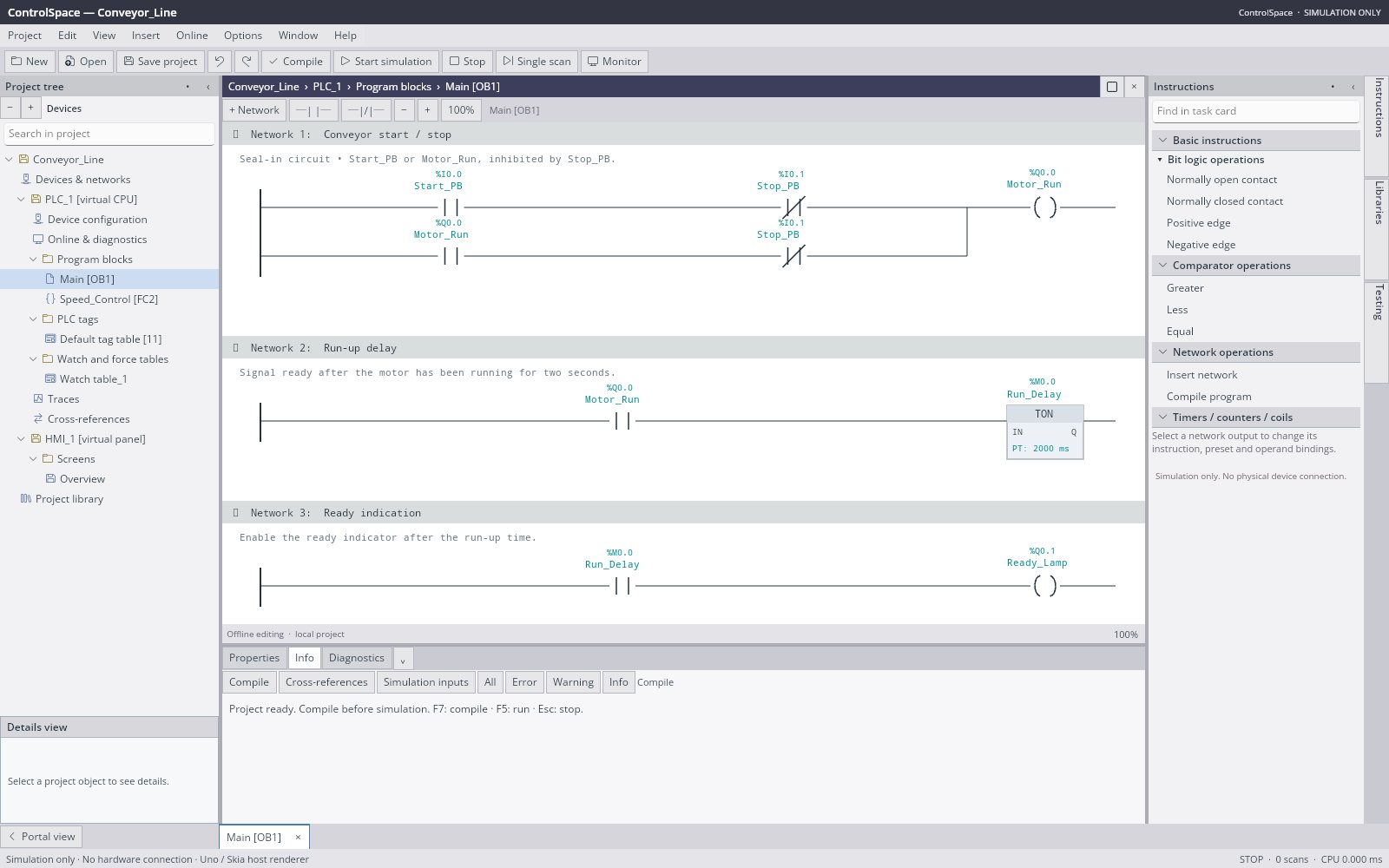
TIA Portal-style project view
Compact menus and toolbars, a project tree, central editors, task cards, a Properties/Info/Diagnostics inspector and an open-editor bar.
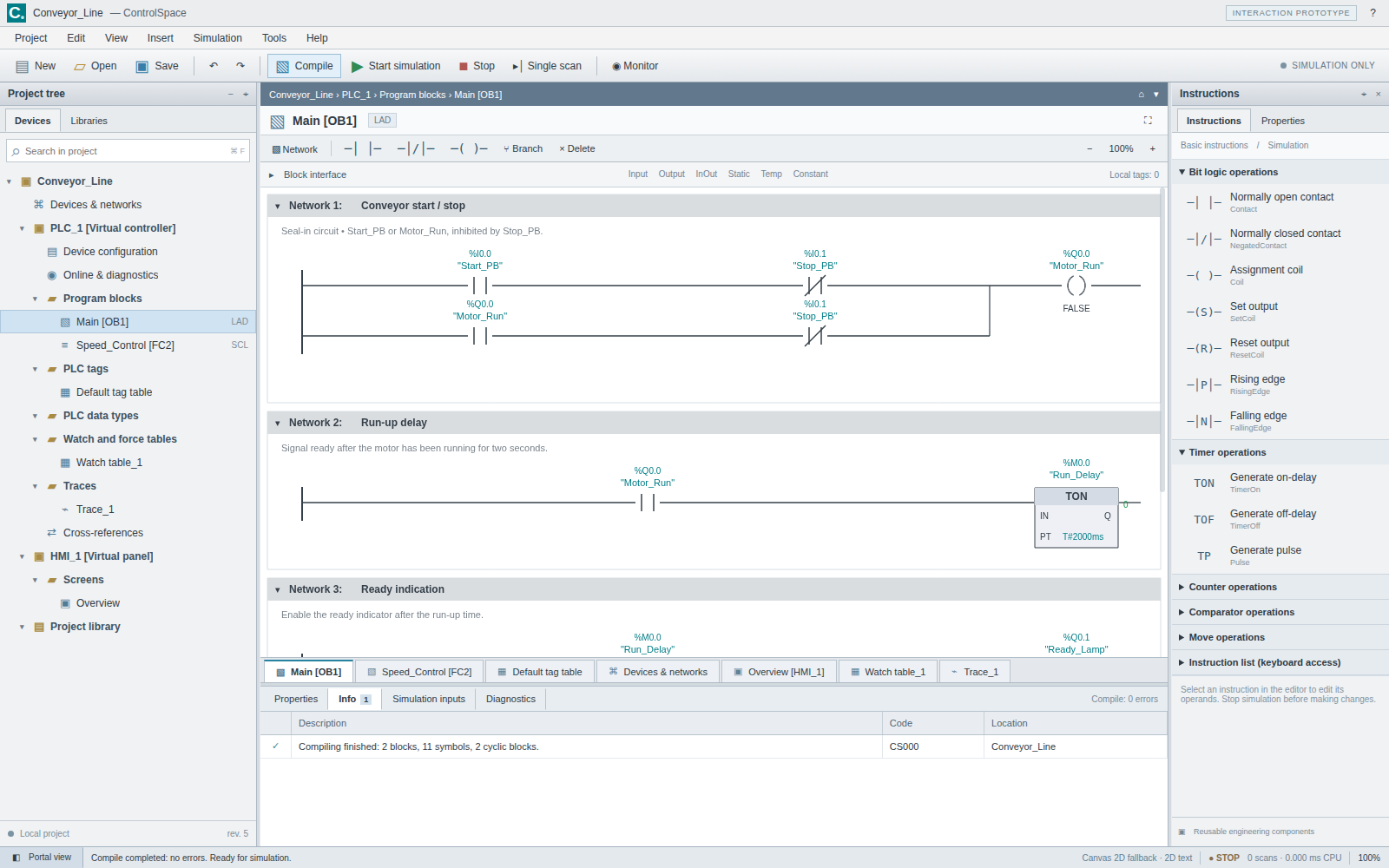
Ladder logic editor
Series contacts and parallel paths, NO/NC and edge contacts, comparisons, set/reset coils, TON/TOF/TP timers, CTU counters and MOVE.
Typed SCL subset
A bounded parser for assignments, IF/THEN/ELSE, arithmetic, comparisons and Boolean logic. Unsupported syntax is rejected, never evaluated.
Deterministic virtual PLC
Run, stop, reset and single-scan with input images, virtual forcing, scan-order execution, rollback on faults and a bounded trace.
Editable tag tables
A virtualized grid with inline editing, rectangular clipboard paste, validation, undo/redo, filtering, sorting and reference-safe renaming.
HMI screens
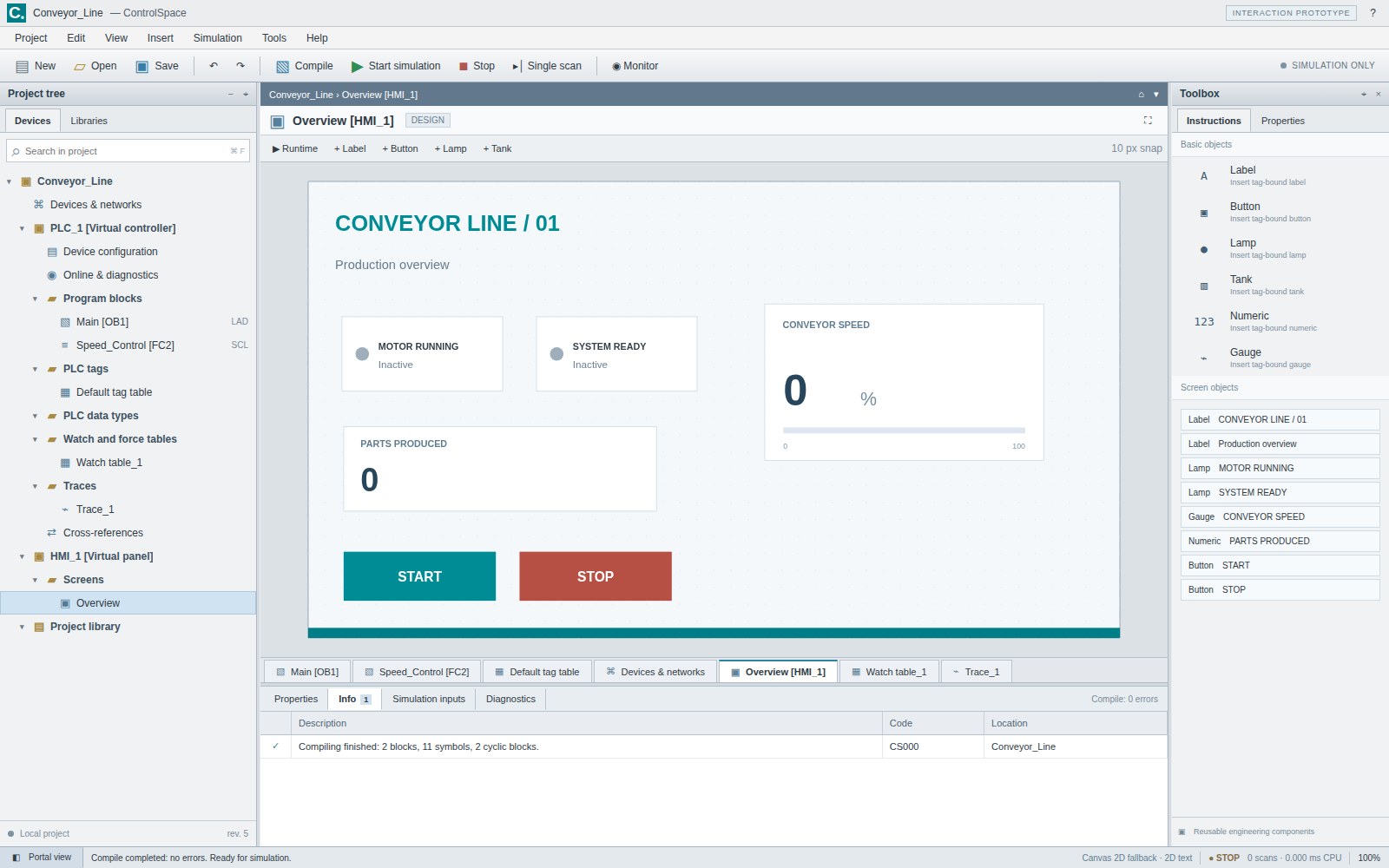
Labels, lamps, buttons, numeric displays, tanks and gauges bound to tags, with per-screen navigation and virtual-input buttons.
Shared Skia rendering
Editors draw into the host canvas via SKCanvasElement, cull offscreen ladder networks and return hit regions for interaction.
Simulation only, by design
No controller transport or hardware communication. Every execution runs in-process against a virtual controller.
From the repository
35 capabilities, 7 areas
PLC tags
- BOOL, INT, DINT, REAL and TIME tags with %I, %Q and %M addressing
- Overlap and value validation, comments and retain metadata
- Add and Duplicate allocate unique names and unoccupied marker addresses
- Delete rejects tags still referenced by LAD, SCL or HMI objects
- Renaming rewrites symbols across LAD, SCL and HMI sources
Tag-table grid
- Viewport-recycled grid that only realizes visible rows
- Inline editing with F2, Enter, Tab and Escape
- Rectangular tab-separated copy/paste committed as one transaction
- Column sort, resize, reorder and visibility; filter by name, address, type or comment
- Optional read-only monitor values from the virtual controller
Ladder and SCL
- LAD networks of series contacts and parallel paths feeding one output
- NO/NC and edge contacts, comparisons, assignment/set/reset coils
- TON/TOF/TP timers, CTU counters and constant MOVE
- SCL typed assignments, IF/THEN/ELSE/END_IF, arithmetic and Boolean expressions
- Bounded parser: 1,000,000 characters, 100,000 tokens, nesting depth 64
Virtual PLC
- Run, stop, reset and single-scan execution
- Input image and virtual forcing
- Faults roll back the scan, clear outputs and require explicit reset
- Cold and warm (retain-aware) reset
- Bounded trace history with a speed plot
Hardware and HMI
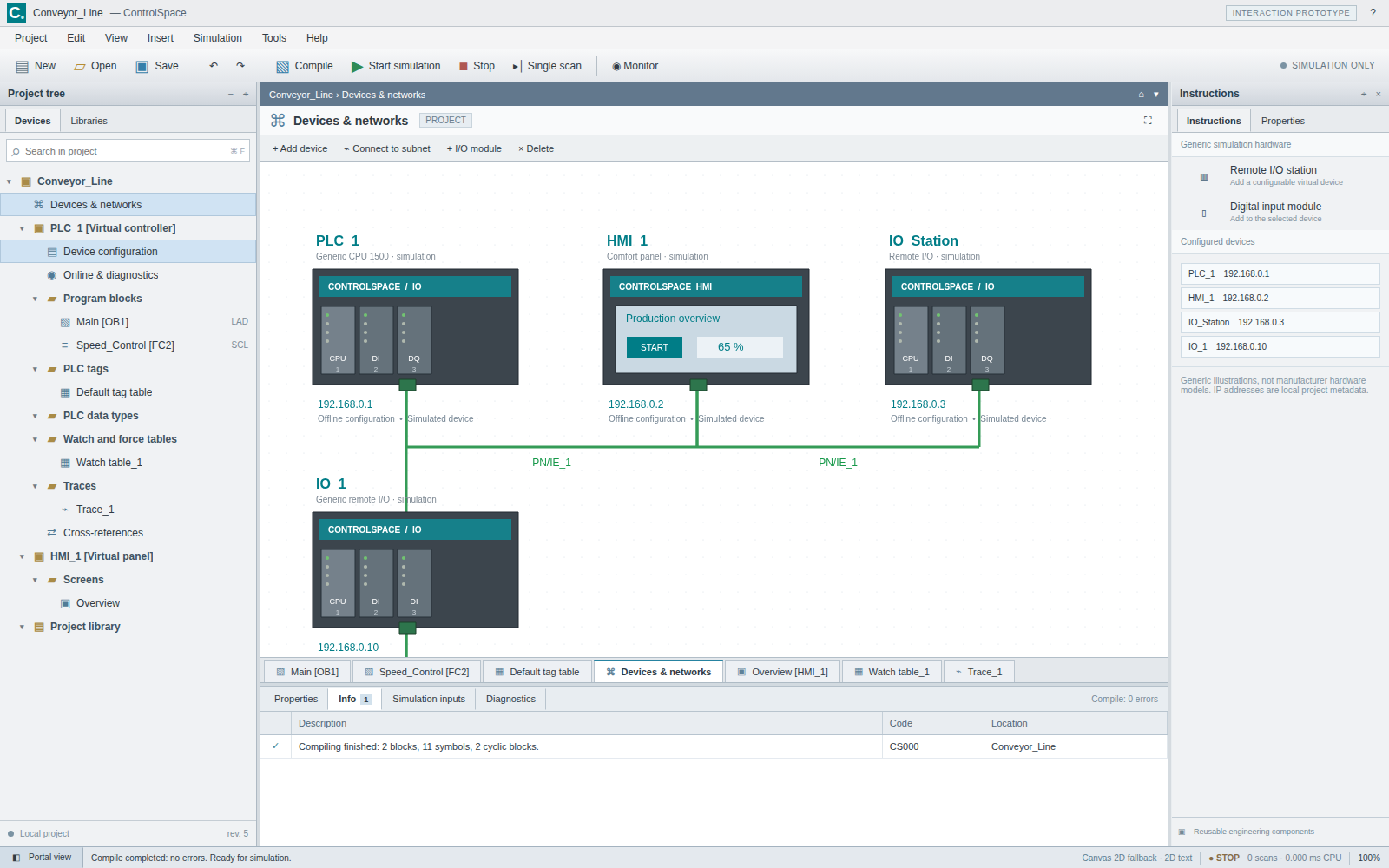
- Generic controller, panel and remote-I/O views
- Editable addresses, modules and topology metadata
- HMI labels, lamps, buttons, numeric displays, tanks and gauges
- Per-screen navigation, tag bindings, dragging and virtual-input buttons
Workbench
- Portal view grouping Start, Devices & networks, PLC programming, Visualization and diagnostics
- Project search that keeps matching ancestors visible
- Unique editor tabs that can be closed, cycled and reordered
- Pointer and keyboard pane resizing, collapsible panes and Reset window layout
- Compact windows switch task cards and project tree to overlay drawers
- Clicking a compile diagnostic navigates to its source block and position
Projects and persistence
- Versioned ControlSpace JSON with duplicate-key rejection and import limits
- CSV tag-table interchange
- Draft recovery that preserves SCL drafts without compiling them
- Validated editing transactions with undo/redo
- Layout preferences stored separately from project files
Run ControlSpace right here
Open the compiled Uno WebAssembly build and program, compile and simulate PLC logic entirely in your browser. Switch viewports, go fullscreen and tick off the guided tour as you explore.
Try ControlSpace live
Open the compiled Uno WebAssembly build and program, compile and simulate PLC logic entirely in your browser.
Real C# · Uno WebAssembly · runs locally in your browser8 libraries you can embed
ControlSpace is assembled from independently reusable libraries, each published on NuGet.org. Hover the graph to trace dependencies; click a node to jump to its package, and open a card for install and usage.
ControlSpace.Core
Typed engineering model, validation and detached snapshots
ControlSpace.Languages
Bounded SCL parser, LAD compiler and typed intermediate representation
ControlSpace.Simulation
Deterministic virtual scans, inputs, forcing and trace
ControlSpace.Storage
JSON, CSV and atomic filesystem persistence
ControlSpace.Engineering
Editing transactions, references, tag-table editing, WorkbenchLayout and EditorSession
ControlSpace.Rendering.Skia
Shared vector drawing and hit regions for engineering editors
ControlSpace.Controls.Uno
Canvas, table, project tree, theme, pane chrome, splitters and editor bar
ControlSpace.Workbench.Uno
Composable engineering workbench with IProjectFiles and IWorkbenchPreferences
8 packages on NuGet.org
ControlSpace ships as eight MIT-licensed packages on NuGet.org, versioned together and published by release tags with symbol packages (.snupkg) and SourceLink. The six engine packages target net10.0 and have no UI dependency (only ControlSpace.Rendering.Skia needs SkiaSharp); the two Uno packages target net10.0-desktop and net10.0-browserwasm and can be consumed by any Uno Platform host. ControlSpace.App only supplies entry points and platform storage/file pickers and is not published; neither is the JavaScript prototype.
dotnet add package ControlSpace.Core<PackageReference Include="ControlSpace.Core" Version="0.1.0" />
<PackageReference Include="ControlSpace.Languages" Version="0.1.0" />
<PackageReference Include="ControlSpace.Simulation" Version="0.1.0" />
<PackageReference Include="ControlSpace.Storage" Version="0.1.0" />
<PackageReference Include="ControlSpace.Engineering" Version="0.1.0" />
<PackageReference Include="ControlSpace.Rendering.Skia" Version="0.1.0" />
<PackageReference Include="ControlSpace.Controls.Uno" Version="0.1.0" />
<PackageReference Include="ControlSpace.Workbench.Uno" Version="0.1.0" /><!-- Directory.Packages.props -->
<ItemGroup>
<PackageVersion Include="ControlSpace.Core" Version="0.1.0" />
<PackageVersion Include="ControlSpace.Languages" Version="0.1.0" />
<PackageVersion Include="ControlSpace.Simulation" Version="0.1.0" />
<PackageVersion Include="ControlSpace.Storage" Version="0.1.0" />
<PackageVersion Include="ControlSpace.Engineering" Version="0.1.0" />
<PackageVersion Include="ControlSpace.Rendering.Skia" Version="0.1.0" />
<PackageVersion Include="ControlSpace.Controls.Uno" Version="0.1.0" />
<PackageVersion Include="ControlSpace.Workbench.Uno" Version="0.1.0" />
</ItemGroup> Published with NuGet Trusted Publishing from GitHub Actions, with symbols (.snupkg) and SourceLink. Release v0.1.0 ↗
Dependencies follow the real project references: Core ← Languages ← Simulation, Core ← Storage, Languages + Simulation + Storage ← Engineering, Simulation ← Rendering.Skia, Engineering + Rendering.Skia ← Controls.Uno ← Workbench.Uno.
The typed automation-engineering model: immutable records for tags, instructions, LAD networks, program blocks, devices, links and HMI screens, plus a validator that reports addressing overlaps, invalid values and broken references. Use it on its own to generate, inspect or lint ControlSpace projects. No dependencies and no UI.
dotnet add package ControlSpace.CoreKey types
ControlProject— root record (Tags,Blocks,Devices,Links,Screens,Revision).PlcTag,ProgramBlock,LadderNetwork,Instruction— tag table and LAD/SCL program model.ProjectValidator.Validate— returnsDiagnosticrecords with severity, code and location.ProjectSnapshot.Clone— detached copy of all mutable lists; leaves share immutable records.PlcValues— type range checks,%I/%Qhelpers and TIA-style value formatting.DemoProject.Create— the conveyor sample project.
Basic usage
using ControlSpace.Core;

var project = DemoProject.Create();
project.Tags.Add(new PlcTag("Alarm_Lamp", PlcType.Bool, "%Q0.2", Comment: "Alarm indicator"));

foreach (var d in ProjectValidator.Validate(project))
    Console.WriteLine($"{d.Severity} {d.Code}: {d.Message} ({d.Location})");

var copy = ProjectSnapshot.Clone(project);   // detached lists, shared immutable records
copy.Tags.RemoveAt(0);                       // does not affect `project`
Console.WriteLine(PlcValues.Format(PlcType.Time, 2000)); // T#2000msCompiles a ControlProject into a typed, interpreter-friendly program: LAD networks become contact paths and outputs, SCL blocks go through a bounded parser (IF/THEN/ELSE, arithmetic, comparisons, Boolean logic; no eval or code generation). Use it standalone to check programs or build other runtimes on the IR. Depends on ControlSpace.Core; no UI.
dotnet add package ControlSpace.LanguagesKey types
ProjectCompiler.Compile— validates and compiles a project into aCompilationResult.CompilationResult—Program,DiagnosticsandSuccess.CompiledProgram/CompiledBlock— symbol slots, compiled networks and SCL statements.SclParser— SCL subset parser;SclParser.RenameSymbolperforms token-aware renames.Expression,Statement— the typed IR records (BinaryExpression,IfStatement, …).
Basic usage
using ControlSpace.Core;
using ControlSpace.Languages;

var result = ProjectCompiler.Compile(DemoProject.Create());
foreach (var d in result.Diagnostics)
    Console.WriteLine($"{d.Severity} {d.Code} at {d.Location}:{d.Line}:{d.Column} {d.Message}");

if (result.Success)
{
    CompiledProgram program = result.Program!;
    Console.WriteLine($"{program.Blocks.Count} blocks, {program.Symbols.Count} tag slots");
}

// Token-aware SCL rename: comments and longer names are left alone.
string scl = SclParser.RenameSymbol("\"Motor_Run\" := TRUE; // Motor_Run_Old", "Motor_Run", "Conveyor_Run");A deterministic virtual PLC that executes a compiled program in scan order with an input image, virtual forcing, TON/TOF/TP timers, CTU counters, rollback on faults and a bounded trace. Use it for headless tests of control logic. Depends on ControlSpace.Core and ControlSpace.Languages; no UI. Simulation only — never connect it to real machinery.
dotnet add package ControlSpace.SimulationKey types
VirtualPlc—Run/Stop/Reset,Step(TimeSpan),SetInput,Force/Release,Read.ScanSnapshot— cycle, virtual time, state, value image and power flow of one scan.TraceBuffer— bounded ring ofScanSnapshotsamples (VirtualPlc.Trace).ControllerState—Stopped,RunningorFaulted(seeVirtualPlc.Fault).
Basic usage
using ControlSpace.Core;
using ControlSpace.Languages;
using ControlSpace.Simulation;

var compilation = ProjectCompiler.Compile(DemoProject.Create());
if (!compilation.Success)
    throw new InvalidOperationException(string.Join("\n", compilation.Diagnostics));

var plc = new VirtualPlc(compilation.Program!);
plc.SetInput("Start_PB", 1);
plc.Run();
plc.Step(TimeSpan.FromMilliseconds(100));
Console.WriteLine(plc.Read("Motor_Run"));   // 1 in the sample simulation

plc.Force("Stop_PB", 1);                     // virtual forcing, never real I/O
plc.Step(TimeSpan.FromMilliseconds(100));
Console.WriteLine($"{plc.State}, cycle {plc.Cycle}, {plc.Trace.Count} trace samples");
plc.ReleaseAll();
plc.Stop();Persistence for ControlSpace projects: versioned camelCase JSON with an 8 MiB import limit, duplicate-key rejection and validation on load, CSV tag import/export and an atomic write-then-replace save. Depends on ControlSpace.Core; no UI.
dotnet add package ControlSpace.StorageKey types
ProjectStorage.Serialize/Deserialize— JSON round trip with limits and validation.ProjectStorage.SaveAtomicAsync— writes a temporary file, then replaces the target.ProjectStorage.ExportTagsCsv/ImportTagsCsv— tag-table interchange.ProjectStorage.MaximumBytes— the import size limit.
Basic usage
using ControlSpace.Core;
using ControlSpace.Storage;

var project = DemoProject.Create();

string json = ProjectStorage.Serialize(project);          // versioned camelCase JSON
ControlProject loaded = ProjectStorage.Deserialize(json);  // limits, duplicate keys, validation
await ProjectStorage.SaveAtomicAsync("Conveyor_Line.json", loaded);

string csv = ProjectStorage.ExportTagsCsv(project.Tags);
IReadOnlyList<PlcTag> tags = ProjectStorage.ImportTagsCsv(csv);UI-independent editing on top of the model: every change is a validated transaction with undo/redo that invalidates compilation, tag renames update LAD operands, SCL source and HMI bindings, and dedicated editors cover program blocks, networks, contacts and tag tables. It also holds the workbench layout and open-editor state. Depends on Core, Languages, Simulation and Storage; no UI.
dotnet add package ControlSpace.EngineeringKey types
Workspace— currentProject,Edit,Undo/Redo,IsDirty,RenameTag,CrossReferences,CompileandController.ProgramEditor— add/duplicate/move blocks, networks, branches and contacts.TagTableEditor— cell edits, add/delete, filtering/sorting and value parsing.TableClipboard— tab-separated rectangular copy/paste.WorkbenchLayout/EditorSession— persisted pane layout and open editor tabs.
Basic usage
using ControlSpace.Core;
using ControlSpace.Engineering;

var workspace = new Workspace(DemoProject.Create());
workspace.Changed += (_, _) => Console.WriteLine($"rev {workspace.Project.Revision}, dirty {workspace.IsDirty}");

// Validated transactions with undo/redo; references follow the rename.
workspace.RenameTag("Motor_Run", "Conveyor_Run");
new TagTableEditor(workspace).Add(PlcType.Int);
var blocks = new ProgramEditor(workspace);
string id = blocks.AddBlock(workspace.Project, "Diagnostics", BlockLanguage.SCL);
workspace.Undo();

foreach (var reference in workspace.CrossReferences("Conveyor_Run"))
    Console.WriteLine($"{reference.Block}/{reference.Network} {(reference.Write ? "write" : "read")}");

var result = workspace.Compile(); // creates workspace.Controller on successShared vector drawing for ladder networks, device topology, HMI screens and trace charts onto any SKCanvas, returning hit regions for interaction. Offscreen networks and contacts are culled and text runs are cached. Use it to render or export views without Uno. Depends on Core, Simulation and SkiaSharp 3.119; no UI framework.
dotnet add package ControlSpace.Rendering.SkiaKey types
EngineeringRenderer—Ladder,Devices,HmiandTracedrawing;SetFontsfor custom typefaces.RenderResult/HitRegion— hit-test regions and content height of a drawn view.LadderLayout— network positions, collapsed networks and visible ranges.
Basic usage
using ControlSpace.Core;
using ControlSpace.Rendering.Skia;
using SkiaSharp;

var project = DemoProject.Create();
var main = project.Blocks.First(b => b.Name == "Main");

using var renderer = new EngineeringRenderer();
using var surface = SKSurface.Create(new SKImageInfo(1200, 800));
RenderResult result = renderer.Ladder(surface.Canvas, 1200, 800, main, project.Tags, snapshot: null);

foreach (HitRegion hit in result.Hits)
    Console.WriteLine($"{hit.Kind} {hit.Id} at {hit.Bounds}");

using var png = surface.Snapshot().Encode(SKEncodedImageFormat.Png, 100);
File.WriteAllBytes("main-ladder.png", png.ToArray());Reusable Uno Platform controls built on the engines: an SKCanvasElement-based engineering canvas for LAD, hardware, HMI and trace views, host-managed scrollbars, a virtualized editable tag table, project tree, block browser, editor bar, panes, splitters and theme. Use them to build your own engineering UI. Depends on Engineering, Rendering.Skia and Uno.WinUI.Graphics2DSK; requires Uno Platform (Skia renderer).
dotnet add package ControlSpace.Controls.UnoKey types
EngineeringCanvas—Project,Controller,Mode(EditorMode),BlockId,Zoom,Selected/EditRequestedevents.EngineeringViewport— wraps a canvas with scrollbars.EngineeringTable— tag grid;Bind(Workspace)for undoable inline edits.ProjectTree/ProgramBlockBrowser— project navigation (SetProject).EditorBar,WorkbenchPane,WorkbenchSplitter,EngineeringTheme— shell chrome.
Basic usage
using ControlSpace.Controls.Uno;
using ControlSpace.Core;
using ControlSpace.Engineering;
using Microsoft.UI.Xaml;
using Microsoft.UI.Xaml.Controls;

var workspace = new Workspace(DemoProject.Create());
var canvas = new EngineeringCanvas { Project = workspace.Project, Mode = EditorMode.Ladder, BlockId = "main" };
var tags = new EngineeringTable();
tags.Bind(workspace);                       // inline edits become undoable transactions
workspace.Changed += (_, _) => { canvas.Project = workspace.Project; canvas.Invalidate(); };

var layout = new Grid();
layout.RowDefinitions.Add(new RowDefinition { Height = new GridLength(2, GridUnitType.Star) });
layout.RowDefinitions.Add(new RowDefinition { Height = new GridLength(1, GridUnitType.Star) });
layout.Children.Add(new EngineeringViewport(canvas));
Grid.SetRow(tags, 1);
layout.Children.Add(tags);

var window = new Window { Title = "Ladder", Content = layout };
window.Activate();The complete TIA Portal-style workbench as one UserControl: menus, toolbars, project tree, editors, task cards, inspector, Portal view and simulation commands. Hosts provide file access through IProjectFiles and may also implement IWorkbenchPreferences on the same object to persist the window layout. Depends on ControlSpace.Controls.Uno; requires Uno Platform.
dotnet add package ControlSpace.Workbench.UnoKey types
WorkbenchView— the workbench;InitializeAsync,Navigate("block:main"),Workspace,Dispose.IProjectFiles— open/save pickers and draft recovery storage.IWorkbenchPreferences— optional layout storage, kept separate from project files.
Basic usage
using ControlSpace.Workbench.Uno;
using Microsoft.UI.Xaml;

sealed class MemoryProjectFiles : IProjectFiles
{
    private string? _recovery;
    public Task<string?> OpenAsync() => Task.FromResult<string?>(null);   // show a file picker here
    public Task<bool> SaveAsync(string contents, string name, string extension = ".json") => Task.FromResult(true);
    public Task<string?> ReadRecoveryAsync() => Task.FromResult(_recovery);
    public Task WriteRecoveryAsync(string contents) { _recovery = contents; return Task.CompletedTask; }
}

// In Application.OnLaunched:
var window = new Window { Title = "ControlSpace" };
var workbench = new WorkbenchView(new MemoryProjectFiles());
window.Content = workbench;
window.Activate();
await workbench.InitializeAsync();
window.Closed += (_, _) => workbench.Dispose();From engine to workbench
Layers build bottom‑up: each one depends only on those beneath it.
Typed project records with validation and detached snapshots.
ControlSpace.CoreSCL parser and LAD compiler feed a deterministic, fault-rollback virtual scan engine.
ControlSpace.LanguagesControlSpace.SimulationJSON/CSV storage plus validated transactions, symbol renaming, layout and editor-session state.
ControlSpace.StorageControlSpace.EngineeringShared Skia drawing with hit regions, wrapped in public Uno canvas, table, tree and pane controls.
ControlSpace.Rendering.SkiaControlSpace.Controls.UnoComposable engineering shell with host-supplied project-file and preference adapters.
ControlSpace.Workbench.UnoEmbed, script, extend
using ControlSpace.Core;
using ControlSpace.Languages;
using ControlSpace.Simulation;

var compilation = ProjectCompiler.Compile(DemoProject.Create());
if (!compilation.Success)
    throw new InvalidOperationException(string.Join("\n", compilation.Diagnostics));

var plc = new VirtualPlc(compilation.Program!);
plc.SetInput("Start_PB", 1);
plc.Run();
plc.Step(TimeSpan.FromMilliseconds(100));
Console.WriteLine(plc.Read("Motor_Run")); // 1 in the sample simulation
plc.Stop();
File formats
Keyboard essentials
Continuously verified
Each push runs through GitHub Actions. The public browser build is deployed only from successful pipelines.


Toolchain
Third‑party NuGet packages
git clone https://github.com/wieslawsoltes/ControlSpace.git
cd ControlSpace
dotnet workload install wasm-tools
dotnet run --project src/ControlSpace.App -f net10.0-browserwasmWhat it doesn’t claim
The project documents its limits as carefully as its features.
- Simulation only: never use it to operate or commission real machinery
- 0.1.0 preview, not a feature-complete or pixel-exact replacement for Siemens TIA Portal
- No FBD/STL/GRAPH, full SCL, arrays/UDTs or native Siemens project files
- No S7/PROFINET/OPC UA communication, WinCC compatibility, safety, drives or motion
- Floating/split editor windows and drag-and-drop tab docking are not implemented