LightSpace
A local-first photography workspace for desktop and browser
LightSpace is a shared Uno desktop/WebAssembly photography application: browse a local catalog, develop a photograph, refine its composition and masks, and export a rendered copy while the original bytes stay untouched. A dark workspace combines a library sidebar, photo canvas, filmstrip, histogram and development inspector, powered by GPU-capable SkSL effects and eight reusable C# libraries.
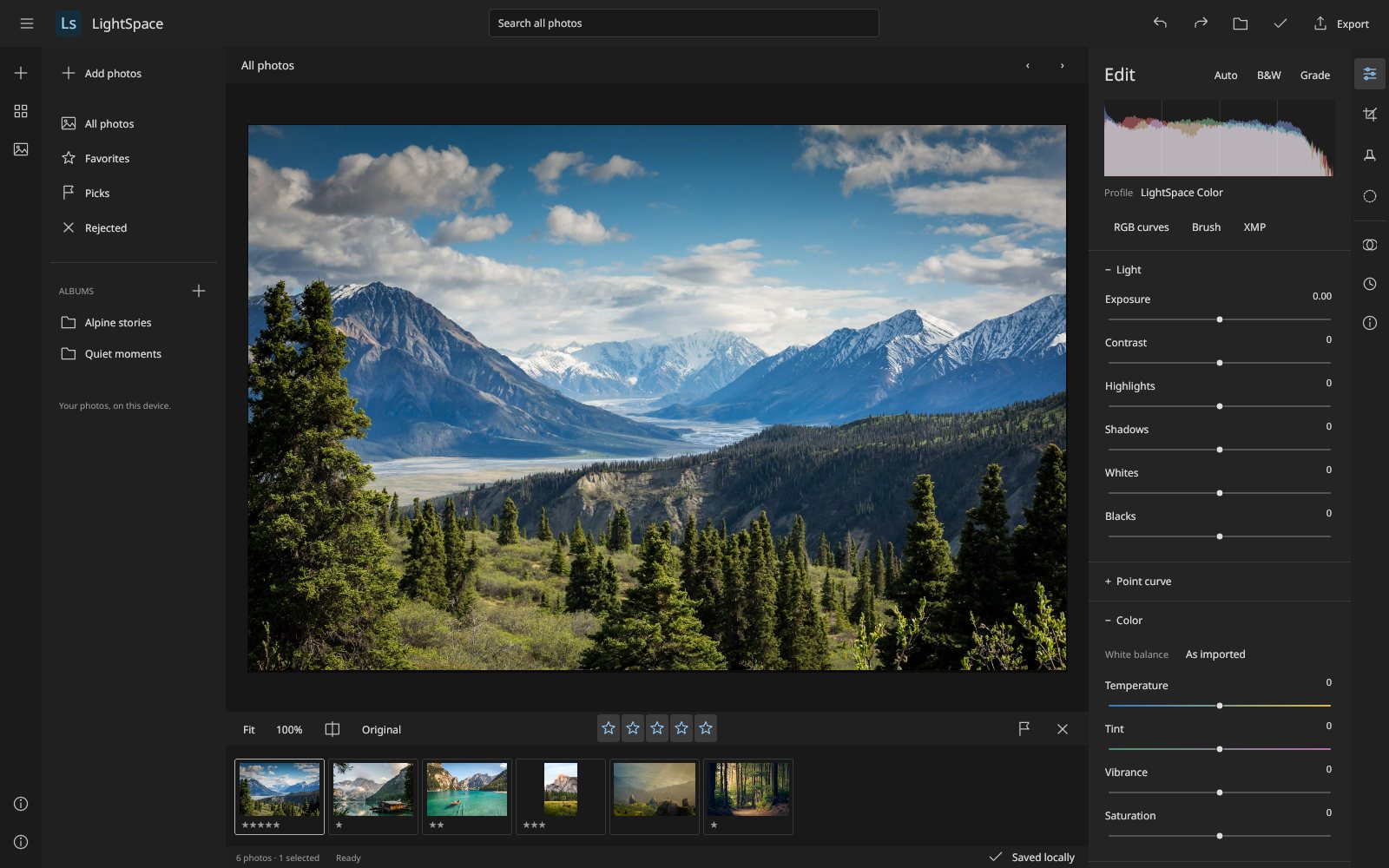
What makes LightSpace special
Familiar if you know Lightroom-style photo workflows — but original, local‑first and written end‑to‑end in C#.
Non-destructive development
Light, white balance, vibrance, curves, eight color bands and effects are stored as settings; original encoded bytes are never modified.
Local photo catalog
Import, search, rate, flag and group photos into albums in a paged grid and filmstrip that runs entirely on your device.
Four-way color grading
Shadow, midtone, highlight and global wheels with luminance, blending and balance controls.
Arbitrary RGB curves
Master, red, green and blue curves with up to 32 points each and linear or shape-preserving smooth interpolation.
Masks and brushes
Radial and linear gradients, luminance and sampled Oklab color ranges, and pressure-aware brush masks with local adjustments.
GPU-capable SkSL effects
Compiled SkSL runtime effects render inside Uno's Skia composition path, with software rendering for tests and export.
XMP sidecars
Import and export standard metadata and a reported Camera Raw subset, with a native extension for full LightSpace round trips.
Content-addressed recovery
Originals stored under SHA-256 keys, atomically published edit manifests and integrity checks on restore.
28 capabilities, 6 areas
Organize
- Import JPEG, PNG, WebP, BMP or the first GIF frame, retaining original bytes
- Paged grid, detail view and filmstrip with 60-photo pages
- Search filenames, captions and keywords
- Ratings, pick/reject flags and albums
- Copy/paste and sync development settings across selected photos
Develop
- Light, relative white balance, vibrance/saturation and monochrome
- Eight-band HSV color mixer with hue, saturation and luminance
- Four-way color grading with blending and balance
- Creative presets, texture/clarity/dehaze approximations and sharpening
- Spatial smoothing, vignette and grain; double-click resets a slider
Curves
- Master, red, green and blue curves with up to 32 points per channel
- Linear or shape-preserving smooth interpolation
- Add, drag and delete points or type Input/Output values
- 2048-entry floating-point lookup cache reused across unrelated edits
Crop, clone and compare
- Free crop rectangles with handles, centered ratios, quarter turns and flips
- Up to 32 feathered clone stamps from an explicit Alt-click source
- Original view and a draggable before/after divider
- Fit, source-pixel 100% zoom and wheel zoom around the pointer
Masks
- Up to eight masks with enable, amount, inversion, rename and duplicate
- Rotatable radial and linear gradients with on-canvas handles
- Luminance ranges and up to five sampled Oklab color pins
- Pressure-aware brush masks with size, feather, flow and density
- Local exposure, contrast, temperature, tint and saturation
Preserve and export
- One transaction per gesture with 100-step undo/redo and named versions
- Export 8-bit sRGB JPEG, PNG or WebP copies or a ZIP of a selection
- Portable .lightspace catalogs with originals, edits, albums and versions
- XMP sidecar import with a compatibility report before applying
- IndexedDB or native recovery with source integrity checks and retry
Run LightSpace right here
Open the live WebAssembly build and develop the demonstration catalog — every edit is non-destructive and stays on your device. Switch viewports, go fullscreen and tick off the guided tour as you explore.
Try LightSpace live
Open the live WebAssembly build and develop the demonstration catalog — every edit is non-destructive and stays on your device.
Real C# · Uno WebAssembly · runs locally in your browser8 libraries you can embed
LightSpace is assembled from independently reusable libraries, each published on NuGet.org. Hover the graph to trace dependencies; click a node to jump to its package, and open a card for install and usage.
LightSpace.Core
Photo state, grading, curves/interpolation, masks, brush samples, geometry and presets
LightSpace.Catalog
Schema migration, serialization, queries and XMP metadata/settings interchange
LightSpace.Editing
Gesture transactions, bounded undo/redo, versions, synchronization and revision-aware recovery
LightSpace.Imaging
Bounded decoding, EXIF orientation, sRGB conversion and fallback artwork
LightSpace.Rendering.Skia
SkSL runtime effects, image cache, curve tables, incremental brush coverage, histogram and export
LightSpace.Storage
Import/export contracts, atomic native recovery store and optional sidecar-picker capability
LightSpace.Controls
Original Uno chrome, icons, sliders, grading/mixer/curve/mask/brush controls and photo canvas
LightSpace.Workbench
Composable workspace, inspectors, commands, dialogs and save UX
8 packages on NuGet.org
All eight libraries are MIT-licensed. The badges below show the versions and downloads on NuGet.org, independently of the current source version. The six engine packages (Core, Storage, Catalog, Imaging, Rendering.Skia, Editing) target net10.0 without Uno; Imaging and Rendering.Skia use SkiaSharp 3.119. Controls and Workbench target net10.0-desktop and net10.0-browserwasm with the Uno Skia renderer. Packages are versioned together, with .snupkg symbols and SourceLink. Build artifacts alone do not imply that a new version has been published.
dotnet add package LightSpace.Core --prerelease<PackageReference Include="LightSpace.Core" Version="0.4.1-alpha.1" />
<PackageReference Include="LightSpace.Storage" Version="0.4.1-alpha.1" />
<PackageReference Include="LightSpace.Catalog" Version="0.4.1-alpha.1" />
<PackageReference Include="LightSpace.Imaging" Version="0.4.1-alpha.1" />
<PackageReference Include="LightSpace.Rendering.Skia" Version="0.4.1-alpha.1" />
<PackageReference Include="LightSpace.Editing" Version="0.4.1-alpha.1" />
<PackageReference Include="LightSpace.Controls" Version="0.4.1-alpha.1" />
<PackageReference Include="LightSpace.Workbench" Version="0.4.1-alpha.1" /><!-- Directory.Packages.props -->
<ItemGroup>
<PackageVersion Include="LightSpace.Core" Version="0.4.1-alpha.1" />
<PackageVersion Include="LightSpace.Storage" Version="0.4.1-alpha.1" />
<PackageVersion Include="LightSpace.Catalog" Version="0.4.1-alpha.1" />
<PackageVersion Include="LightSpace.Imaging" Version="0.4.1-alpha.1" />
<PackageVersion Include="LightSpace.Rendering.Skia" Version="0.4.1-alpha.1" />
<PackageVersion Include="LightSpace.Editing" Version="0.4.1-alpha.1" />
<PackageVersion Include="LightSpace.Controls" Version="0.4.1-alpha.1" />
<PackageVersion Include="LightSpace.Workbench" Version="0.4.1-alpha.1" />
</ItemGroup> Published with NuGet Trusted Publishing from GitHub Actions, with symbols (.snupkg) and SourceLink. Release v0.4.1-alpha.1 ↗
Dependencies: Core ← Catalog, Imaging; Imaging ← Rendering.Skia; Catalog + Storage ← Editing; Editing + Rendering.Skia ← Controls; Controls + Storage ← Workbench. Storage has no project dependencies. The host supplies startup and platform storage. Standard Uno input, scrolling and accessibility primitives remain in use where appropriate.
Dispose workspaces and native-resource caches (PhotoRenderer, ThumbnailCache, PhotoViewport, StudioView). Treat snapshot arrays as copy-on-write and originals as read-only. Objects have one logical owner, normally the UI synchronization context. Component API · Recovery invariants
The editing model includes PhotoState, development/crop/optics/geometry, local masks, clone spots, ratings, flags and keywords. Point curves support linear or shape-preserving interpolation; grading, sampled color ranges, brush strokes and built-in presets are UI-independent. Settings normalize values to their supported ranges. No dependencies and no UI.
dotnet add package LightSpace.Core --prereleaseKey types
PhotoState,DevelopSettings(17 adjustments and named Get/Set),CropSettings,CloneSpot.GeometrySettings,LensCorrectionSettings,GeometryProjection,ProjectiveTransform,LensMapping,WhiteBalanceEstimator.PointCurve,ChannelCurves,CompiledPointCurve,ColorGradingSettings,GradingTone,ColorBand.LocalMask,ColorRangeSettings,BrushStroke,BrushStrokeBuilder.CatalogDocument,PhotoDocument,Album,NamedVersion,BuiltInPresets.
Basic usage
using LightSpace.Core;

var state = new PhotoState
{
    Develop = BuiltInPresets.All.First(p => p.Name == "Golden hour").Settings with { Exposure = .3f },
    Crop = new CropSettings(Left: .05f, Top: .05f, Right: .95f, Bottom: .9f),
    Geometry = new GeometrySettings { Rotate = 1.5f, ConstrainCrop = true },
    Optics = new LensCorrectionSettings(Distortion: 12),
    Masks = [new LocalMask { Name = "Sky", Kind = MaskKind.Linear, Y = .2f, Exposure = -.4f }],
    Rating = 4, Flag = PhotoFlag.Pick, Keywords = ["alps", "sunset"]
}.Normalize();
var develop = state.Develop.Set(nameof(DevelopSettings.Contrast), 20);
var curve = new PointCurve { Points = [new(0, 0), new(.25f, .18f), new(.75f, .82f), new(1, 1)] };
float midtone = curve.Compile().Evaluate(.5f);
(int width, int height) = state.Crop.OutputSize(6000, 4000);Host contracts for pickers, downloads and recovery. FileRecoveryStore stages immutable originals under SHA-256 keys and atomically replaces the manifest after required sources exist. No project dependencies or UI.
dotnet add package LightSpace.Storage --prereleaseKey types
IWorkspaceStorage: OpenImagesAsync, OpenCatalogAsync, SaveAsync, ReadRecoveryAsync, WriteRecoveryAsync;WorkspaceFile(Name, Bytes).IRecoveryStore: ReadManifestAsync, ReadBlobAsync, CommitAsync;FileRecoveryStore(directory).RecoveryWrite(Manifest, References, Blobs),RecoveryBlob(Key, Bytes),RecoveryKeys.ISidecarStorage: optional user-authorized XMP picker.
Basic usage
using LightSpace.Storage;

IRecoveryStore store = new FileRecoveryStore(Path.Combine(
    Environment.GetFolderPath(Environment.SpecialFolder.LocalApplicationData), "MyApp", "recovery"));

// manifestJson must describe these sources using the recovery manifest contract.
byte[] original = File.ReadAllBytes("mountains.jpg");
string key = RecoveryKeys.Hash(original);
await store.CommitAsync(new RecoveryWrite(manifestJson, [key], [new RecoveryBlob(key, original)]));
string? manifest = await store.ReadManifestAsync();
byte[]? restored = await store.ReadBlobAsync(key);
Normally RecoveryPersistence in LightSpace.Editing builds these writes for the host.
Validated catalog serialization, migration, search/filter/sort, recovery manifests and XMP metadata/settings interchange. Current schema 5 accepts catalogs 1–4 with neutral missing fields. The Camera Raw subset is reported explicitly; native extensions retain complete LightSpace state. Depends on Core; no UI.
dotnet add package LightSpace.Catalog --prereleaseKey types
CatalogSerializer: Serialize, Deserialize, Validate, SerializeSettings, DeserializeSettings.PhotoQuery(Text, MinimumRating, Flag, Album, Sort).Execute(catalog)andPhotoSort.XmpSidecar,XmpImportResult,XmpExportResult,RecoveryManifest,RecoverySourceReference.
Basic usage
using LightSpace.Catalog;
using LightSpace.Core;

CatalogDocument catalog = CatalogSerializer.Deserialize(File.ReadAllText("catalog.json"));
var picks = new PhotoQuery(Text: "alps", MinimumRating: 3,
    Flag: PhotoFlag.Pick, Sort: PhotoSort.Rating).Execute(catalog);
if (picks.Count > 0)
{
    var photo = picks[0];
    XmpImportResult imported = XmpSidecar.Import(File.ReadAllText("IMG_0042.xmp"), photo.State);
    foreach (var warning in imported.Warnings) Console.WriteLine(warning);
    // An interactive host should present warnings before applying this state.
    photo.State = imported.State;
    File.WriteAllText("IMG_0042.xmp", XmpSidecar.Export(photo.State).Xml);
}
File.WriteAllText("catalog.json", CatalogSerializer.Serialize(catalog));Bounded decoding for JPEG, PNG, WebP, BMP and GIF sources, EXIF orientation, downscaled sRGB previews and procedural sample landscapes. Limits are 64 MiB encoded and 100 megapixels decoded. Depends on Core and SkiaSharp; no UI.
dotnet add package LightSpace.Imaging --prereleaseKey types
PhotoCodec.Import(name, bytes)validates source metadata and retains original bytes.PhotoCodec.Decode(bytes, maxDimension)returns an oriented sRGBSKImage.SamplePhotos.CreateCatalog()andSamplePhotos.Create(seed)provide generated content.
Basic usage
using LightSpace.Core;
using LightSpace.Imaging;
using SkiaSharp;

PhotoDocument photo = PhotoCodec.Import("mountains.jpg", File.ReadAllBytes("mountains.jpg"));
using SKImage preview = PhotoCodec.Decode(photo.Original, maxDimension: 1024);
CatalogDocument samples = SamplePhotos.CreateCatalog();Development, curves, grading, masks, clone spots and color ranges run as SkSL runtime effects. A separate optical effect composes with development; projective geometry is a draw matrix. The backend is selected by the host and may be GPU or software. Histograms, Auto settings, source sampling and JPEG/PNG/WebP export are also provided. Depends on Imaging; no UI framework.
dotnet add package LightSpace.Rendering.Skia --prereleaseKey types
PhotoRenderer: Draw, CreateShader, Export, CalculateHistogram, Auto, SampleSource, Statistics and Presentation.Histogram,PhotoTransform,GeometryMapping,ClippingIndicators.ToneLookupCache,BrushCoverageCacheand their construction/work statistics.
Basic usage
using LightSpace.Core;
using LightSpace.Editing;
using LightSpace.Imaging;
using LightSpace.Rendering.Skia;
using SkiaSharp;

var photo = PhotoCodec.Import("architecture.jpg", File.ReadAllBytes("architecture.jpg"));
var session = new EditorSession(new CatalogDocument { Photos = [photo], ActivePhoto = photo.Id });
session.Edit("Correct perspective and contrast", state => state with
{
    Develop = state.Develop with
    {
        Exposure = .3f,
        Channels = new ChannelCurves
        {
            Master = new PointCurve { Points = [new(0, 0), new(.25f, .18f), new(.75f, .82f), new(1, 1)] }
        }
    },
    Geometry = new GeometrySettings { Vertical = -18, Rotate = 1.5f, ConstrainCrop = true },
    Optics = new LensCorrectionSettings(Distortion: 12, Vignetting: 8)
});
using var renderer = new PhotoRenderer();
File.WriteAllBytes("architecture-edited.jpg",
    renderer.Export(photo, SKEncodedImageFormat.Jpeg, quality: 92, maxDimension: 4096));
session.Undo(); // Original encoded bytes are untouched.EditorSession makes each completed gesture one transaction. Previews update the visible state without adding history; commit adds a step and cancel restores the opening state. Named versions, selection synchronization, albums and committed-revision recovery are included. Depends on Catalog and Storage; no UI.
dotnet add package LightSpace.Editing --prereleaseKey types
EditorSession: Catalog, Active, Selection, Edit, BeginGesture/Preview/CommitGesture/CancelGesture, Undo/Redo, SaveVersion, SyncSelected, CreateAlbum, Changed.RecoveryPersistence(IRecoveryStore): Capture, CommitAsync, RestoreAsync.RecoveryCoordinator: FlushAsync, Status and StatusChanged; overlapping flush calls share one writer.
Basic usage
using LightSpace.Core;
using LightSpace.Editing;
using LightSpace.Storage;

var session = new EditorSession(catalog);
session.Changed += () => Console.WriteLine($"Revision {session.Revision}");
session.BeginGesture();
foreach (var value in new[] { .1f, .2f, .35f })
    session.Preview(state => state with { Develop = state.Develop with { Exposure = value } });
session.CommitGesture("Exposure");
session.SaveVersion("Bright");
session.SyncSelected(); // Includes crop, geometry, optics and masks; retains target metadata.
session.Undo();

var persistence = new RecoveryPersistence(new FileRecoveryStore("recovery"));
using var recovery = RecoveryCoordinator.Incremental(session, persistence, initiallySaved: false);
await recovery.FlushAsync();Original dark Uno photography controls include the corrected-coordinate viewport, adjustment sliders, curves, grading/mixer/range/mask editors, optics/geometry, interactive histogram, panel-resize grips, thumbnails and chrome. Editors expose preview/commit/cancel events without owning the host's transaction policy. Brush settings affect new strokes. Depends on Editing and Rendering.Skia; requires the Uno Skia renderer.
dotnet add package LightSpace.Controls --prereleaseKey types
PhotoViewport(EditorSession, PhotoRenderer): SetTool, Fit, Compare, Before, Clipping, MaskOverlay, SetActiveMask, BrushSettings.AdjustmentSlider: ValueChanged, ValueCommitted, GestureCanceled.PointCurveEditor,ColorGradingEditor,ColorMixerEditor,ColorRangeEditor,MaskSettingsEditor,GeometryEditor,OpticsEditor: Value and preview/commit/cancel contracts.BrushSettingsEditor,HistogramView,PanelResizeGrip,PhotoCard,PhotoThumbnail,ThumbnailCache,PanelSection,LightButton,Theme.
Basic usage
using LightSpace.Controls;
using LightSpace.Editing;
using LightSpace.Rendering.Skia;
using Microsoft.UI.Xaml;
using Microsoft.UI.Xaml.Controls;

var session = new EditorSession(catalog);
var renderer = new PhotoRenderer();
var viewport = new PhotoViewport(session, renderer);
var exposure = new AdjustmentSlider("Exposure", -5, 5, 0, .01);
exposure.ValueChanged += value => session.Preview(s => s with { Develop = s.Develop with { Exposure = value } });
exposure.ValueCommitted += () => session.CommitGesture("Exposure");
exposure.GestureCanceled += session.CancelGesture;
var curves = new PointCurveEditor { Value = session.Active!.State.Develop.Channels };
curves.Previewed += value => session.Preview(s => s with { Develop = s.Develop with { Channels = value } });
curves.Committed += () => session.CommitGesture("RGB point curve");
curves.Canceled += session.CancelGesture;
var geometry = new GeometryEditor { Value = session.Active.State.Geometry };
geometry.Previewed += value => session.Preview(s => s with { Geometry = value });
geometry.Committed += () => session.CommitGesture("Geometry");
geometry.Canceled += session.CancelGesture;

// Keep values synchronized after undo, cancellation and external edits.
session.ViewChanged += () =>
{
    if (session.Active is not { } active) return;
    exposure.Value = active.State.Develop.Exposure;
    curves.Value = active.State.Develop.Channels;
    geometry.Value = active.State.Geometry;
};
var inspector = new StackPanel { Width = 300, Children = { exposure, curves, geometry } };
var root = new Grid { Background = Theme.Background };
root.ColumnDefinitions.Add(new ColumnDefinition());
root.ColumnDefinitions.Add(new ColumnDefinition { Width = GridLength.Auto });
Grid.SetColumn(inspector, 1);
root.Children.Add(viewport); root.Children.Add(new ScrollViewer { Content = inspector });
Grid.SetColumn(root.Children[1], 1);
window.Content = root;
window.Closed += (_, _) => { viewport.Dispose(); renderer.Dispose(); };The complete application workspace as one control: library/grid, filmstrip, interactive histogram, development/optics/geometry inspectors, tools, presets, versions, sidecar/export dialogs, shortcuts, resizable panels and recovery status. Depends on Controls and Storage; requires Uno. ISidecarStorage remains optional.
dotnet add package LightSpace.Workbench --prereleaseKey types
StudioView(EditorSession, IWorkspaceStorage, recoveryLoaded, RecoveryPersistence?): Session, Viewport, Recovery, SetGrid, ChooseTool, SetStatus, SaveRecoveryAsync.- UnsavedChangesChanged and opt-in DiagnosticsChanged events.
- ProtectExistingRecovery preserves unreadable prior data until explicit replacement.
Basic usage
using LightSpace.Editing;
using LightSpace.Imaging;
using LightSpace.Storage;
using LightSpace.Workbench;

IWorkspaceStorage storage = new MyWorkspaceStorage(); // Your picker/export/recovery implementation.
var persistence = storage is IRecoveryStore store ? new RecoveryPersistence(store) : null;
var catalog = persistence is null ? null : await persistence.RestoreAsync();
var studio = new StudioView(new EditorSession(catalog ?? SamplePhotos.CreateCatalog()),
    storage, recoveryLoaded: catalog is not null, persistence: persistence);
window.Content = studio;
window.Closed += (_, _) => studio.Dispose();
A production host should catch restore failures and protect unreadable existing recovery rather than automatically replacing it; the supplied application host implements that behavior.
From engine to workbench
Layers build bottom‑up: each one depends only on those beneath it.
Immutable photo state, adjustments, curves, masks and geometry with no Uno dependency.
LightSpace.CoreVersioned catalog serialization and XMP, bounded Skia decoding, and platform-independent storage contracts.
LightSpace.CatalogLightSpace.ImagingLightSpace.StorageGesture transactions, undo and versions alongside SkSL development, masks, histogram and export.
LightSpace.EditingLightSpace.Rendering.SkiaOriginal photography controls composed into a reusable workspace for browser and desktop hosts.
LightSpace.ControlsLightSpace.WorkbenchEmbed, script, extend
using LightSpace.Core;
using LightSpace.Editing;
using LightSpace.Imaging;
using LightSpace.Rendering.Skia;
using SkiaSharp;

var photo = PhotoCodec.Import("mountains.jpg", File.ReadAllBytes("mountains.jpg"));
var session = new EditorSession(new CatalogDocument { Photos = [photo], ActivePhoto = photo.Id });
session.Edit("Refine contrast", state => state with
{
    Develop = state.Develop with
    {
        Exposure = .3f,
        Channels = new ChannelCurves
        {
            Master = new PointCurve { Points = [new(0, 0), new(.25f, .18f), new(.75f, .82f), new(1, 1)] }
        }
    }
});
using var renderer = new PhotoRenderer();
File.WriteAllBytes("mountains-edited.jpg",
    renderer.Export(photo, SKEncodedImageFormat.Jpeg, quality: 92, maxDimension: 4096));
session.Undo(); // Original encoded bytes are untouched.git clone https://github.com/wieslawsoltes/LightSpace.git
cd LightSpace
python3 scripts/fetch-assets.py
dotnet workload install wasm-tools --skip-manifest-update
# Model, processing, lifetime, recovery, XMP and performance checks
dotnet run --project tests/LightSpace.Engine.Tests -c Release
# Shared native desktop host
dotnet run --project src/LightSpace.App -f net10.0-desktop \
-p:LightSpaceDesktopOnly=true
# Actual Uno WebAssembly publication
dotnet publish src/LightSpace.App -f net10.0-browserwasm -c Release \
-o artifacts/publish -p:WasmShellWebAppBasePath=/LightSpace/
python3 scripts/collect-site.py artifacts/publish artifacts/site
python3 scripts/serve-site.py --directory artifacts/site --port 4173File formats
Keyboard essentials
Continuously verified
Each push runs through GitHub Actions. The public browser build is deployed only from successful pipelines.
build.yml Desktop
desktop.yml Pages
Pagespages.yml Release
release.yml Slider baseline diagnostic
slider-diagnostic.yml
Toolchain
Third‑party NuGet packages
git clone https://github.com/wieslawsoltes/LightSpace.git
cd LightSpace
dotnet workload install wasm-tools
dotnet run --project src/LightSpace.App -f net10.0-browserwasmWhat it doesn’t claim
The project documents its limits as carefully as its features.
- Independent early-stage software, not a pixel-identical or feature-complete Lightroom replacement
- No RAW/DNG/HEIF/TIFF decoding, AI tools, HDR/panorama merging or calibrated camera/lens correction
- Output is 8-bit sRGB up to an 8192 px long edge; source EXIF/IPTC is not embedded in copies
- Brush mask coverage is capped at a 1024-pixel long edge, even for export
- Recovery is local and unencrypted — not cloud sync or a substitute for original-file backups