CodeSpace
A VS Code-style developer workbench, custom-built in C# on Uno
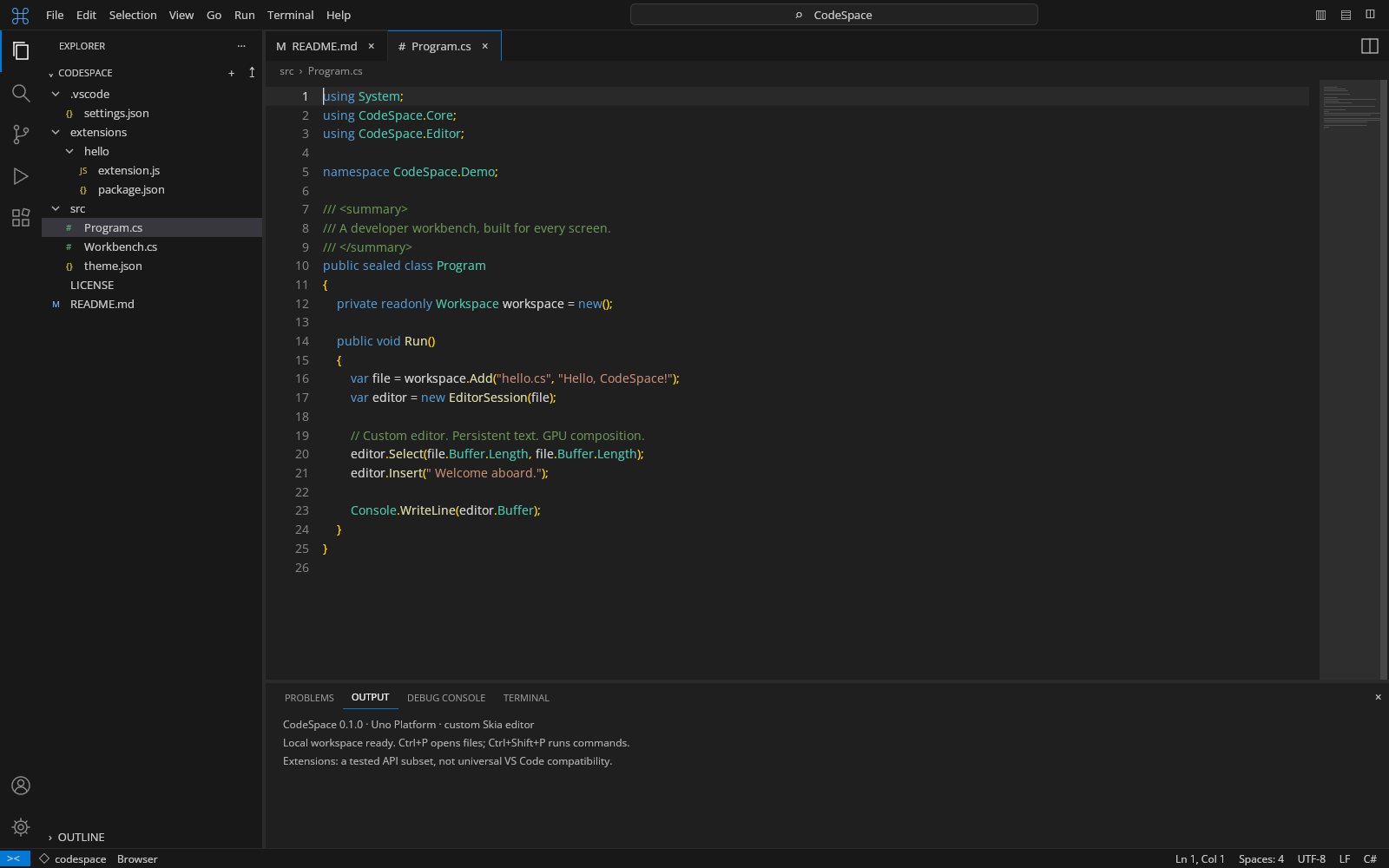
CodeSpace brings a familiar activity bar, explorer, command center, editor groups and bottom panel to a native Uno Platform / C# application. The editor, highlighting, file tree, icons, docking model and composition are all custom-built, with no Monaco, Electron or embedded VS Code workbench. A persistent AVL-rope text engine, Skia renderer and experimental VSIX extension host are packaged as independently reusable libraries.
What makes CodeSpace special
Familiar if you know Visual Studio Code-style workbenches — but original, local‑first and written end‑to‑end in C#.
Custom editor, no Monaco
The editor, highlighting, file tree, icons and docking are custom-built in C#. No Monaco, Electron, embedded VS Code or screenshot-based UI is used.
Persistent rope text engine
A persistent AVL rope with indexed line navigation and structurally shared undo/redo, gated on two-million-character documents.
Multi-cursor editing
Multiple selections, Ctrl+D next-occurrence selection, Alt+Shift rectangular pointer selection, grapheme-aware deletion and literal/regex find and replace.
Folding and minimap
Folding with indexed visual rows, a minimap, whitespace visualization, line numbers and Ctrl+wheel font zoom.
Docked editor groups
Draggable tabs, nested horizontal/vertical editor splits and resizable side and bottom panels, backed by an immutable layout model.
Command palette and quick-open
Fuzzy commands with Ctrl+Shift+P, Go to file with Ctrl+P, breadcrumbs and workspace search.
VSIX extension host
Bounded VSIX inspection, explicit activation trust, browser worker and Node process hosts, with completion, hover, definition, symbol and format providers.
Batched Skia rendering
SKCanvasElement draws into Uno's Skia composition canvas with a 512-entry line layout cache and positioned-text batches.
29 capabilities, 6 areas
Editing
- Folding/unfolding with indexed visual rows
- Multiple selections, next-occurrence selection and Alt+Shift rectangular pointer selection
- Structurally shared undo/redo and version-checked atomic multi-document edits
- Literal and regex find and replace, comments, autoindent and duplicate line
- Suggestions, symbol navigation and Go to line/column
- Minimap, line numbers, whitespace visualization, scrolling and zoom
Workbench
- Custom vector activity icons and a virtualized explorer
- File create, import, rename, delete and export with dirty tab markers
- Draggable tab reordering and moves across nested editor splits
- Resizable side and bottom panels with Ctrl+B / Ctrl+J toggles
- Fuzzy commands, quick-open, breadcrumbs, document status and workspace search
Languages
- C#, JavaScript, TypeScript, JSON, Python, HTML and XML/XAML
- CSS, Markdown, YAML, shell scripts and plain text
- Stateful tokens, bracket diagnostics, folding ranges and declaration extraction
- Incremental re-tokenization that stops once lexer state converges
Extensions
- Bounded, non-executing VSIX inspection with manifest/host classification
- Explicit activation trust before any extension code runs
- Bundled CommonJS loading in a browser module worker or an optional Node.js 22+ process
- Completion, hover, definition, symbol and format providers bridged to the editor
- Diagnostic collections with Problems entries and editor squiggles
Files and settings
- Import UTF-8 text into a virtual workspace via File → Open / Import Files
- Save/export the active file through a picker or download
- Workspace: Export Backup writes a portable .codespace.json file
- Local recovery of dirty baselines, selections, viewport and fold state
- Live JSONC settings for font size, tab size, minimap, whitespace and line numbers
Rendering and performance
- Draws into Uno's Skia composition canvas without a per-frame CPU bitmap upload
- Up to 512 cached line layouts with positioned-text batches
- Zero-allocation indexed line navigation on two-million-character documents
- Fold mapping stored in proportion to collapsed intervals, not total lines
Run CodeSpace right here
The live build is the full C# workbench compiled to WebAssembly: import some files and try the editor, docking and command palette in your browser. Switch viewports, go fullscreen and tick off the guided tour as you explore.
Try CodeSpace live
The live build is the full C# workbench compiled to WebAssembly: import some files and try the editor, docking and command palette in your browser.
Real C# · Uno WebAssembly · runs locally in your browser9 libraries you can embed
CodeSpace is assembled from independently reusable libraries, each published on NuGet.org. Hover the graph to trace dependencies; click a node to jump to its package, and open a card for install and usage.
CodeSpace.Core
Persistent text, virtual workspace, commands and configuration
CodeSpace.Editor
Transactions, selections, history and folding indexes
CodeSpace.Docking
Immutable split/tab layouts and persistence
CodeSpace.Languages
Tokenizer and lexical language services
CodeSpace.Extensions
VSIX inspection, compatibility reports and RPC framing
CodeSpace.ExtensionHost
@codespace/extension-host: browser/Node extension runtime and provider adapters
CodeSpace.Rendering.Skia
Editor renderer and viewport on a caller-owned SKCanvas
CodeSpace.Controls.Uno
Editor, input bridge, tree, tabs, splitter, activity bar and quick pick controls
CodeSpace.Workbench.Uno
Composable workbench and IWorkbenchPlatform adapter contract
8 packages on NuGet.org
CodeSpace ships as eight MIT-licensed .NET packages on NuGet.org, versioned together and published by release tags with symbol packages (.snupkg) and SourceLink. The six engine packages target net10.0 and have no UI dependency (only CodeSpace.Rendering.Skia needs SkiaSharp); the two Uno packages target net10.0-desktop and net10.0-browserwasm, and CI verifies that both target assemblies are in each package. Engines do not depend on the sample application. The JavaScript extension host (src/CodeSpace.ExtensionHost, @codespace/extension-host) is not on NuGet or the npm registry; it is attached to each GitHub Release as an archive.
Embed EditorRenderer on a caller-owned SKCanvas, CodeEditorControl in a Uno app, or the whole WorkbenchView with your own IWorkbenchPlatform storage and extension transport.
dotnet add package CodeSpace.Core<PackageReference Include="CodeSpace.Core" Version="0.1.0" />
<PackageReference Include="CodeSpace.Docking" Version="0.1.0" />
<PackageReference Include="CodeSpace.Editor" Version="0.1.0" />
<PackageReference Include="CodeSpace.Languages" Version="0.1.0" />
<PackageReference Include="CodeSpace.Extensions" Version="0.1.0" />
<PackageReference Include="CodeSpace.Rendering.Skia" Version="0.1.0" />
<PackageReference Include="CodeSpace.Controls.Uno" Version="0.1.0" />
<PackageReference Include="CodeSpace.Workbench.Uno" Version="0.1.0" /><!-- Directory.Packages.props -->
<ItemGroup>
<PackageVersion Include="CodeSpace.Core" Version="0.1.0" />
<PackageVersion Include="CodeSpace.Docking" Version="0.1.0" />
<PackageVersion Include="CodeSpace.Editor" Version="0.1.0" />
<PackageVersion Include="CodeSpace.Languages" Version="0.1.0" />
<PackageVersion Include="CodeSpace.Extensions" Version="0.1.0" />
<PackageVersion Include="CodeSpace.Rendering.Skia" Version="0.1.0" />
<PackageVersion Include="CodeSpace.Controls.Uno" Version="0.1.0" />
<PackageVersion Include="CodeSpace.Workbench.Uno" Version="0.1.0" />
</ItemGroup> Published with NuGet Trusted Publishing from GitHub Actions, with symbols (.snupkg) and SourceLink. Release v0.1.0 ↗
Dependencies follow the real project references: Core ← Editor, Core ← Languages, Core ← Extensions, Editor + Languages ← Rendering.Skia, Rendering.Skia + Docking ← Controls.Uno, Controls.Uno + Extensions ← Workbench.Uno; Docking stands alone.
The text and workspace engine: an immutable AVL-rope TextBuffer with indexed line lookup and structural sharing, a virtual in-memory Workspace with search and JSON backups, a fuzzy CommandRegistry and layered JSONC settings. Use it for any headless text-processing or document model. No dependencies and no UI.
dotnet add package CodeSpace.CoreKey types
TextBuffer— persistent text;Replace/Applyreturn new buffers, plusGetLine,PositionAt,OffsetAt,Slice.Workspace/WorkspaceFile— virtual files with dirty tracking,Search,Serialize/Deserialize.CommandRegistry/Command— registered commands with fuzzySearchandExecute.EditorConfiguration— default/user/workspace settings resolved intoEditorOptions.
Basic usage
using CodeSpace.Core;

var buffer = new TextBuffer("line one\nline two\n");
TextBuffer edited = buffer.Replace(5, 3, "1");    // `buffer` still holds the original text
Console.WriteLine(edited.GetLine(0).Text);         // line 1

var workspace = new Workspace { Name = "example" };
workspace.Add("src/hello.cs", "class Hello {}\n");
foreach (var hit in workspace.Search("Hello"))
    Console.WriteLine($"{hit.Path}:{hit.Line + 1} {hit.Preview}");
var restored = Workspace.Deserialize(workspace.Serialize());

var commands = new CommandRegistry();
commands.Register(new Command("demo.hello", "Say Hello", "Ctrl+Alt+H", () => Console.WriteLine("Hello")));
commands.Execute(commands.Search("hello")[0].Id);

var settings = new EditorConfiguration();
settings.LoadWorkspace("{ \"editor.fontSize\": 16, // JSONC\n }");
EditorOptions options = settings.Options; // FontSize = 16An immutable model of editor groups: tab groups inside nested horizontal/vertical splits, side bar and panel sizes, and JSON persistence. Hosts decide how to present each node, so it can back any UI framework. No dependencies and no UI.
dotnet add package CodeSpace.DockingKey types
DockLayout— mutable façade over the currentDockState:Open,Close,Split,Move,Resize,Serialize/Restore,Changed.DockState— root node plus side bar/panel dimensions and visibility.DockNode,TabGroup,SplitNode,SplitAxis— the immutable layout tree.
Basic usage
using CodeSpace.Docking;

var layout = new DockLayout();
layout.Open("README.md");
layout.Open("src/Program.cs");
string right = layout.Split("primary", SplitAxis.Horizontal, "src/Program.cs");
layout.SetPanel(visible: false);

foreach (TabGroup group in layout.Groups)
    Console.WriteLine($"{group.Id}: {string.Join(", ", group.Tabs)} (active {group.ActiveTab})");

string json = layout.Serialize();
var restored = new DockLayout();
restored.Restore(json);The editing engine for one document: multiple and rectangular selections, grapheme-aware movement and deletion, autoindent, comments, find/replace, structurally shared undo/redo, folding indexes and version-checked multi-document transactions. Use it to drive any editor surface or to script edits. Depends on CodeSpace.Core; no UI.
dotnet add package CodeSpace.EditorKey types
EditorSession— selections,Insert,Delete,Move,Find,ReplaceAll,AddNextOccurrence,ToggleLineComment,Undo/Redo,Changed.Selection— anchor/active pair (Start,End,Length).FoldingState— collapsed regions with line↔visual-row mapping.WorkspaceEditTransaction/DocumentEditBatch— atomic edits across several documents.
Basic usage
using CodeSpace.Core;
using CodeSpace.Editor;

var workspace = new Workspace { Name = "example" };
var file = workspace.Add("src/hello.cs", "class Hello {}\n");
var editor = new EditorSession(file);
editor.Select(6, 11);
editor.Insert("World");
editor.Undo();

editor.Select(0, 0);
editor.AddNextOccurrence();                        // Ctrl+D-style multi-selection
int replaced = editor.ReplaceAll("Hello", "Greeter");
Console.WriteLine($"{replaced} replaced, dirty: {editor.IsDirty}");

// Version-checked edit spanning several open documents
WorkspaceEditTransaction.Apply([new DocumentEditBatch(editor, [new TextEdit(0, 0, "// header\n")], editor.Version)]);Lexical language services for C#, JavaScript, TypeScript, JSON, Python, HTML, XML/XAML, CSS, Markdown, YAML, shell and plain text: a stateful tokenizer with incremental re-tokenization, plus declaration symbols, word completions, bracket diagnostics and folding ranges. These are lexical services, not compiler-backed IntelliSense. Depends on CodeSpace.Core; no UI.
dotnet add package CodeSpace.LanguagesKey types
LanguageCatalog— built-inLanguageDefinitions by path (ForPath) or id (ForId).SyntaxLexer.Tokenize— tokenizes a line, carrying aLexerStateacross lines.IncrementalSyntaxDocument/SyntaxDocument— cached per-lineTokenizedLines for aTextBuffer.LanguageServices—Symbols,Complete,DiagnosticsandFoldingRanges.
Basic usage
using CodeSpace.Core;
using CodeSpace.Languages;

var buffer = new TextBuffer("namespace Demo;\nclass Hello\n{\n    void Run() { }\n");
var syntax = new SyntaxDocument("Hello.cs");        // language chosen from the extension
foreach (SyntaxToken token in syntax.GetLine(buffer, 1).Tokens)
    Console.WriteLine($"{token.Kind}: {buffer.GetLine(1).Text.Substring(token.Start, token.Length)}");

foreach (var symbol in LanguageServices.Symbols(buffer))
    Console.WriteLine($"{symbol.Kind} {symbol.Name} (line {symbol.Line + 1})");
foreach (var problem in LanguageServices.Diagnostics(buffer, "Hello.cs"))
    Console.WriteLine($"{problem.Severity}: {problem.Message} at {problem.Line + 1}:{problem.Character + 1}");
IReadOnlyList<string> words = LanguageServices.Complete(buffer, "Ru", "csharp");Host-side VS Code extension support: bounded VSIX reading (size and entry limits, no execution), manifest parsing, host selection (browser worker, Node process, declarative) and compatibility reports, plus Content-Length JSON-RPC framing and the IExtensionBridge transport contract. Depends on CodeSpace.Core; no UI. Extensions are trusted executable code; this package only inspects them.
dotnet add package CodeSpace.ExtensionsKey types
ExtensionPackage.Read— reads a.vsixstream into aManifestand boundedFiles.ExtensionManifest— parsedpackage.json(Parse,SelectHost,Commands).ExtensionCompatibility.Inspect—ExtensionCapabilityReportwith host, trust and limitations.JsonRpcFraming—WriteAsync/ReadAsyncof framed JSON messages on aStream.IExtensionBridge— transport implemented by hosts (worker, Node process).
Basic usage
using CodeSpace.Extensions;

await using var vsix = File.OpenRead("hello-0.1.0.vsix");
var package = ExtensionPackage.Read(vsix);           // inspected, never executed
ExtensionManifest manifest = package.Manifest;
foreach (var command in manifest.Commands)
    Console.WriteLine($"{command.Command}: {command.Title}");

var report = ExtensionCompatibility.Inspect(manifest, browser: true);
Console.WriteLine($"{report.ExtensionId} -> {report.Host}, trust required: {report.RequiresTrust}");
foreach (var limitation in report.Limitations) Console.WriteLine("  " + limitation);

using var stream = new MemoryStream();
await JsonRpcFraming.WriteAsync(stream, new { jsonrpc = "2.0", method = "initialize", id = 1 });The editor renderer: draws an EditorSession onto any caller-owned SKCanvas with cached positioned-text line layouts, syntax colors, selections, caret, find matches, diagnostics, folding gutter, whitespace and minimap, and maps points back to text offsets. Use it to render code outside Uno (images, other UI toolkits). Depends on Editor, Languages and SkiaSharp 3.119; no UI framework.
dotnet add package CodeSpace.Rendering.SkiaKey types
EditorRenderer—Draw,HitTest,EnsureCaretVisible,Theme,Metrics;DefaultTypefacefor the font.EditorViewport— scroll, font size, minimap/whitespace/line-number toggles,Folding,FindMatches,Diagnostics.EditorTheme— background, gutter, selection and per-TokenKindcolors.RenderMetrics— visible/cached lines, glyphs and draw calls of the last frame.
Basic usage
using CodeSpace.Core;
using CodeSpace.Editor;
using CodeSpace.Rendering.Skia;
using SkiaSharp;

var file = new Workspace().Add("src/hello.cs", "class Hello\n{\n    void Run() { }\n}\n");
var session = new EditorSession(file);
var view = new EditorViewport { FontSize = 15, ShowMinimap = false };

using var renderer = new EditorRenderer();
using var surface = SKSurface.Create(new SKImageInfo(800, 300));
renderer.Draw(surface.Canvas, new SKRect(0, 0, 800, 300), session, view);
Console.WriteLine($"{renderer.Metrics.VisibleLines} lines, {renderer.Metrics.TextDrawCalls} text calls");

int offset = renderer.HitTest(session, view, 120, 30);   // pointer -> text offset
using var png = surface.Snapshot().Encode(SKEncodedImageFormat.Png, 100);
File.WriteAllBytes("hello.png", png.ToArray());Custom Uno Platform controls built on the engines: CodeEditorControl (Skia editor surface with a hidden text-input bridge, find box, folding and clipboard), the virtualized FileTreeControl, EditorTabs, ActivityBar, QuickPickControl, DockSplitter, vector icons and colors. Use them to compose your own editor UI. Depends on Rendering.Skia and Docking; requires Uno Platform (Skia renderer).
dotnet add package CodeSpace.Controls.UnoKey types
CodeEditorControl— hosts anEditorSession; exposesViewport,Renderer,ShowFind,FoldAll,FocusEditor,CommandRequested.FileTreeControl— explorer for aWorkspace;FileActivatedevent.EditorTabs— tab strip for aTabGroupwith activate/close/move events.QuickPickControl/QuickPickItem— command palette and quick-open list.ActivityBar,DockSplitter,VectorIcon,WorkbenchColors— workbench chrome.
Basic usage
using CodeSpace.Controls.Uno;
using CodeSpace.Core;
using CodeSpace.Editor;
using Microsoft.UI.Xaml;
using Microsoft.UI.Xaml.Controls;

var workspace = new Workspace();
workspace.Add("src/hello.cs", "class Hello\n{\n}\n");
var editor = new CodeEditorControl(new EditorSession(workspace.Files["src/hello.cs"]));
editor.Viewport.ShowMinimap = false;

var tree = new FileTreeControl { Workspace = workspace, Width = 240 };
tree.FileActivated += (_, path) => Console.WriteLine("open " + path);

var root = new Grid();
root.ColumnDefinitions.Add(new ColumnDefinition { Width = GridLength.Auto });
root.ColumnDefinitions.Add(new ColumnDefinition());
root.Children.Add(tree);
root.Children.Add(editor);
Grid.SetColumn(editor, 1);

var window = new Window { Title = "Editor", Content = root };
window.Activate();
editor.FocusEditor();The complete VS Code-style workbench as a single Grid: activity bar, explorer, search, extensions view, editor groups, bottom panel, status bar, command palette, recovery and extension activation. Hosts supply storage, file pickers and the optional extension transport through IWorkbenchPlatform. Depends on Controls.Uno and Extensions; requires Uno Platform.
dotnet add package CodeSpace.Workbench.UnoKey types
WorkbenchView— the workbench;InitializeAsync,Open(path, line),Execute(commandId),Workspace,Docking,Commands,StatusChanged.IWorkbenchPlatform— file import/export, recovery storage and optionalIExtensionBridge.ImportedFile— a picked file's path and bytes.SampleWorkspace.Create— the demo workspace shown on first start.
Basic usage
using CodeSpace.Extensions;
using CodeSpace.Workbench.Uno;
using Microsoft.UI.Xaml;

sealed class MemoryPlatform : IWorkbenchPlatform
{
    private string? _recovery;
    public bool IsBrowser => OperatingSystem.IsBrowser();
    public Task<IReadOnlyList<ImportedFile>> PickFilesAsync(string extension = "*") => Task.FromResult<IReadOnlyList<ImportedFile>>([]);
    public Task SaveFileAsync(string name, byte[] content) => Task.CompletedTask;   // show a save picker here
    public Task<string?> LoadRecoveryAsync() => Task.FromResult(_recovery);
    public Task SaveRecoveryAsync(string workspaceJson) { _recovery = workspaceJson; return Task.CompletedTask; }
    public IExtensionBridge? ExtensionBridge => null;                              // no extension host
}

// In Application.OnLaunched:
var window = new Window { Title = "CodeSpace" };
var workbench = new WorkbenchView(new MemoryPlatform());
window.Content = workbench;
window.Activate();
await workbench.InitializeAsync();
workbench.Open("README.md");
window.Closed += (_, _) => workbench.Dispose();From engine to workbench
Layers build bottom‑up: each one depends only on those beneath it.
Persistent AVL-rope text, a virtual workspace and transactional editor sessions with folding indexes.
CodeSpace.CoreCodeSpace.EditorLexical language services and an immutable split/tab docking model, all free of UI dependencies.
CodeSpace.LanguagesCodeSpace.DockingNon-executing VSIX inspection and RPC framing in .NET, plus an independent JavaScript host for workers and Node.
CodeSpace.ExtensionsCodeSpace.ExtensionHostA SkiaSharp editor renderer that paints onto any caller-owned SKCanvas.
CodeSpace.Rendering.SkiaCustom Uno controls composed into the embeddable WorkbenchView behind an IWorkbenchPlatform adapter.
CodeSpace.Controls.UnoCodeSpace.Workbench.UnoEmbed, script, extend
using CodeSpace.Core;
using CodeSpace.Editor;

var workspace = new Workspace { Name = "example" };
var file = workspace.Add("src/hello.cs", "class Hello {}\n");
var editor = new EditorSession(file);
editor.Select(6, 11);
editor.Insert("World");
editor.Undo();
File formats
Keyboard essentials
Continuously verified
Each push runs through GitHub Actions. The public browser build is deployed only from successful pipelines.


Toolchain
Third‑party NuGet packages
git clone https://github.com/wieslawsoltes/CodeSpace.git
cd CodeSpace
dotnet workload install wasm-tools
dotnet run --project src/CodeSpace.App -f net10.0-browserwasmWhat it doesn’t claim
The project documents its limits as carefully as its features.
- Development preview: not a complete or pixel-exact clone of Visual Studio Code
- No LSP client, TextMate grammars, Git operations, real process terminal or debugger integration yet
- Extensions are trusted executable code, not sandboxed; existing extensions work only within the API subset
- Files live in a virtual workspace, not a watched disk folder; local recovery is not a backup
- Full IME, bidi, contextual shaping, font fallback and screen-reader navigation remain open