CadSpace
A modular CAD workspace for desktop and the browser
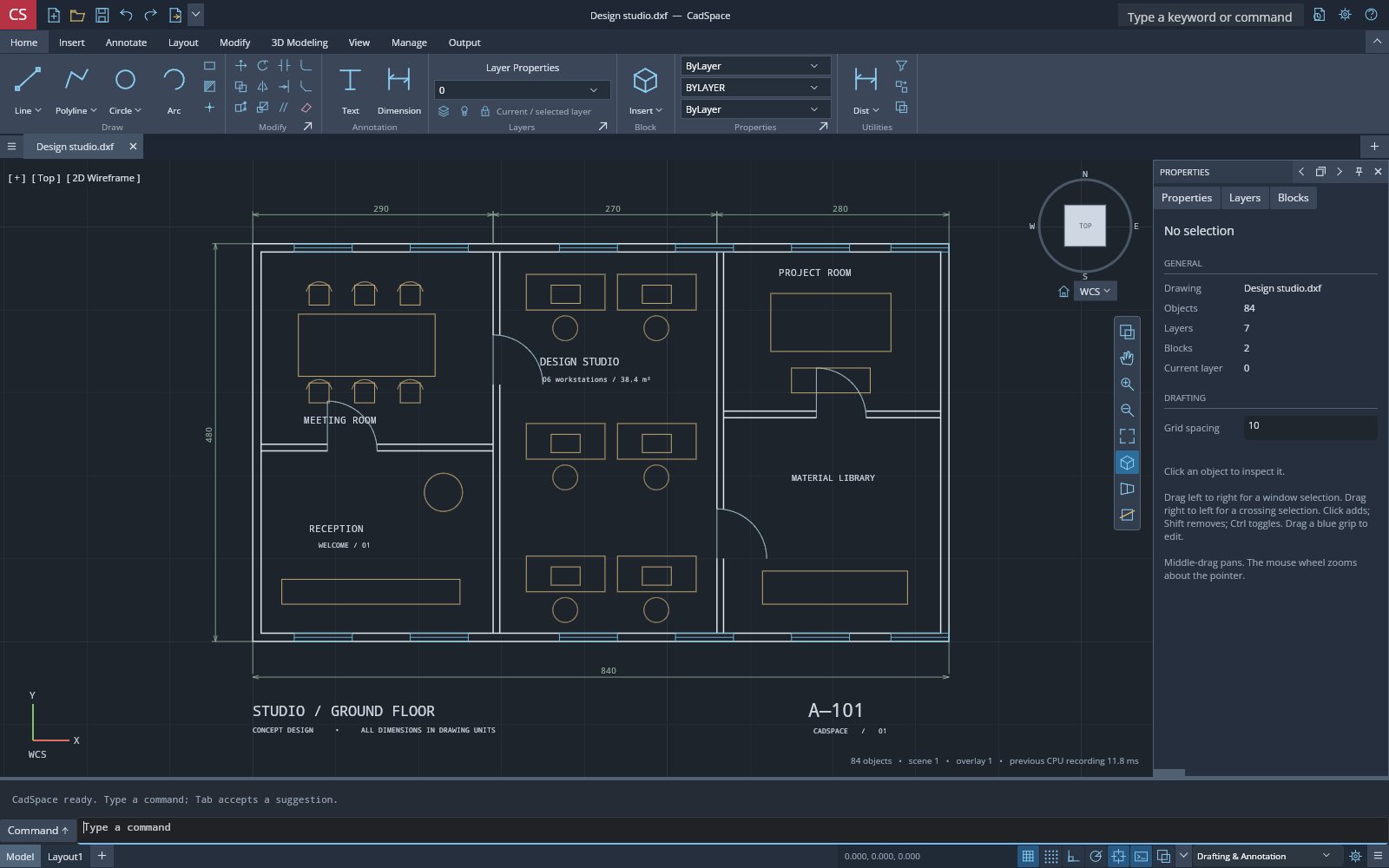
CadSpace is an independent C# CAD application built with Uno Platform, Skia and OpenGL/WebGL. It pairs a familiar dark ribbon workspace with double-precision drafting, layers, blocks, rational splines, triangle-mesh modeling and ASCII/binary DXF exchange, exposing 77 command workflows through six independently reusable libraries.
What makes CadSpace special
Familiar if you know AutoCAD-style ribbon CAD workspaces — but original, local‑first and written end‑to‑end in C#.
Ribbon CAD workspace
Application menu, Quick Access, command search, contextual ribbon tabs, document tabs and Model/Layout tabs wired to one session.
Precision drafting
Double-precision lines, polylines, arcs, ellipses, splines, text, dimensions and hatches with absolute, relative and polar input.
Command line
Type commands and aliases with completion, resizable history and dynamic input driving the same command engine.
Snaps and grips
Indexed object snaps, grid, ortho and polar guidance, plus blue grips that preview and commit one undoable edit.
Mesh modeling
Primitives, extrusion, revolve, loft, sweep and bounded closed-mesh UNION, SUBTRACT and INTERSECT.
GPU 3D viewport
Depth-tested OpenGL/WebGL rendering with visual styles, perspective or orthographic cameras and a synchronized ViewCube.
Layers and linetypes
Virtualized Layer Properties and Linetype managers with ByLayer/ByBlock styles and per-object or global scales.
DXF exchange and recovery
ASCII/binary DXF with original-record provenance, plus checksummed recovery checkpoints every five seconds.
33 capabilities, 8 areas
Drafting
- Lines, 2D/3D polylines, rectangles, circles, arcs, ellipses and points
- Control-point rational splines of degree up to 3
- Plain text, aligned dimensions and supported hatches
- Constant and tapered polyline widths with PLINEWID and PEDIT
Editing
- Move, copy, rotate, scale, mirror, offset, array and explode
- Line-based trim, extend, fillet, chamfer, join and break
- Crossing-window STRETCH and transactional grip editing
- QSELECT and SELECTSIMILAR selection tools
- Atomic, validated edits with undo/redo
Precision
- Absolute, relative (@x,y) and polar (@d<a) coordinate input
- Endpoint, midpoint, center, quadrant, intersection, perpendicular and tangent snaps
- Grid, ortho, polar guidance and dynamic input
- DIST and AREA measurement commands
Organization
- Layers with color, visibility, locking, lineweight and linetype
- Nested blocks with BLOCK and INSERT
- Simple dash/gap/dot linetypes with ByLayer/ByBlock and scales
- Model/paper-space separation with undoable layout create, rename and delete
Mesh modeling
- BOX, CYLINDER, SPHERE and CONE primitives
- EXTRUDE, REVOLVE, capped LOFT and parallel-transport SWEEP
- Bounded closed-mesh UNION, SUBTRACT and INTERSECT
- ROTATE3D, MIRROR3D and ALIGN3D transforms
Viewport and rendering
- Wireframe, hidden-line, shaded and shaded-with-edges visual styles
- Perspective and orthographic cameras with display-only clipping
- ViewCube with face/edge/corner picking and drag-to-orbit
- Navigation bar for pan, zoom, orbit and projection
Workspace
- Docked, floating and auto-hide palettes with Escape rollback
- Searchable Tool Palettes for commands and drawing blocks
- Optional classic File/Edit/View/Draw/Modify/Tools/Help menus
- Staged Options dialog with three workspace presets
Files and recovery
- Native .cadspace projects preserving DXF provenance
- ASCII and binary DXF open and interchange export with loss reports
- Checksummed recovery checkpoints every five seconds for dirty drawings
- Workspace preferences stored separately from drawings
Run CadSpace right here
The live build opens an editable studio floor plan, with a 3D model example available from the CS application menu. Switch viewports, go fullscreen and tick off the guided tour as you explore.
Try CadSpace live
The live build opens an editable studio floor plan, with a 3D model example available from the CS application menu.
Real C# · Uno WebAssembly · runs locally in your browser6 libraries you can embed
CadSpace is assembled from independently reusable libraries, each published on NuGet.org. Hover the graph to trace dependencies; click a node to jump to its package, and open a card for install and usage.
CadSpace.Geometry
Double vectors/transforms, OCS, rays/planes, intersections, triangulation and spatial index
CadSpace.Model
Immutable geometry, styles and blocks, scene cache, spline/hatch and mesh algorithms
CadSpace.Engine
Sessions, commands, selection/grips/snapping, undoable editing and workspace preferences
CadSpace.Dxf
DXF transport, interpreters and writers, native projects and recovery journal
CadSpace.Rendering
Cameras, Skia drafting and OpenGL geometry, text, pattern and selection passes
CadSpace.Controls
Public Uno workspace components, managers, palette host, ribbon and navigation
6 packages on NuGet.org
All six libraries are MIT-licensed, versioned together with the app and published to NuGet.org on tagged releases, with symbol packages (.snupkg) and SourceLink. The first five target net10.0: geometry, model, editing and exchange require neither Uno nor a graphics context, and only CadSpace.Rendering brings SkiaSharp and Silk.NET OpenGL. CadSpace.Controls is the Uno Platform package (net10.0-desktop and net10.0-browserwasm) and ships every workspace component in one package, not one package per widget. The app owns file dialogs and document lifetime.
dotnet add package CadSpace.Geometry<PackageReference Include="CadSpace.Geometry" Version="0.1.0" />
<PackageReference Include="CadSpace.Model" Version="0.1.0" />
<PackageReference Include="CadSpace.Engine" Version="0.1.0" />
<PackageReference Include="CadSpace.Dxf" Version="0.1.0" />
<PackageReference Include="CadSpace.Rendering" Version="0.1.0" />
<PackageReference Include="CadSpace.Controls" Version="0.1.0" /><!-- Directory.Packages.props -->
<ItemGroup>
<PackageVersion Include="CadSpace.Geometry" Version="0.1.0" />
<PackageVersion Include="CadSpace.Model" Version="0.1.0" />
<PackageVersion Include="CadSpace.Engine" Version="0.1.0" />
<PackageVersion Include="CadSpace.Dxf" Version="0.1.0" />
<PackageVersion Include="CadSpace.Rendering" Version="0.1.0" />
<PackageVersion Include="CadSpace.Controls" Version="0.1.0" />
</ItemGroup> Published with NuGet Trusted Publishing from GitHub Actions, with symbols (.snupkg) and SourceLink. Release v0.1.0 ↗
Dependencies follow the project references: Model → Geometry; Engine, Dxf and Rendering → Model (Rendering adds SkiaSharp and Silk.NET.OpenGL); Controls → Engine + Rendering.
The dependency-free math layer: Vec3, affine Transform3, bounds, rays and planes, object coordinate systems (OCS), 2D/3D intersection helpers, polygon triangulation and a bounding-volume SpatialIndex for fast window/ray queries. Use it for any double-precision CAD geometry work; no UI.
dotnet add package CadSpace.GeometryKey types namespace CadSpace.Geometry
Vec3,Bounds3,Ray3,Plane3– immutable value types with dot/cross,Include/Union, plane and triangle intersection.Transform3–Translation,Scaling,RotationZ,RotationAxis,MirrorXY, composed withThen.GeometryMath–IntersectLinesXY,CircleThrough,NearestOnSegment,PointInPolygon,TryParsePoint.Coordinates3D– OCS (ObjectCoordinateSystem),FrameandInverse.Triangulation/SpatialIndex– polygon triangulation and indexed box/ray queries.
Basic usage
using CadSpace.Geometry;

var a = new Vec3(0, 0);
var b = new Vec3(100, 50);
if (GeometryMath.IntersectLinesXY(a, b, new Vec3(0, 50), new Vec3(100, 0), out var hit))
    Console.WriteLine($"Intersection at {hit}");

var transform = Transform3.RotationZ(45, center: new Vec3(50, 25)).Then(Transform3.Translation(new Vec3(10, 0)));
Vec3 moved = transform.Point(b);
var (center, radius) = GeometryMath.CircleThrough(a, b, new Vec3(100, 0));

Vec3[] square = [new(0, 0), new(10, 0), new(10, 10), new(0, 10)];
int[] triangles = Triangulation.Polygon(square);                // index triples

var index = new SpatialIndex([Bounds3.From(square), Bounds3.From([moved, moved + new Vec3(5, 5)])]);
var found = new List<int>();
index.Query(new Bounds3(new Vec3(-1, -1), new Vec3(20, 20)), found, xyOnly: true);The immutable drawing model: entity records (lines, polylines with bulges/widths, arcs, circles, ellipses, splines, text, dimensions, hatches, meshes, block references), layers, linetypes and blocks in a Drawing, an undoable CadDocument, scene tessellation and mesh algorithms (primitives, extrude/revolve and closed-mesh Booleans). Depends on CadSpace.Geometry; no UI.
dotnet add package CadSpace.ModelKey types namespace CadSpace.Model
Drawing– immutable entities,Layers,Blocks,Linetypes; start fromDrawing.Empty.CadDocument– validated, undoable wrapper:Edit,Add,Undo/Redo,IsDirty,Changed.LineEntity,CircleEntity,PolylineEntity,TextEntity,HatchEntity,MeshEntity, … –Entityrecords with layer/color/linetype.EntityGeometry.BuildScene(drawing)– tessellates to aDrawingSceneof paths, texts and triangles.MeshFactory/MeshBoolean– boxes, cylinders, spheres, extrusion, revolution and union/subtract/intersect.
Basic usage
using CadSpace.Geometry;
using CadSpace.Model;

var document = new CadDocument();
document.Edit("Add layer", d => d with { Layers = d.Layers.Add("Walls", new Layer("Walls", 0xFFFFC857)) });
document.Add("Draw walls",
    PolylineEntity.FromPoints([new(0, 0), new(240, 0), new(240, 140), new(0, 140)], closed: true) with { Layer = "Walls" },
    new CircleEntity(new Vec3(120, 70), 30));

var box = MeshFactory.Box(new Vec3(0, 0, 0), new Vec3(50, 50, 50));
var drill = MeshFactory.Cylinder(new Vec3(25, 25, -10), 10, 70);
document.Add("Drill", MeshBoolean.Apply(box, drill, MeshBooleanOperation.Subtract));

DrawingScene scene = EntityGeometry.BuildScene(document.Drawing);
Console.WriteLine($"{document.Drawing.Entities.Length} entities, {scene.Paths.Length} paths, {scene.Triangles.Length} triangles");
document.Undo();The headless CAD session: selection (pick, window, crossing), object snaps, grips, transforms, offset/trim/extend/fillet and other edits, block creation, mesh modeling commands and a text CommandEngine implementing the command-line workflows. Also holds the WorkspaceLayout preference codec and sample drawings. Depends on CadSpace.Model; no UI.
dotnet add package CadSpace.EngineKey types namespace CadSpace.Engine
CadSession–Document,Selection,SelectWindow,HitTest,Snap,TransformSelection,Offset,Extrude,Changed.CommandEngine–Submit(text),Point(vec),Preview(cursor),Prompt,Message;Commandslists every workflow.CommandCatalog.Suggest(query)– command completion.GripEditing,LineEditing,PolylineEditing,AdvancedEditing– reusable entity edits.WorkspaceLayout/SampleDrawings– preferenceEncode/Decodeand theStudioPlan/ModelStudysamples.
Basic usage
using CadSpace.Engine;
using CadSpace.Geometry;
using CadSpace.Model;

var session = new CadSession(new CadDocument(SampleDrawings.StudioPlan()));
var commands = new CommandEngine(session);
commands.Message += Console.WriteLine;

foreach (var line in new[] { "RECTANG", "0,0", "240,140", "CIRCLE", "120,70", "30" })
    commands.Submit(line);                                     // same input as the command line

session.SelectWindow(new Vec3(-10, -10), new Vec3(250, 150), crossing: false);
session.TransformSelection("Copy", Transform3.Translation(new Vec3(500, 0)), copy: true);
SnapResult snap = session.Snap(new Vec3(501, 2), tolerance: 5);
Console.WriteLine($"{snap.Kind} at {snap.Point}; {commands.Prompt}");
session.Document.Undo();DXF exchange and persistence: ASCII and binary DXF reading with code-page detection, writers that reuse unmodified source records, the native .cadspace project format (geometry plus original DXF provenance) and a checksummed, alternating-slot RecoveryJournal over a host-supplied IRecoveryStorage. Depends on CadSpace.Model; no UI. Review returned warnings for lossy conversions.
dotnet add package CadSpace.DxfKey types namespace CadSpace.Dxf
DxfBinary–Read(bytes)for ASCII or binary input,Write(drawing, source, binary),IsBinary.DxfCodec– textRead/WritereturningDxfReadResult/DxfWriteResultwith warnings.CadProjectCodec– native projectWrite/Readpreserving theDxfSource.RecoveryJournal/IRecoveryStorage–SaveAsync,ReadAsync,RemoveAsynccheckpoints.
Basic usage
using CadSpace.Dxf;

DxfReadResult read = DxfBinary.Read(File.ReadAllBytes("plan.dxf"), "plan.dxf");   // ASCII or binary
foreach (var warning in read.Warnings) Console.WriteLine(warning);

DxfWriteResult ascii = DxfCodec.Write(read.Drawing, read.Source);    // reuses unmodified source records
File.WriteAllText("plan-copy.dxf", ascii.Text);
DxfBytesResult binary = DxfBinary.Write(read.Drawing, read.Source, binary: true);
File.WriteAllBytes("plan-binary.dxf", binary.Bytes);

File.WriteAllText("plan.cadspace", CadProjectCodec.Write(read.Drawing, read.Source));
CadProjectReadResult project = CadProjectCodec.Read(File.ReadAllText("plan.cadspace"));

var journal = new RecoveryJournal(storage);                          // your IRecoveryStorage
await journal.SaveAsync(Guid.NewGuid(), generation: 1, "plan.dxf", project.Drawing, project.DxfSource);Rendering building blocks without a UI framework: 2D and 3D cameras, a SkiaSharp drafting renderer (grid, linetypes, widths, selection, snap/cursor overlays) and OpenGL scene, text, pattern and selection-attribute passes through Silk.NET, plus ViewCube geometry. Depends on CadSpace.Model, SkiaSharp and Silk.NET.OpenGL; the OpenGL passes need a current GL/GLES/WebGL context supplied by the host.
dotnet add package CadSpace.RenderingKey types namespace CadSpace.Rendering
Camera2D–Fit,Pan,Zoom,WorldToScreen/ScreenToWorld,VisibleBounds.Camera3D– orbit/zoom/pan, orthographic or perspectiveMatrix,Raypicking andProject.SkiaDraftRenderer–Render(canvas, camera, scene, selection)andDrawInteractionoverlays.GlSceneRenderer–Initialize(gl),Render(gl, scene, camera, …)withModelVisualStyle,Destroy(gl).ViewCubeGeometry– named orientations, cube faces and picking.
Basic usage
using CadSpace.Geometry;
using CadSpace.Model;
using CadSpace.Rendering;
using SkiaSharp;

var drawing = Drawing.Empty with { Entities = [new LineEntity(new Vec3(0, 0), new Vec3(240, 140)), new CircleEntity(new Vec3(120, 70), 30)] };
DrawingScene scene = EntityGeometry.BuildScene(drawing);

var camera = new Camera2D { Width = 1200, Height = 800 };
camera.Fit(Bounds3.From(scene.Paths.SelectMany(p => p.Points)));

using var surface = SKSurface.Create(new SKImageInfo(1200, 800));
using var renderer = new SkiaDraftRenderer();
renderer.Render(surface.Canvas, camera, scene, new HashSet<Guid>(), grid: true);
using var png = surface.Snapshot().Encode(SKEncodedImageFormat.Png, 100);
File.WriteAllBytes("plan.png", png.ToArray());The Uno Platform CAD workspace: CadWorkspace assembles the application bar, ribbon, classic menus, document/layout tabs, retained Skia/OpenGL CadViewport with ViewCube and navigation bar, dockable palettes, Properties and Layer/Linetype managers, command line with dynamic input and the status bar. Each component can also be hosted on its own. Depends on CadSpace.Engine and CadSpace.Rendering; requires Uno Platform (Skia renderer; 3D needs OpenGL/GLES/WebGL).
dotnet add package CadSpace.ControlsKey types namespace CadSpace.Controls
CadWorkspace–Bind(session, commands),Invoke(command),FileRequested,PreferencesChanged,RestorePreferences.CadViewport–Bind,Fit(),Set3D,Camera/ModelCamera,VisualStyle,ClippingPlane.CadCommandLine– command history and input bound to aCommandEngine.CadRibbon,CadDockHost/CadDockPane,CadPropertySelectors,CadLayerManager,CadStatusBar,CadWorkspaceOptions.
Basic usage
using CadSpace.Controls;
using CadSpace.Engine;
using CadSpace.Model;

var session = new CadSession(new CadDocument(SampleDrawings.StudioPlan()));
var commands = new CommandEngine(session);
var workspace = new CadWorkspace();
workspace.Bind(session, commands);
workspace.FileRequested += action => { /* Host supplies NEW/OPEN/SAVE/export/recovery. */ };
workspace.PreferencesChanged += layout => SaveUiPreferences(layout.Encode());
window.Content = workspace;

// Or host individual components:
var viewport = new CadViewport();
viewport.Bind(session, commands);
var console = new CadCommandLine();
console.Bind(commands);From engine to workbench
Layers build bottom‑up: each one depends only on those beneath it.
Double-precision math, intersections, triangulation and spatial indexing with no UI dependency.
CadSpace.GeometryImmutable drawings, styles, blocks and mesh algorithms, plus DXF and native project I/O that depends on Model, not the UI.
CadSpace.ModelCadSpace.DxfA command state machine with selection, snapping and undo, alongside Skia drafting and OpenGL 3D renderers.
CadSpace.EngineCadSpace.RenderingPublic Uno ribbon, palettes, managers, ViewCube and navigation components that expose events to the host app.
CadSpace.ControlsEmbed, script, extend
RECTANG
0,0
240,140
CIRCLE
120,70
30
ZOOMvar session = new CadSpace.Engine.CadSession();
var commands = new CadSpace.Engine.CommandEngine(session);
var workspace = new CadSpace.Controls.CadWorkspace();
workspace.Bind(session, commands);
// Connect workspace.FileRequested and PreferencesChanged to your host.git clone https://github.com/wieslawsoltes/CadSpace.git
cd CadSpace
dotnet workload install wasm-tools
# Windows, macOS or Linux/X11
dotnet run --project src/CadSpace.App -f net10.0-desktop -p:CadSpaceDesktopOnly=true
# Browser development host
dotnet run --project src/CadSpace.App -f net10.0-browserwasm
# Publish for this repository's GitHub Pages path
dotnet publish src/CadSpace.App -c Release -f net10.0-browserwasm \
-p:WasmShellWebAppBasePath=/CadSpace/File formats
Keyboard essentials
Continuously verified
Each push runs through GitHub Actions. The public browser build is deployed only from successful pipelines.


Toolchain
Third‑party NuGet packages
git clone https://github.com/wieslawsoltes/CadSpace.git
cd CadSpace
dotnet workload install wasm-tools
dotnet run --project src/CadSpace.App -f net10.0-browserwasmWhat it doesn’t claim
The project documents its limits as carefully as its features.
- Development preview, not full AutoCAD parity or CUI/API compatibility
- Mesh modeling is triangle-based, not an analytic ACIS/B-rep solid kernel
- No DWG or ACIS decoding; arbitrary DXF editing is not universally lossless
- Paper-space viewports, plotting, dynamic blocks and constraints remain unimplemented
- 3D requires an accelerated OpenGL/GLES/WebGL context; uses framebuffer readback, not zero-copy