GitSpace
A familiar Git desktop workflow, running as one shared Uno app
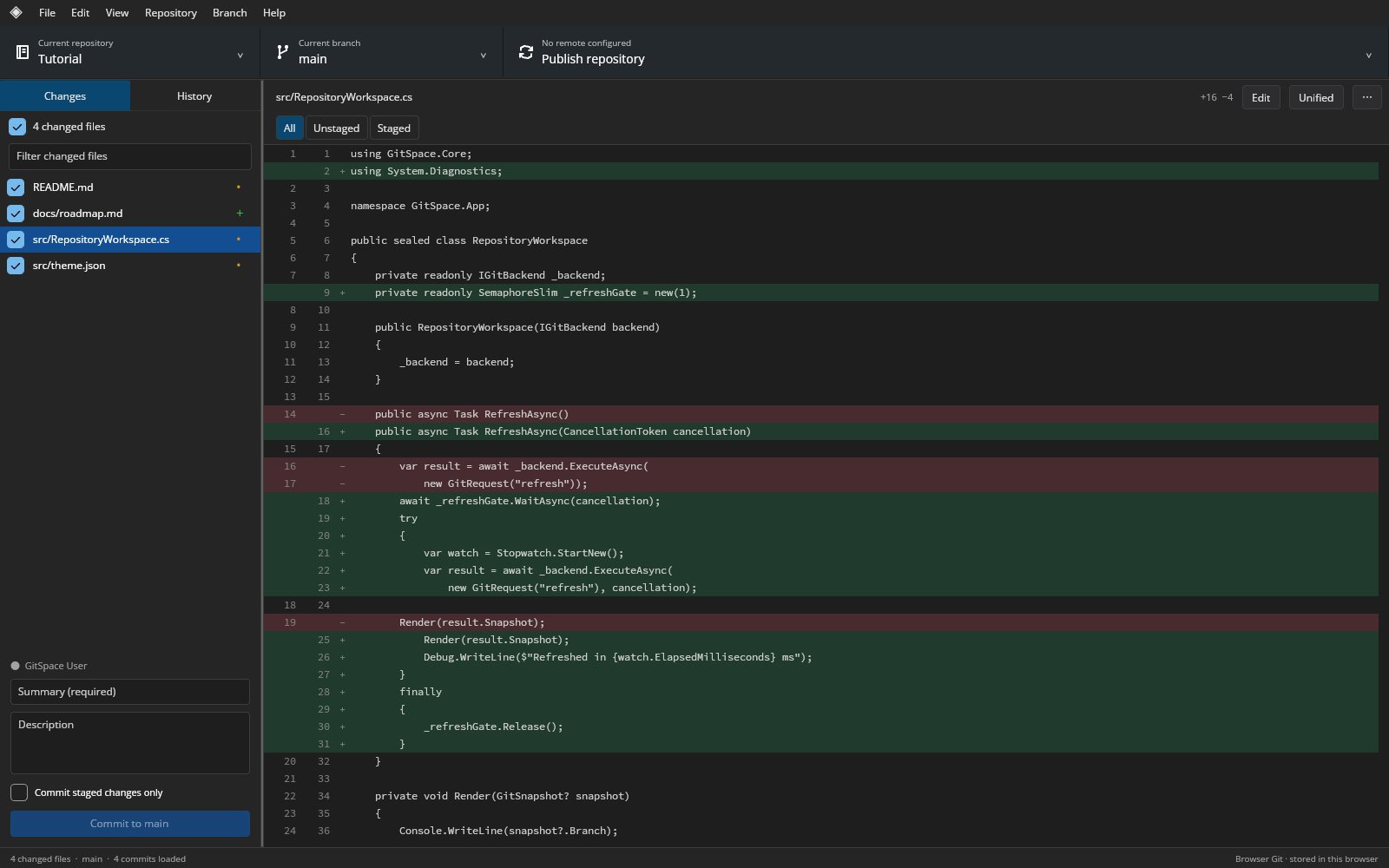
GitSpace is an independent, MIT-licensed Git client with a GitHub Desktop-style interface, built in C# and Uno Platform. Review changes in unified or split diffs, stage individual lines, commit, browse history, manage branches and sync remotes. On desktop it drives your installed Git; in the browser, the same compiled Uno UI runs against a bundled Git worker that writes real repositories to IndexedDB.
What makes GitSpace special
Familiar if you know GitHub Desktop-style Git clients — but original, local‑first and written end‑to‑end in C#.
Same app on desktop and web
The browser build is the actual compiled Uno application, sharing the workbench and custom controls with the Win32, macOS and X11 desktop hosts.
Real Git in the browser
A bundled isomorphic-git worker writes genuine objects, refs and index to IndexedDB via LightningFS, off the UI thread. No in-memory simulation.
Skia-rendered diff viewer
Unified and split diffs with line gutters, intraline highlights, search, whitespace-ignore and text zoom, drawn viewport-only through SKCanvasElement.
Line and hunk staging
Select exact lines or hunks in Unstaged/Staged modes, update the index safely and make staged-only commits.
Graphical conflict resolver
On desktop, resolve conflicts in a current/incoming/result editor with stale-content guards and an explicit Mark resolved step.
GitHub pull requests
List the first 100 open pull requests, create a new one, or open the repository or PR in the browser using a session-only token.
Safety by design
No force push, hooks disabled for GitSpace commands, confirmations for destructive actions and no simulated success behind unsupported menus.
Bounded, measurable limits
Myers diff with an explicit work budget, 2 MiB preview limit, 16 MiB output caps and an LRU text-blob cache keep work predictable.
32 capabilities, 7 areas
Repository work
- Open, initialize and HTTPS-clone repositories; refresh and add HTTPS remotes
- Real, editable tutorial repository with four commits opens on first launch
- Recent repositories and persisted non-secret preferences
- Browser repositories exported as ZIP (.git + working files, up to 64 MiB)
Review
- Changed-file list with inclusion checkboxes, stage and unstage
- Unified and split diffs with line numbers and intraline split highlights
- Diff search, whitespace-ignore view, copy and text zoom
- Exact line/hunk selection in Unstaged and Staged review modes
- Explicit unsupported preview for binary and image files
Editing and commits
- Bounded UTF-8 file editor with new files and an external-change check before saving
- Tracked-file discard with confirmation; untracked files are never deleted by Discard
- Commit composer with required summary, optional description and author identity
- Selected-file commits and confirmed amend of the latest commit
- Preserves BOMs and mixed newline conventions in unchanged content
History and branches
- Paged history in 200-commit pages up to 2,000 commits, with filter
- Author, date, message and per-commit file changes with parent comparison
- Create, switch and rename branches; safe merged-branch deletion
- Lightweight tags
Sync and integration
- Fetch, fast-forward pull and non-force push
- Desktop merge, rebase, revert and cherry-pick with continue/abort
- Desktop current/incoming/result conflict editor with explicit Mark resolved
- Tracked/untracked stash, apply without dropping and confirmed drop on desktop
- Explicit, user-configured trusted CORS proxy for browser clone/fetch/push
GitHub
- List the first 100 open pull requests
- Create a pull request from the app
- Open the repository or a pull request in the browser
- Session-only token authentication; tokens never persisted
Workspace
- Compact menu bar with repository, branch and sync tiles
- Changes and History tabs with a resizable sidebar
- Light and dark appearances
- Keyboard shortcuts, explicit errors and busy state
- Embedded Source Code Pro font for consistent monospace diff metrics
Run GitSpace right here
Open the live WebAssembly build and work in a real, persisted tutorial repository stored in your browser. Switch viewports, go fullscreen and tick off the guided tour as you explore.
Try GitSpace live
Open the live WebAssembly build and work in a real, persisted tutorial repository stored in your browser.
Real C# · Uno WebAssembly · runs locally in your browser8 libraries you can embed
GitSpace is assembled from independently reusable libraries, each published on NuGet.org. Hover the graph to trace dependencies; click a node to jump to its package, and open a card for install and usage.
GitSpace.Core
Repository contracts, command/result models, JSON and path/ref validation
GitSpace.Diff
Bounded Myers line diff, split alignment, intraline spans and viewport arithmetic
GitSpace.Git
Asynchronous, shell-free system Git process backend with status/history parsing
GitSpace.BrowserGit
npm package @gitspace/browser-git: worker-ready real Git backend over IndexedDB storage
GitSpace.Hosting.GitHub
Bounded GitHub pull-request HTTP client with session-scoped credentials
GitSpace.Rendering.Skia
Framework-independent, viewport-virtualized unified and split diff renderer
GitSpace.Controls.Uno
Toolbar tiles, change and history lists, commit composer, diff viewer and splitter
GitSpace.Workbench.Uno
Complete embeddable Git client workspace and dialogs with an injected backend
7 packages on NuGet.org
GitSpace ships as seven MIT-licensed .NET packages on NuGet.org, versioned together and published by v* tags with symbol packages (.snupkg) and SourceLink. The five engine packages target net10.0 and have no UI dependency (only GitSpace.Rendering.Skia needs SkiaSharp); the two Uno packages target net10.0-desktop and net10.0-browserwasm. None of them depends on GitSpace.App. The browser Git backend (src/GitSpace.BrowserGit, @gitspace/browser-git, built on isomorphic-git, LightningFS and fflate) is not a NuGet package and is not on the npm registry; it is attached to each GitHub Release as an archive.
dotnet add package GitSpace.Core<PackageReference Include="GitSpace.Core" Version="0.1.0" />
<PackageReference Include="GitSpace.Diff" Version="0.1.0" />
<PackageReference Include="GitSpace.Git" Version="0.1.0" />
<PackageReference Include="GitSpace.Hosting.GitHub" Version="0.1.0" />
<PackageReference Include="GitSpace.Rendering.Skia" Version="0.1.0" />
<PackageReference Include="GitSpace.Controls.Uno" Version="0.1.0" />
<PackageReference Include="GitSpace.Workbench.Uno" Version="0.1.0" /><!-- Directory.Packages.props -->
<ItemGroup>
<PackageVersion Include="GitSpace.Core" Version="0.1.0" />
<PackageVersion Include="GitSpace.Diff" Version="0.1.0" />
<PackageVersion Include="GitSpace.Git" Version="0.1.0" />
<PackageVersion Include="GitSpace.Hosting.GitHub" Version="0.1.0" />
<PackageVersion Include="GitSpace.Rendering.Skia" Version="0.1.0" />
<PackageVersion Include="GitSpace.Controls.Uno" Version="0.1.0" />
<PackageVersion Include="GitSpace.Workbench.Uno" Version="0.1.0" />
</ItemGroup> Published with NuGet Trusted Publishing from GitHub Actions, with symbols (.snupkg) and SourceLink. Release v0.1.0 ↗
Dependencies follow the real project references: Core ← Git, Diff ← Rendering.Skia, Core + Rendering.Skia ← Controls.Uno, Controls.Uno + Hosting.GitHub ← Workbench.Uno; Core, Diff and Hosting.GitHub have no GitSpace dependencies. Individual controls can be used without the workbench; see architecture and embedding.
The backend-neutral contract shared by the desktop backend, the browser worker and the UI: operation requests, results and repository snapshots, the IGitBackend interface, web-style JSON helpers and validation for relative paths, ref names, commit IDs and HTTPS remotes. Reference it to write another backend or to drive any backend headlessly. No dependencies and no UI.
dotnet add package GitSpace.CoreKey types
IGitBackend—ExecuteAsync(GitRequest),Capabilities(supported operation names) andDisplayName.GitRequest— an operation ("open","diff","commit", …) withRoot,Path,Paths,Message,Value,ExpectedHead.GitResult/GitSnapshot— diff text and the repository state (Branch,Changes,Commits,Branches,Remotes,Ahead/Behind).GitChange,GitCommit,GitRemote,GitStash— snapshot records.GitSafety/GitJson/GitText— validation, serialization and line-ending helpers.
Basic usage
using GitSpace.Core;

var request = new GitRequest("commit")
{
    Message = "Update documentation",
    Paths = [GitSafety.RelativePath("docs/guide.md")],   // rejects absolute and ../ paths
    Author = "Ada Lovelace",
    Email = "ada@example.com"
};
string branch = GitSafety.Ref("feature/review");          // validated ref name
string remote = GitSafety.HttpsRemote("https://github.com/wieslawsoltes/GitSpace.git");

string json = GitJson.Serialize(request);                  // same wire format as the browser worker
GitRequest roundTrip = GitJson.Deserialize<GitRequest>(json);
var commit = new GitCommit("0123456789abcdef", "Ada", "ada@example.com", "2026-01-01", "Initial commit\n\nBody", []);
Console.WriteLine($"{commit.ShortId} {commit.Summary}");Pure text algorithms behind the review UI: a bounded Myers line diff that reports a coarse replacement instead of exceeding its work budget, split-view alignment, whitespace-insensitive comparison, exact line/hunk selection for partial staging, merge/diff3 conflict parsing and resolution, and viewport row arithmetic. No dependencies and no UI.
dotnet add package GitSpace.DiffKey types
DiffEngine.Compare— returns aDiffDocument(Lines,Additions,Deletions,Coarse,Split()).DiffLine/SplitLine/DiffKind— unified rows and aligned left/right pairs.LineSelection—HunkAt(row)andApply(rows)to build partially staged text, preserving line endings.ConflictDocument— parses conflict markers intoConflictBlocks andResolves them.DiffEngine.VisibleRange— first/last visible row for a scroll position.
Basic usage
using GitSpace.Diff;

var before = "alpha\nbeta\ngamma\n";
var after = "alpha\nBETA\ngamma\ndelta\n";

DiffDocument diff = DiffEngine.Compare(before, after, ignoreWhitespace: false);
Console.WriteLine($"+{diff.Additions} -{diff.Deletions}, coarse: {diff.Coarse}");
foreach (var line in diff.Lines)
    Console.WriteLine($"{line.Kind,-8} {line.OldLine,3} {line.NewLine,3}  {line.Text}");
IReadOnlyList<SplitLine> sideBySide = diff.Split();

// Stage only the hunk that touches row 1 (beta -> BETA), not the appended line.
var selection = new LineSelection(before, after);
string staged = selection.Apply(selection.HunkAt(1));

var conflict = new ConflictDocument("<<<<<<< ours\nA\n=======\nB\n>>>>>>> theirs\n");
string resolved = conflict.Resolve([ConflictChoice.Incoming]); // "B\n"The desktop backend: runs the installed Git (2.30+) as an asynchronous, cancellable process with argument lists (no shell), hooks disabled, one command at a time per backend and bounded output, and parses porcelain status and history. It implements IGitBackend for review, staging, commits, history, branches, tags, stashes, remotes, synchronization, merge/rebase/revert/cherry-pick and conflicts. Depends on GitSpace.Core; no UI. Only open repositories you trust: Git configuration, filters and helpers can still run programs.
dotnet add package GitSpace.GitKey types
DesktopGitBackend—IGitBackendover system Git; checkCapabilitiesfor supported operations.GitProcess— low-levelRunAsync(directory, arguments)returningGitProcessResult.StatusParser—Parseporcelain status intoGitChange[],LogintoGitCommit[].GitCommandException— a failed Git command with itsExitCode.RepositoryPath— canonical repository directory comparison.
Basic usage
using GitSpace.Core;
using GitSpace.Git;

await using var git = new DesktopGitBackend();
var opened = await git.ExecuteAsync(new GitRequest("open")
{
    Root = "/absolute/path/to/repository"
});

foreach (var file in opened.Snapshot!.Changes)
    Console.WriteLine($"{file.Status} {file.Path}");

var diff = await git.ExecuteAsync(new GitRequest("diff")
{
    Path = "README.md"
});
Console.WriteLine(diff.Binary ? "binary file" : $"{diff.Before.Length} -> {diff.After.Length} chars");

await git.ExecuteAsync(new GitRequest("commit")
{
    Message = "Update README",
    Paths = ["README.md"],
    ExpectedHead = opened.Snapshot.Head          // refuse if HEAD moved meanwhile
});A small GitHub REST client for pull requests: list the first 100 open pull requests and create one, with explicit API version headers, a 4 MiB response limit and a token passed per call (never stored). Bring your own HttpClient. No GitSpace dependencies and no UI.
dotnet add package GitSpace.Hosting.GitHubKey types
GitHubClient—ListPullRequestsAsync,CreatePullRequestAsyncover a caller-ownedHttpClient.GitHubClient.TryParseRemote— extracts owner/repository from a GitHub remote URL.PullRequest— number, title, author, head/base branches, URL and draft flag.
Basic usage
using GitSpace.Hosting.GitHub;

using var http = new HttpClient();
var github = new GitHubClient(http);

if (GitHubClient.TryParseRemote("https://github.com/wieslawsoltes/GitSpace.git", out var owner, out var repository))
{
    foreach (PullRequest pr in await github.ListPullRequestsAsync(owner, repository))
        Console.WriteLine($"#{pr.Number} {pr.Title} ({pr.Head} -> {pr.Base}){(pr.Draft ? " draft" : "")}");

    string token = Environment.GetEnvironmentVariable("GITHUB_TOKEN") ?? "";
    // PullRequest created = await github.CreatePullRequestAsync(owner, repository, "Title", "feature/x", "main", "Body", token);
}Draws a DiffDocument onto any SKCanvas as a unified or split diff with line-number gutters, addition/deletion colors, intraline emphasis, row selection and light/dark palettes. Only visible rows are visited; paints, fonts, text runs and split alignment are cached. Use it to render diffs without Uno. Depends on GitSpace.Diff and SkiaSharp 3.119; no UI framework.
dotnet add package GitSpace.Rendering.SkiaKey types
DiffRenderer—SetDocument,Draw(canvas, bounds, viewport),RowCount(split), frame statistics;DefaultTypeface.DiffViewport— scroll offsets,FontSize/RowHeight,Split, selected rows andPalette.DiffPalette—DarkandLightcolor sets, or your own.
Basic usage
using GitSpace.Diff;
using GitSpace.Rendering.Skia;
using SkiaSharp;

var diff = DiffEngine.Compare("alpha\nbeta\n", "alpha\nBETA\ngamma\n");

using var renderer = new DiffRenderer();
renderer.SetDocument(diff);
var view = new DiffViewport { Split = true, FontSize = 13, Palette = DiffPalette.Light };

using var surface = SKSurface.Create(new SKImageInfo(1000, 240));
renderer.Draw(surface.Canvas, new SKRect(0, 0, 1000, 240), view);
Console.WriteLine($"{renderer.RowCount(view.Split)} rows, {renderer.LastVisibleRows} visible");

using var png = surface.Snapshot().Encode(SKEncodedImageFormat.Png, 100);
File.WriteAllBytes("diff.png", png.ToArray());Compact custom Uno Platform controls for Git clients: an SKCanvasElement-based DiffViewer with scrollbars, selection, find and copy; changed-file list with inclusion checkboxes; paged history list; commit composer; conflict resolver; repository tiles, buttons, segmented selectors, icons, pane splitter and a light/dark GitTheme. Depends on Core and Rendering.Skia; requires Uno Platform (Skia renderer).
dotnet add package GitSpace.Controls.UnoKey types
DiffViewer—SetDocument,SetSplit,Zoom,FindNext,CopySelection,SelectedChangedRows.ChangedFilesView—SetFiles,SelectedPaths,FileSelected.HistoryView—SetCommits,CommitSelected,LoadMoreRequested.CommitComposer— summary/description boxes,Message,CommitRequested.ConflictResolver,RepositoryTile,GitButton,PaneSplitter,GitTheme— dialogs and chrome.
Basic usage
using GitSpace.Controls.Uno;
using GitSpace.Core;
using GitSpace.Diff;
using Microsoft.UI.Xaml;
using Microsoft.UI.Xaml.Controls;

var files = new ChangedFilesView { Width = 280 };
files.SetFiles([new GitChange("README.md"), new GitChange("docs/guide.md", "A")], active: "README.md");

var diff = new DiffViewer();
diff.SetDocument(DiffEngine.Compare("alpha\nbeta\n", "alpha\nBETA\n"));
diff.SetSplit(true);
files.FileSelected += (_, path) => Console.WriteLine("show diff for " + path);

var root = new Grid();
root.ColumnDefinitions.Add(new ColumnDefinition { Width = GridLength.Auto });
root.ColumnDefinitions.Add(new ColumnDefinition());
root.Children.Add(files);
root.Children.Add(diff);
Grid.SetColumn(diff, 1);

var window = new Window { Title = "Changes", Content = root };
window.Activate();The complete GitHub Desktop-style workspace as one Grid: toolbar tiles, Changes/History tabs, commit composer, diff workspace, dialogs for repositories, remotes, stashes, pull requests, conflicts and preferences, and busy/error handling. Hosts inject an IWorkbenchPlatform that supplies the IGitBackend (for example DesktopGitBackend), preference storage, external navigation and downloads; DisposeAsync also disposes the backend. Depends on Controls.Uno and Hosting.GitHub; requires Uno Platform.
dotnet add package GitSpace.Workbench.UnoKey types
WorkbenchView—InitializeAsync,Snapshot,IsReady/IsBusy,Diff,StateChanged,RefreshOnActivationAsync,DisposeAsync.IWorkbenchPlatform—Backend,IsBrowser, preferences,OpenExternalAsync,DownloadAsync.WorkspacePreferences— author identity, recent repositories, theme and diff options (non-secret).
Basic usage
using GitSpace.Core;
using GitSpace.Git;
using GitSpace.Workbench.Uno;
using Microsoft.UI.Xaml;

sealed class DesktopPlatform : IWorkbenchPlatform
{
    private WorkspacePreferences _preferences = new() { Author = "Ada Lovelace", Email = "ada@example.com" };
    public IGitBackend Backend { get; } = new DesktopGitBackend();
    public bool IsBrowser => false;
    public Task<WorkspacePreferences> LoadPreferencesAsync() => Task.FromResult(_preferences);
    public Task SavePreferencesAsync(WorkspacePreferences preferences) { _preferences = preferences; return Task.CompletedTask; }
    public Task OpenExternalAsync(string httpsUrl) => Task.CompletedTask;          // launch a browser here
    public Task DownloadAsync(string fileName, string base64Content) =>
        File.WriteAllBytesAsync(fileName, Convert.FromBase64String(base64Content));
}

// In Application.OnLaunched:
var window = new Window { Title = "GitSpace" };
var workbench = new WorkbenchView(new DesktopPlatform());
window.Content = workbench;
window.Activate();
await workbench.InitializeAsync();
window.Closed += async (_, _) => await workbench.DisposeAsync();From engine to workbench
Layers build bottom‑up: each one depends only on those beneath it.
Portable repository contracts, validation and a bounded Myers diff with no UI or Skia dependency.
GitSpace.CoreGitSpace.DiffInterchangeable IGitBackend implementations for installed Git and a browser worker, plus a GitHub REST client.
GitSpace.GitGitSpace.BrowserGitGitSpace.Hosting.GitHubViewport-only Skia diff renderer with cached paints, fonts and split alignment.
GitSpace.Rendering.SkiaCustom Uno controls that communicate through events and never touch repositories or the network.
GitSpace.Controls.UnoEmbeddable client workspace composed from the controls, driven by an injected platform and backend.
GitSpace.Workbench.UnoEmbed, script, extend
using GitSpace.Core;
using GitSpace.Git;

await using var git = new DesktopGitBackend();
var opened = await git.ExecuteAsync(new GitRequest("open")
{
    Root = "/absolute/path/to/repository"
});

foreach (var file in opened.Snapshot!.Changes)
    Console.WriteLine($"{file.Status} {file.Path}");

var diff = await git.ExecuteAsync(new GitRequest("diff")
{
    Path = "README.md"
});git clone https://github.com/wieslawsoltes/GitSpace.git
cd GitSpace
dotnet run --project src/GitSpace.App -f net10.0-desktop \
-p:GitSpaceTargetFrameworks=net10.0-desktopFile formats
Keyboard essentials
Continuously verified
Each push runs through GitHub Actions. The public browser build is deployed only from successful pipelines.


Toolchain
Third‑party NuGet packages
git clone https://github.com/wieslawsoltes/GitSpace.git
cd GitSpace
dotnet workload install wasm-tools
dotnet run --project src/GitSpace.App -f net10.0-browserwasmWhat it doesn’t claim
The project documents its limits as carefully as its features.
- 0.1.0 development preview, not complete or pixel-qualified GitHub Desktop parity
- Browser merge and pull are fast-forward only; rebase, revert, cherry-pick and conflict editor are desktop only
- Browser clone/fetch/push to GitHub usually needs a CORS proxy you configure and trust
- Browser storage can be evicted; export a ZIP or push to preserve important work
- No OAuth/account switching, GitHub Enterprise, LFS/submodule/worktree UI or interactive rebase