GridSpace
A local-first spreadsheet with a real C# engine and dynamic arrays
GridSpace is a local-first spreadsheet workbench that pairs an Excel-style ribbon, formula bar and worksheet tabs with a real C# workbook engine. The worksheet is drawn by SkiaSharp through Uno's SKCanvasElement—not an HTML table or a separate JavaScript spreadsheet—and desktop and browser hosts share the same model, calculations, transactions and controls. Version 0.3 adds spilling dynamic arrays and delta-based cell history.
What makes GridSpace special
Familiar if you know Excel-style spreadsheets — but original, local‑first and written end‑to‑end in C#.
A real workbook engine
Parser, evaluator, transactions and history in C#, rendered by SkiaSharp through Uno's SKCanvasElement—no HTML table or JavaScript spreadsheet.
Spilling dynamic arrays
SEQUENCE, FILTER, SORT, UNIQUE, stacking functions, LET, array constants, broadcasting and A1# references spill through the real worksheet.
Conditional formatting
Eleven rule kinds with relative formulas, priorities and Stop If True, plus two/three-color scales and signed data bars.
Filter and sort
A searchable value checklist, And/Or custom predicates with wildcards, and stable multi-level sorts with blank-last ordering.
Structural edits that follow
Insert or delete rows and columns while formulas, names, merges, validation, charts and rules are rebased in one transaction.
Sparse, fast viewport
Render through XFD1048576 with frozen panes and hidden rows, and dependency-based recalculation that only touches affected cells.
Charts
Single-series column, bar, line and pie charts with bounded previews and XLSX chart interchange.
Honest XLSX interchange
Native .gridspace, CSV/TSV and a documented XLSX subset, with import warnings and Open XML SDK schema validation in CI.
30 capabilities, 7 areas
Workbook editing
- Sparse worksheets with A1 navigation and rectangular selection
- Direct cell and formula-bar editing with copy/paste
- Bounded undo/redo using per-cell deltas
- Fill down/right, formula translation and two-value series
- Fonts, wrapping, alignment, borders, merges, row/column sizing and AutoFit
Formulas and arrays
- Relative, absolute, mixed and cross-sheet references plus names
- Common aggregates, logic, math, text/date, conditional aggregates, lookups and PMT
- SEQUENCE, FILTER, SORT, SORTBY, UNIQUE, TRANSPOSE, TAKE, DROP and more
- LET, array constants, broadcasting and A1# spill references
- #SPILL! and #CYCLE! errors with protected spill followers
Conditional formatting
- Cell comparisons, formula expressions, contains-text and duplicate/unique rules
- Top/bottom and above/below-average rules
- Two/three-color scales and signed data bars
- Manage Rules to edit, delete and reorder with Stop If True
Filter and sort
- Searchable value checklist in the filter-header popup
- One or two custom predicates with And/Or and * ? ~ wildcards
- Manual hiding kept separate from filtered-out rows
- Stable multi-level sorts with header and case options
Structure and navigation
- Multi-row/column insertion and deletion with transactional rebasing
- Frozen panes, hidden-row/column geometry and zoom
- Wheel scrolling, touch panning and keyboard navigation
- Worksheet insert, copy, rename, delete and manual hide/unhide
Worksheet tools
- Find and replace
- List validation and plain cell notes
- Styled table ranges with AutoFilter metadata
- Column, bar, line and pie charts
Files and recovery
- Native .gridspace JSON with conditional/filter/sort metadata
- CSV/TSV with formula-injection guards on export
- XLSX subset including dynamic-array metadata and chart interchange
- Debounced IndexedDB recovery in the browser; atomic recovery file on desktop
Run GridSpace right here
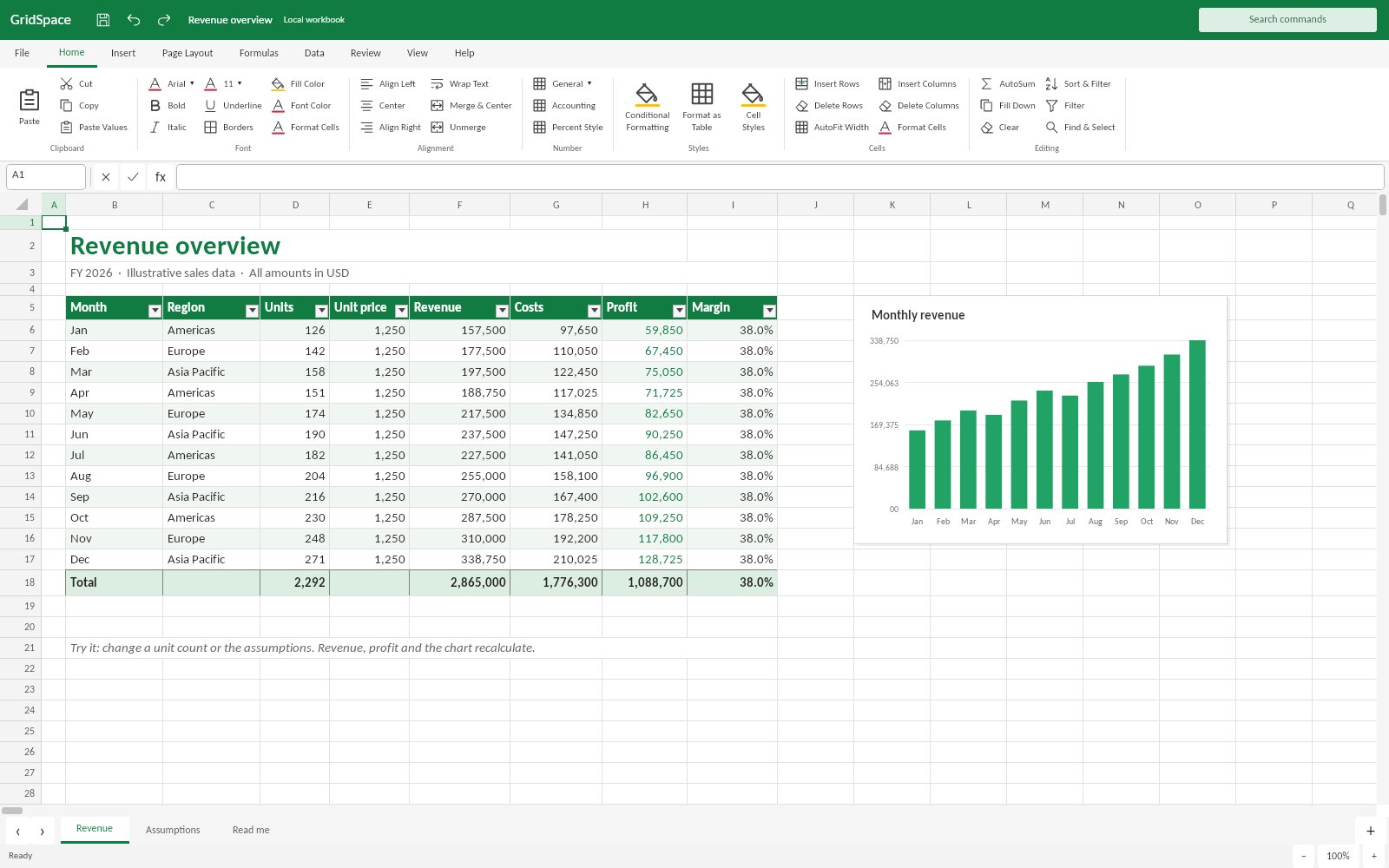
The live browser build opens a sample model with Revenue, Assumptions and Read me sheets—edit inputs and watch the C# engine recalculate. Switch viewports, go fullscreen and tick off the guided tour as you explore.
Try GridSpace live
The live browser build opens a sample model with Revenue, Assumptions and Read me sheets—edit inputs and watch the C# engine recalculate.
Real C# · Uno WebAssembly · runs locally in your browser8 libraries you can embed
GridSpace is assembled from independently reusable libraries, each published on NuGet.org. Hover the graph to trace dependencies; click a node to jump to its package, and open a card for install and usage.
GridSpace.Core
Workbook, cell, style and range contracts; conditional/filter/sort models
GridSpace.Formulas
Bounded non-eval parser, evaluator, reference rewriting and number formatting
GridSpace.Editing
Sessions, transactions, bounded history, structural edits and data tools
GridSpace.IO
Native, CSV/TSV and XLSX interchange with fidelity warnings
GridSpace.Layout
Sparse axis indexes, frozen panes, hit testing and viewport geometry
GridSpace.Skia
Viewport-culled cell, conditional visual, chart and selection rendering
GridSpace.Controls
Embeddable grid, ribbon, formula bar, tabs, scrollbars and data-tool editors
GridSpace.Workbench
Complete workbench, commands, dialogs, rule management and local recovery
8 packages on NuGet.org
GridSpace ships as eight MIT-licensed packages, all versioned together. Six target plain net10.0 and have no UI dependency: GridSpace.Core, Formulas, Editing, IO and Layout are pure .NET, and GridSpace.Skia adds only SkiaSharp. The two Uno Platform packages (Controls, Workbench) target net10.0-desktop and net10.0-browserwasm. Symbols are published to nuget.org as .snupkg with SourceLink. GridSpace.App is the platform composition root and is not packaged.
dotnet add package GridSpace.Core --prerelease<PackageReference Include="GridSpace.Core" Version="0.3.0-alpha.1" />
<PackageReference Include="GridSpace.Formulas" Version="0.3.0-alpha.1" />
<PackageReference Include="GridSpace.Editing" Version="0.3.0-alpha.1" />
<PackageReference Include="GridSpace.IO" Version="0.3.0-alpha.1" />
<PackageReference Include="GridSpace.Layout" Version="0.3.0-alpha.1" />
<PackageReference Include="GridSpace.Skia" Version="0.3.0-alpha.1" />
<PackageReference Include="GridSpace.Controls" Version="0.3.0-alpha.1" />
<PackageReference Include="GridSpace.Workbench" Version="0.3.0-alpha.1" /><!-- Directory.Packages.props -->
<ItemGroup>
<PackageVersion Include="GridSpace.Core" Version="0.3.0-alpha.1" />
<PackageVersion Include="GridSpace.Formulas" Version="0.3.0-alpha.1" />
<PackageVersion Include="GridSpace.Editing" Version="0.3.0-alpha.1" />
<PackageVersion Include="GridSpace.IO" Version="0.3.0-alpha.1" />
<PackageVersion Include="GridSpace.Layout" Version="0.3.0-alpha.1" />
<PackageVersion Include="GridSpace.Skia" Version="0.3.0-alpha.1" />
<PackageVersion Include="GridSpace.Controls" Version="0.3.0-alpha.1" />
<PackageVersion Include="GridSpace.Workbench" Version="0.3.0-alpha.1" />
</ItemGroup> Published with NuGet Trusted Publishing from GitHub Actions, with symbols (.snupkg) and SourceLink. Release v0.3.0-alpha.1 ↗
Dependencies (from project references): Core ← Formulas ← Editing ← IO, Core ← Layout, Layout + Editing ← Skia ← Controls, Controls + IO ← Workbench. A mutable SpreadsheetSession has one owning thread; use snapshots (for example Workbook.ToJson/FromJson) for background processing.
The sparse spreadsheet document model: workbooks, worksheets keyed by A1 address, immutable cell records and styles, ranges, merges, charts, validation lists, frozen panes, and the models for conditional formats, column filters and sort levels. It also owns JSON persistence. No dependencies and no UI.
dotnet add package GridSpace.Core --prereleaseKey types
Workbook–Sheets,Names,ActiveSheet,FindSheet,ToJson/FromJsonWorksheet–Get/Set,UsedRange,Merges,FrozenRows/FrozenColumns,ConditionalFormats,FiltersCell,CellStyle– immutable input + style records (Cell.IsFormula)CellAddress/CellRange– A1 parsing and formatting up toXFD1048576ConditionalFormatRule,DifferentialStyle,ColumnFilter,SortLevel,ChartSpec– data-tool models
Basic usage
using GridSpace.Core;

var book = new Workbook { Title = "Budget" };
var sheet = book.ActiveSheet;
sheet.Set("A1", "Item");
sheet.Set("B1", "Cost");
sheet.Set("A2", "Rent");
sheet.Set("B2", "1200");
sheet.Set("B3", "=SUM(B2:B2)");
sheet.Set(CellAddress.Parse("A1"), sheet.Get("A1") with { Style = CellStyle.Default with { Bold = true } });
sheet.Merges.Add(CellRange.Parse("C1:D1"));
sheet.FrozenRows = 1;

CellRange used = sheet.UsedRange;
Console.WriteLine($"{used} ({used.Count} cells); B3 is a formula: {sheet.Get("B3").IsFormula}");
var copy = Workbook.FromJson(book.ToJson()); // native .gridspace JSONA bounded, non-eval formula engine: parser, evaluator with revision-based caching and dependency invalidation, common functions, dynamic arrays that spill (SEQUENCE, FILTER, SORT, UNIQUE, LET, A1#…), cross-sheet references and names, reference rewriting for fills and structural edits, Excel-style number formatting, conditional-format evaluation and filter predicates. Depends on GridSpace.Core; no UI.
dotnet add package GridSpace.Formulas --prereleaseKey types
CalculationEngine–Evaluate,EvaluateFormula,Register(custom functions),GetSpill,Invalidate,BuiltInFunctionsCalcValue– number/text/boolean/error/array result (Num,Str,Error,Array,TryNumber)FormulaReferences–Translate,RenameSheet,Insert/Deletereference rewritingNumberFormatter.Format– format codes such as0.00,#,##0,0%ConditionalFormattingEngine,WorksheetFilterEngine– rule and filter evaluation
Basic usage
using GridSpace.Core;
using GridSpace.Formulas;

var book = new Workbook();
var sheet = book.ActiveSheet;
sheet.Set("A1", "21");
sheet.Set("A2", "=A1*2");
sheet.Set("B1", "=SEQUENCE(3)");                 // spills into B1:B3

var calc = new CalculationEngine(book);
calc.Register("DOUBLE", args => args[0].TryNumber(out var n) ? CalcValue.Num(n * 2) : CalcValue.Error("#VALUE!"));

Console.WriteLine(NumberFormatter.Format(calc.Evaluate(sheet, "A2"), "0.00"));   // 42.00
Console.WriteLine(calc.EvaluateFormula(sheet, "=DOUBLE(A1)+SUM(B1#)"));          // 48
Console.WriteLine(calc.GetSpill(sheet, CellAddress.Parse("B1"))?.Range);          // B1:B3
Console.WriteLine(FormulaReferences.Translate("=A1*$B$2", rows: 1, columns: 0)); // =A2*$B$2The UI-independent editing session. Every command runs as a transaction with delta-based, bounded undo/redo; structural row/column edits rebase formulas, names, merges, validation, charts, conditional rules and freeze boundaries. It also provides clipboard blocks, fill/series, find/replace, sheet operations, filtering, multi-level sorting and a sample workbook. Depends on GridSpace.Formulas; no UI.
dotnet add package GridSpace.Editing --prereleaseKey types
SpreadsheetSession–Book,Sheet,Calculation,Selection,SetInput,ApplyStyle,Undo/Redo,Changed- Structure and tools –
InsertRows/DeleteColumns,Fill,Paste,Sort,SetFilter,SetConditionalFormat,AddChart DelimitedText– bounded TSV/CSVParse/WriteSampleWorkbook.Create()– the demo Revenue/Assumptions workbook
Basic usage
using GridSpace.Core;
using GridSpace.Editing;
using GridSpace.Formulas;

var session = new SpreadsheetSession(new Workbook { Title = "Example" });
session.SetInput("21", new CellAddress(0, 0));
session.SetInput("=A1*2", new CellAddress(0, 1));
Console.WriteLine(session.Calculation.Evaluate(session.Sheet, "B1")); // 42

session.SetConditionalFormat(new ConditionalFormatRule
{
    Range = "A1:B1",
    Kind = ConditionalFormatKind.CellValue,
    Comparison = CellComparison.GreaterThan,
    Operand = "30",
    Style = new DifferentialStyle { Background = "#C6EFCE", Bold = true }
});
var rules = new ConditionalFormattingEngine(session.Calculation);
var address = new CellAddress(0, 1);
var displayed = rules.Evaluate(session.Sheet, address,
    session.Calculation.Evaluate(session.Sheet, address));
Console.WriteLine(displayed.Style.Background); // #C6EFCE

session.InsertRows(0, 2); // References and modeled metadata follow the insertion.
session.Undo();File interchange: native .gridspace JSON, CSV/TSV (values only; formula-looking text is neutralized) and a documented XLSX subset including styles, merges, shared and dynamic-array formulas, conditional formatting, filters and charts. Imports are size-bounded and return warnings for anything not preserved. IWorkbookStorage is the host contract used by the workbench. Depends on GridSpace.Editing; no UI.
dotnet add package GridSpace.IO --prereleaseKey types
WorkbookFiles–Import(name, bytes)by extension,Native,CsvXlsxWorkbook–Read(bytes)/Write(book)ImportResult– importedWorkbookplusWarningsIWorkbookStorage,OpenedFile– open/save pickers and recovery persistence for hosts
Basic usage
using GridSpace.Core;
using GridSpace.Editing;
using GridSpace.IO;

ImportResult imported = WorkbookFiles.Import("sales.xlsx", File.ReadAllBytes("sales.xlsx"));
foreach (var warning in imported.Warnings) Console.WriteLine(warning);

var session = new SpreadsheetSession(imported.Workbook);
session.SetInput("=SUM(B2:B13)", CellAddress.Parse("B14"));

File.WriteAllBytes("sales-out.xlsx", XlsxWorkbook.Write(session.Book));
File.WriteAllBytes("sales.csv", WorkbookFiles.Csv(session.Book));        // active sheet, calculated values
File.WriteAllBytes("sales.gridspace", WorkbookFiles.Native(session.Book));Renderer-independent grid geometry for a 1,048,576 × 16,384 sheet: sparse axis indexes over custom sizes and hidden rows/columns, zoom and scrolling, frozen-pane splitting, cell/range bounds and hit testing of cells and headers. Use it to build your own grid view on any surface. Depends on GridSpace.Core; no UI.
dotnet add package GridSpace.Layout --prereleaseKey types
GridViewport–Refresh(sheet),ScrollTo,Zoom,Panes(),CellBounds,HitTest,EnsureVisibleAxisLayout–Position,Size,IndexAt,Visibleover sparse sizesGridPane,GridRect,GridHit/GridHitKind– geometry results
Basic usage
using GridSpace.Core;
using GridSpace.Layout;

var sheet = new Worksheet { FrozenRows = 1, FrozenColumns = 1 };
sheet.ColumnWidths[0] = 160;
sheet.HiddenRows.Add(4);

var viewport = new GridViewport { Width = 1280, Height = 720, Zoom = 1.25 };
viewport.Refresh(sheet);                       // rebuild axis indexes from sizes/hidden/frozen state
viewport.ScrollTo(0, 2_000);
foreach (GridPane pane in viewport.Panes())
    Console.WriteLine($"rows {pane.FirstRow}-{pane.LastRow}, columns {pane.FirstColumn}-{pane.LastColumn}");

GridHit hit = viewport.HitTest(300, 200);      // Cell, ColumnHeader, RowHeader or Corner
GridRect bounds = viewport.CellBounds(new CellAddress(hit.Row, hit.Column));Draws a session's visible cells onto any SKCanvas: values and number formats, fonts, wrapping, alignment, borders, merges, conditional styles, data bars, headers, frozen panes, selection and charts, culled to the viewport. TypefaceCatalog owns registered font data so hosts (especially WebAssembly) render consistently. Depends on GridSpace.Layout, GridSpace.Editing and SkiaSharp; no UI framework.
dotnet add package GridSpace.Skia --prereleaseKey types
SpreadsheetRenderer–Render(canvas, session, viewport),MeasureColumn(AutoFit),FontsTypefaceCatalog–Register(family, regular, bold, italic, boldItalic, aliases),Resolve(style)
Basic usage
using GridSpace.Editing;
using GridSpace.Layout;
using GridSpace.Skia;
using SkiaSharp;

var session = new SpreadsheetSession(SampleWorkbook.Create());
using var renderer = new SpreadsheetRenderer();
renderer.Fonts.Register("Carlito", regular, bold, italic, boldItalic, "Arial", "Calibri"); // font file bytes

var viewport = new GridViewport { Width = 1200, Height = 800 };
viewport.Refresh(session.Sheet);

using var surface = SKSurface.Create(new SKImageInfo(1200, 800));
renderer.Render(surface.Canvas, session, viewport);
using var png = surface.Snapshot().Encode(SKEncodedImageFormat.Png, 100);
File.WriteAllBytes("sheet.png", png.ToArray());Uno Platform building blocks: SpreadsheetGrid (Skia-drawn through SKCanvasElement, with in-cell editing, selection, clipboard, zoom, touch panning and keyboard navigation), a data-driven RibbonControl, formula bar, sheet tabs, status bar, scroll bars, vector icons, and the filter, sort and conditional-format editors. Compose them with your own command routing. Depends on GridSpace.Skia and Uno Platform (Skia renderer).
dotnet add package GridSpace.Controls --prereleaseKey types
SpreadsheetGrid–Session,Renderer,Viewport,BeginEdit,CopyAsync/PasteAsync,SetZoom,EnableDataToolInteractionsRibbonControl–SetTabs(RibbonTab[]),CommandRequested;RibbonTab/RibbonGroup/RibbonCommandrecordsFormulaBarControl,WorksheetTabsControl,SpreadsheetStatusBar,SheetScrollBarFilterEditorControl,SortEditorControl,ConditionalFormatEditorControl–BuildFilter/BuildLevels/BuildRule
Basic usage
using GridSpace.Controls;
using GridSpace.Editing;
using Microsoft.UI.Xaml;
using Microsoft.UI.Xaml.Controls;

var session = new SpreadsheetSession(SampleWorkbook.Create());
var sheetView = new SpreadsheetGrid { Session = session };

var ribbon = new RibbonControl();
ribbon.SetTabs([new RibbonTab("Home", [new RibbonGroup("Font", [new RibbonCommand("bold", "Bold", OfficeIconKind.Bold)])])]);
ribbon.CommandRequested += id =>
{
    if (id != "bold") return;
    var bold = !session.SelectedStyle.Bold;
    session.ApplyStyle(style => style with { Bold = bold });
};

var root = new Grid { RowDefinitions = { new RowDefinition { Height = GridLength.Auto }, new RowDefinition() } };
Grid.SetRow(sheetView, 1);
root.Children.Add(ribbon);
root.Children.Add(sheetView);
window.Content = root;
window.Closed += (_, _) => sheetView.Dispose();The complete Excel-style shell used by the app: ribbon (WorkbookRibbon.Create()), formula bar, grid, sheet tabs, status bar, context menus, dialogs, filter popup, conditional-rule manager, custom sort and debounced local recovery. Platform file pickers and recovery persistence come from your IWorkbookStorage implementation. Web hosts should register font bytes with Surface.Renderer.Fonts. Depends on GridSpace.Controls, GridSpace.IO and Uno Platform.
dotnet add package GridSpace.Workbench --prereleaseKey types
SpreadsheetWorkbench–SpreadsheetWorkbench(session, storage),Session,Surface,ExecuteAsync(commandId),ShowStatusWorkbookRibbon.Create()– the default tab/group/command setGridSpace.IO.IWorkbookStorage– host services the workbench calls
Basic usage
using GridSpace.Core;
using GridSpace.Editing;
using GridSpace.IO;
using GridSpace.Workbench;

IWorkbookStorage storage = new MyWorkbookStorage(); // OpenAsync, SaveAsync, Read/WriteRecoveryAsync
var recovery = await storage.ReadRecoveryAsync();
var book = string.IsNullOrWhiteSpace(recovery) ? SampleWorkbook.Create() : Workbook.FromJson(recovery);

var workbench = new SpreadsheetWorkbench(new SpreadsheetSession(book), storage);
workbench.Surface.Renderer.Fonts.Register("Carlito", regular, bold, italic, boldItalic, "Arial", "Calibri", "Aptos");
window.Content = workbench;
window.Closed += (_, _) => workbench.Dispose();From engine to workbench
Layers build bottom‑up: each one depends only on those beneath it.
Sparse worksheets, A1 addressing, styles and data-tool definitions with no UI dependency.
GridSpace.CoreBounded, non-eval formula parser and evaluator with dependency-based invalidation and virtual spill output.
GridSpace.FormulasTransactional sessions, delta history and structural transforms, plus native/CSV/XLSX file handling.
GridSpace.EditingGridSpace.IOSparse axis indexes and frozen-pane viewports feed viewport-culled SkiaSharp rendering.
GridSpace.LayoutGridSpace.SkiaThe embeddable SKCanvasElement grid and Office-style controls composed into the complete workbench.
GridSpace.ControlsGridSpace.WorkbenchEmbed, script, extend
using GridSpace.Core;
using GridSpace.Editing;
using GridSpace.Formulas;

var session = new SpreadsheetSession(new Workbook { Title = "Example" });
session.SetInput("21", new CellAddress(0, 0));
session.SetInput("=A1*2", new CellAddress(0, 1));
Console.WriteLine(session.Calculation.Evaluate(session.Sheet, "B1")); // 42

session.SetConditionalFormat(new ConditionalFormatRule
{
    Range = "A1:B1",
    Kind = ConditionalFormatKind.CellValue,
    Comparison = CellComparison.GreaterThan,
    Operand = "30",
    Style = new DifferentialStyle { Background = "#C6EFCE", Bold = true }
});
var rules = new ConditionalFormattingEngine(session.Calculation);
var address = new CellAddress(0, 1);
var displayed = rules.Evaluate(session.Sheet, address,
    session.Calculation.Evaluate(session.Sheet, address));
Console.WriteLine(displayed.Style.Background); // #C6EFCE

session.InsertRows(0, 2); // References and modeled metadata follow the insertion.
session.Undo();using GridSpace.Controls;
using GridSpace.Editing;
var session = new SpreadsheetSession(SampleWorkbook.Create());
var grid = new SpreadsheetGrid { Session = session };
window.Content = grid;
window.Closed += (_, _) => grid.Dispose();File formats
Continuously verified
Each push runs through GitHub Actions. The public browser build is deployed only from successful pipelines.


Toolchain
Third‑party NuGet packages
git clone https://github.com/wieslawsoltes/GridSpace.git
cd GridSpace
dotnet workload install wasm-tools
dotnet run --project src/GridSpace.App -f net10.0-browserwasmWhat it doesn’t claim
The project documents its limits as carefully as its features.
- No VBA, PivotTables, Power Query, external-data refresh, add-ins or multiplayer editing
- XLSX is a supported subset, not package-preserving; .xls, .xlsb and .xlsm are not supported
- Bulk edits, sorts and conditional ranges cap at 100,000 cells; imports at 256 sheets and 32 MB
- No LAMBDA, structured references or full Excel function parity; not for safety-critical calculations
- Browser recovery is a single local slot per origin and profile, not a cloud backup