LabSpace
Build front panels, wire typed block diagrams and run them live
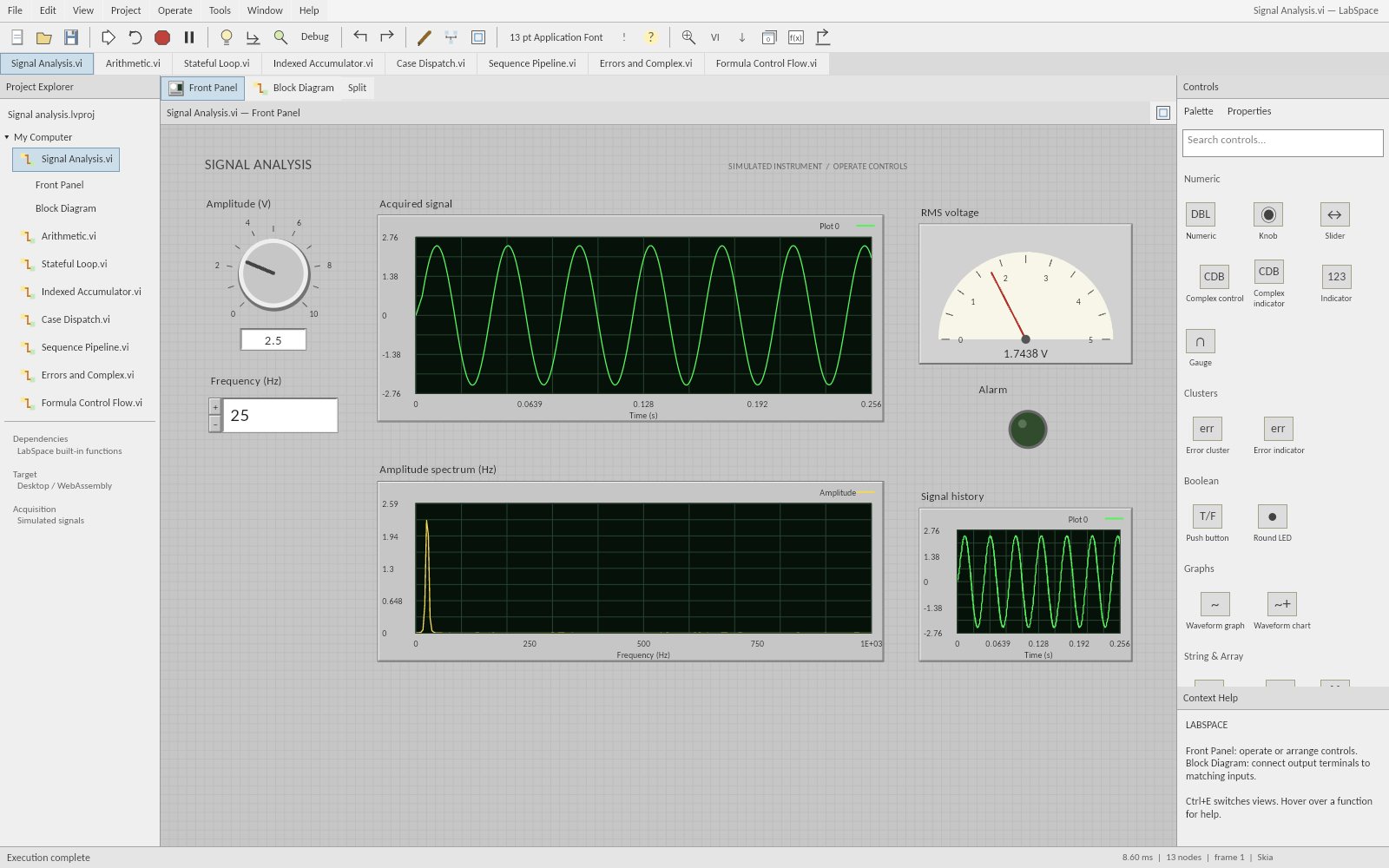
LabSpace is a graphical instrumentation studio for desktop and the browser: design front panels, connect typed block diagrams, inspect live values and run simulated signal-processing programs. It is a working independent implementation inspired by the classic NI LabVIEW workflow, with resumable nested execution, a step-into debugger and Skia-rendered editors that share one C# codebase across native and WebAssembly hosts.
What makes LabSpace special
Familiar if you know the classic NI LabVIEW workflow — but original, local‑first and written end‑to‑end in C#.
Paired panel and diagram
Every VI has a Front Panel instrument interface and a Block Diagram program. Ctrl+E switches between them and Split shows both side by side.
Typed dataflow wiring
Named terminals, single-driver inputs and output fan-out, with color-coded wires for numbers, Booleans, strings and waveforms. Incompatible types are rejected.
Typed structures
For, While, Boolean Case and embedded SubVI nodes with typed tunnels, numeric auto-indexing, conditional collection and stacked shift registers.
Real signal processing
Simulated sine, square and triangle sources feed filtering, RMS, peak-to-peak and Hann-windowed FFT kernels. Plots show real dataflow results, not decoration.
Step-into debugger
Step over or into nested execution, set breakpoints inside structure bodies, highlight execution and attach probes to named outputs.
Quick Drop
Press Ctrl+Space, search for a function or control, press Enter and click to place it on the cursor position.
Skia-rendered editors
Both editors draw with SkiaSharp through Uno's SKCanvasElement, with visible-area culling, cached wire paths and SKPicture structure previews.
Recovery built in
Browser recovery uses per-origin IndexedDB and native hosts use application data. Invalid recovery is preserved rather than silently overwritten.
31 capabilities, 7 areas
Studio
- Project explorer, VI tabs and paired Front Panel / Block Diagram editors
- Split view, searchable palettes and right-click context palettes
- Context help, properties, error list and a broken Run arrow
- Wheel zoom around the pointer, middle-button pan and Fit
Front panel
- Numeric controls, knobs, sliders, gauges, switches and LEDs
- Strings, numeric arrays, waveform graphs and charts with value cursors
- Edit Front Panel mode to move and resize controls; one drag is one undo unit
- New controls create their matching diagram terminals together
Block diagram
- Typed named terminals, single-driver input wiring and output fan-out
- Drag and marquee selection, arrow-key nudging, duplication and deletion
- Copy/paste, undo/redo and probes on named outputs
- Clean Up arranges nodes by dependency rank
- Explicit Feedback node carries state across invocations
Structures
- For, While, Boolean Case and embedded SubVI connector contracts
- Typed tunnels for numbers, Booleans, Unicode strings, numeric arrays and waveforms
- Numeric input/output auto-indexing, conditional collection and array concatenation
- Initialized and uninitialized stacked shift registers
- Staged Tunnels and shift registers editor: Apply is one undoable transaction
Execution and debugging
- Cached topological plans that compile only when code changes
- Run, run continuously, pause and abort
- Step over (F10) and nested step into (F11)
- Nested breakpoints, execution highlight and cooperative cancellation
- Shared node budgets bound loops to 10,000 iterations
Functions and signals
- Arithmetic, transcendentals, Boolean logic and typed Select
- Unicode string transforms and numeric array transforms
- Waveform construction and simulated sine, square and triangle sources
- Gain/offset, moving average, RMS, peak-to-peak and FFT
Documents
- Version-2 .labspace.json with source-generated serialization
- Automatic migration of version-1 project files
- Waveform CSV export from a selected waveform or array
- Browser IndexedDB and native application-data recovery
Run LabSpace right here
The live build is the real C#/Uno WebAssembly studio with four executable example VIs, so every plot you see comes from a running dataflow graph. Switch viewports, go fullscreen and tick off the guided tour as you explore.
Try LabSpace live
The live build is the real C#/Uno WebAssembly studio with four executable example VIs, so every plot you see comes from a running dataflow graph.
Real C# · Uno WebAssembly · runs locally in your browser9 libraries you can embed
LabSpace is assembled from independently reusable libraries, each published on NuGet.org. Hover the graph to trace dependencies; click a node to jump to its package, and open a card for install and usage.
LabSpace.Core
Models, immutable typed values, node catalog, named terminals and structure contracts
LabSpace.Signals
Signal generation, transformations, filtering, stable RMS and FFT
LabSpace.Dataflow
Graph validation/compilation, named-output execution, nested activations and budgets
LabSpace.Documents
Versioned source-generated JSON, validation/migration and executable examples
LabSpace.Editing
UI-independent editing, transactions, history, wiring and debugging session
LabSpace.Skia
Instrument/diagram rendering, geometry, cached previews, icons and plot decimation
LabSpace.Storage
Host-neutral storage contract and protected recovery behavior
LabSpace.Controls
Uno canvases, chrome, palette, Quick Drop, connector editor and property inspector
LabSpace.Workbench
Complete reusable studio, commands, navigation, execution and recovery scheduling
9 packages on NuGet.org
The studio is built from nine MIT-licensed packages that are versioned and released together; the host application and tests are not packages. Seven packages (Core through Skia) target plain net10.0 and have no UI dependency; only LabSpace.Skia pulls in SkiaSharp (3.119.4, the Uno-compatible build). Controls and Workbench are Uno Platform libraries targeting net10.0-desktop and net10.0-browserwasm. Every package ships symbols to NuGet.org (.snupkg) with SourceLink.
dotnet add package LabSpace.Core --prerelease<PackageReference Include="LabSpace.Core" Version="0.3.0-alpha.1" />
<PackageReference Include="LabSpace.Storage" Version="0.3.0-alpha.1" />
<PackageReference Include="LabSpace.Signals" Version="0.3.0-alpha.1" />
<PackageReference Include="LabSpace.Documents" Version="0.3.0-alpha.1" />
<PackageReference Include="LabSpace.Dataflow" Version="0.3.0-alpha.1" />
<PackageReference Include="LabSpace.Editing" Version="0.3.0-alpha.1" />
<PackageReference Include="LabSpace.Skia" Version="0.3.0-alpha.1" />
<PackageReference Include="LabSpace.Controls" Version="0.3.0-alpha.1" />
<PackageReference Include="LabSpace.Workbench" Version="0.3.0-alpha.1" /><!-- Directory.Packages.props -->
<ItemGroup>
<PackageVersion Include="LabSpace.Core" Version="0.3.0-alpha.1" />
<PackageVersion Include="LabSpace.Storage" Version="0.3.0-alpha.1" />
<PackageVersion Include="LabSpace.Signals" Version="0.3.0-alpha.1" />
<PackageVersion Include="LabSpace.Documents" Version="0.3.0-alpha.1" />
<PackageVersion Include="LabSpace.Dataflow" Version="0.3.0-alpha.1" />
<PackageVersion Include="LabSpace.Editing" Version="0.3.0-alpha.1" />
<PackageVersion Include="LabSpace.Skia" Version="0.3.0-alpha.1" />
<PackageVersion Include="LabSpace.Controls" Version="0.3.0-alpha.1" />
<PackageVersion Include="LabSpace.Workbench" Version="0.3.0-alpha.1" />
</ItemGroup> Published with NuGet Trusted Publishing from GitHub Actions, with symbols (.snupkg) and SourceLink. Release v0.3.0-alpha.1 ↗
Dependencies (from project references):
Core ← Signals ← Dataflow
Core ← Documents
Dataflow + Documents ← Editing ← Skia (+ SkiaSharp) ← Controls (Uno)
Controls + Storage ← Workbench
Storage has no dependencies
See typed structures for contract definitions and resumable execution, and architecture for layering.
The document and type model: projects, virtual instruments (VIs), diagrams of nodes and wires, front-panel items, immutable typed Values (number, Boolean, string, array, waveform, error cluster, complex) and the catalog of node definitions with named terminals and structure contracts. No dependencies beyond .NET; no UI.
dotnet add package LabSpace.Core --prereleaseKey types
LabProject/VirtualInstrument/Diagram/Node/Wire/PanelItem— the serializable program model.Value/ValueKind— immutable typed values:Numeric,Bool,String,Vector,Series,ErrorValue,ComplexValue.NodeCatalog—All,Get(kind),Resolve(node)for terminal definitions.StructureContract— tunnels, indexing modes and shift registers for loops/structures.StructureFrame/FormulaSignature/ErrorCluster— case/sequence frames, formula terminals and error clusters.
Basic usage
using LabSpace.Core;

Value wave = Value.Series([0, 1, 0, -1], sampleRate: 1000);
Value error = Value.ErrorValue(status: true, code: 42, source: "Acquire");
Value z = Value.ComplexValue(3, 4);
Console.WriteLine($"{wave.Kind}, |z| = {z.Complex.Magnitude}");   // Waveform, |z| = 5

NodeDefinition add = NodeCatalog.Get("add");
Console.WriteLine(string.Join(", ", add.Inputs.Select(p => $"{p.Name}: {p.Kind}"))); // x: Number, y: NumberA small host-neutral contract for opening, saving, exporting and recovering projects, plus an in-memory implementation and a wrapper that stops automatic recovery from overwriting a recovery copy that failed to load until the user explicitly saves. No dependencies; no UI.
dotnet add package LabSpace.Storage --prereleaseKey types
IProjectStorage—OpenAsync,SaveAsync,ReadRecoveryAsync,WriteRecoveryAsync,ExportAsync.MemoryProjectStorage— in-memory implementation for tests and headless hosts.ProtectedRecoveryStorage— suppresses recovery writes until an explicit save succeeds.
Basic usage
using LabSpace.Storage;

var memory = new MemoryProjectStorage();
IProjectStorage storage = new ProtectedRecoveryStorage(memory);

await storage.WriteRecoveryAsync("{}");                       // ignored: nothing saved yet
await storage.SaveAsync("Demo.labspace.json", projectJson);   // saves and re-enables recovery
Console.WriteLine(memory.Recovery is not null); // TrueDeterministic signal kernels used by the dataflow functions: sine/square/triangle generation with seeded noise, moving-average filtering, numerically stable RMS and a Hann-windowed radix-2 FFT magnitude spectrum. Depends on LabSpace.Core (for Value); no UI.
dotnet add package LabSpace.Signals --prereleaseKey types
SignalMath.Generate— bounded waveform generation (2–65,536 samples, up to Nyquist).SignalMath.MovingAverage,Transform— filtering and per-sample transforms.SignalMath.Rms— overflow-safe RMS.SignalMath.Spectrum— magnitude spectrum of a power-of-two waveform.
Basic usage
using LabSpace.Core;
using LabSpace.Signals;

Value sine = SignalMath.Generate(count: 1024, rate: 2000, frequency: 50, amplitude: 2,
    start: 0, shape: "Sine", noise: 0.05);
Value smooth = SignalMath.MovingAverage(sine, window: 8);
double rms = SignalMath.Rms(smooth.Samples);
Value spectrum = SignalMath.Spectrum(sine); // 513 binsPersistence and examples: version-3 .labspace.json with source-generated serialization, validation, 8 MiB bounds and migration from versions 1 and 2, plus builders for the eight executable example VIs. Depends on LabSpace.Core; no UI.
dotnet add package LabSpace.Documents --prereleaseKey types
ProjectSerializer—Save,Load(validating/migrating),Clone,Validate.Examples—Create()(the example project),Blank,NewNode,Connect.StructuredExamples,AdvancedExamples,FormulaExamples— loop, case/sequence, error/complex and formula VIs.
Basic usage
using LabSpace.Core;
using LabSpace.Documents;

var vi = Examples.Blank("Sum.vi");
var x = Examples.NewNode("control", 80, 80); x.Label = "x"; x.Value = 3;
var y = Examples.NewNode("control", 80, 220); y.Label = "y"; y.Value = 7;
var sum = Examples.NewNode("add", 320, 130);
var output = Examples.NewNode("indicator", 570, 130); output.Label = "x + y";
vi.Diagram.Nodes.AddRange([x, y, sum, output]);
Examples.Connect(vi.Diagram, x, sum, "x");
Examples.Connect(vi.Diagram, y, sum, "y");
Examples.Connect(vi.Diagram, sum, output);

string json = ProjectSerializer.Save(new LabProject { Name = "Demo", Instruments = [vi] });
LabProject loaded = ProjectSerializer.Load(json);The execution engine: validates and compiles a diagram into a cached topological plan (typed terminals, single-driver inputs, explicit feedback), then executes it with named outputs, nested structure activations, shift-register state, a compiled scalar formula language and shared node/instruction budgets. Depends on LabSpace.Signals; no UI.
dotnet add package LabSpace.Dataflow --prereleaseKey types
GraphCompiler—Validate(returnsDiagnostics) andCompileto aCompiledGraph.DataflowRuntime—Runto completion orStarta resumableExecutionFrame;Reset,FrameCompleted.ExecutionFrame—GetOutput(nodeId, output),Step,StepInto,Completed.FormulaProgram—Compile(source, signature)and boundedEvaluate.ExecutionBudget,ExecutionLimitException,GraphValidationException.
Basic usage
using LabSpace.Dataflow;
using LabSpace.Documents;

var vi = StructuredExamples.IndexedAccumulator();
var loop = vi.Diagram.Nodes.Single(node => node.Kind == "for");
var graph = GraphCompiler.Compile(vi.Diagram);
var runtime = new DataflowRuntime();

using var cancellation = new CancellationTokenSource();
var frame = runtime.Run(graph, cancellation.Token, maximumNodes: 100_000);
Console.WriteLine(frame.GetOutput(loop.Id, "state").Number);                  // 15
Console.WriteLine(string.Join(", ", frame.GetOutput(loop.Id, "totals").Samples)); // 1, 3, 6, 10, 15

var formula = FormulaProgram.Compile("result = x * x + 1;", new());
Console.WriteLine(formula.Evaluate(_ => 3)["result"]); // 10The UI-independent editor model: InstrumentSession owns the project, active VI, navigation into structures, selection, bounded undo/redo, typed wiring, gestures, clipboard, execution (run/continuous/pause/abort/step) and the cross-VI debugger with probes and breakpoints. Depends on Dataflow and Documents; no UI.
dotnet add package LabSpace.Editing --prereleaseKey types
InstrumentSession—Add,Connect,SetValue,Delete,Undo/Redo,BeginGesture/EndGesture,Changed.- Execution —
Run(continuous),Tick,Pause,Abort,Step,StepInto,StepOut,OutputValue. - Navigation —
Switch,Enter/Leave,SelectFrame,ConfigureStructure,ConfigureFormula. - Debugger —
ToggleProbe,ToggleBreakpoint,GetProbes,LocateProbe,ProbeSnapshot. SessionChange— flags describing what changed.
Basic usage
using LabSpace.Core;
using LabSpace.Documents;
using LabSpace.Editing;

var session = new InstrumentSession(new LabProject { Name = "Demo", Instruments = [Examples.Blank("Sum.vi")] });
var a = session.Add("control", 80, 80);          // also places a front-panel control
var b = session.Add("control", 80, 220);
var add = session.Add("add", 320, 130);
var result = session.Add("indicator", 570, 130);
session.Connect(a.Id, add.Id, "x");               // type-checked; rejects cycles/multiple drivers
session.Connect(b.Id, add.Id, "y");
session.Connect(add.Id, result.Id, "x");
session.SetValue(a.Id, 3); session.SetValue(b.Id, 7);

session.Run();                                    // continuous runs advance via session.Tick()
Console.WriteLine(session.OutputValue(result.Id)); // 10
session.Undo();Original SkiaSharp rendering for front panels (numerics, knobs, sliders, gauges, LEDs, switches, strings, arrays, error/complex clusters, graphs and charts with extrema-preserving decimation) and typed block diagrams (nodes, wires, structure previews, probes), plus geometry and icons. Draws an InstrumentSession into any SKCanvas. Depends on LabSpace.Editing and SkiaSharp; no UI framework.
dotnet add package LabSpace.Skia --prereleaseKey types
PanelRenderer(LabFonts)—Draw(canvas, session, viewport)for the active front panel;Cursors.DiagramRenderer(LabFonts)—Drawthe active block diagram;HitWire.PlotRenderer,IconPainter,LabDrawing— plots, icons and drawing primitives.DiagramGeometry— node bounds, terminal positions and wire routing.LabFonts— shared typeface (Load(stream));IDisposable.
Basic usage
using LabSpace.Documents;
using LabSpace.Editing;
using LabSpace.Skia;
using SkiaSharp;

var session = new InstrumentSession(Examples.Create());
session.Run();                                   // Signal Analysis.vi

using var fonts = new LabFonts();                // or fonts.Load(stream) for a custom typeface
using var panel = new PanelRenderer(fonts);
using var surface = SKSurface.Create(new SKImageInfo(1200, 700));
panel.Draw(surface.Canvas, session, new SKRect(0, 0, 1200, 700));

using var image = surface.Snapshot();
using var png = image.Encode(SKEncodedImageFormat.Png, 100);
File.WriteAllBytes("front-panel.png", png.ToArray());The interactive Uno controls: front-panel and block-diagram canvases with pan/zoom, placement, wiring and operation; searchable function palette; Quick Drop; staged structure, frame and formula editors; property inspector; and the cross-VI Debug window. Depends on LabSpace.Skia; requires Uno Platform (Skia renderer).
dotnet add package LabSpace.Controls --prereleaseKey types
FrontPanelSurface(session, fonts)/DiagramSurface(session, fonts)— editable canvases;Fit,SetZoom,ArmPlacement.FunctionPalette— searchable palette;SetControls,AddRequested.PropertyInspector(session),DebugWindowControl(session),QuickDropControl.StructureContractEditor,FrameEditorControl,FormulaEditorControl— staged editors.LabTheme,LabButton,VectorIcon— chrome helpers.
Basic usage
using LabSpace.Controls;
using LabSpace.Documents;
using LabSpace.Editing;
using LabSpace.Skia;

var fonts = new LabFonts();
var session = new InstrumentSession(Examples.Create());
var diagram = new DiagramSurface(session, fonts);
var palette = new FunctionPalette();
palette.AddRequested += (kind, widget) => diagram.ArmPlacement(kind);   // click to place

var layout = new Grid();
layout.ColumnDefinitions.Add(new ColumnDefinition { Width = new GridLength(260) });
layout.ColumnDefinitions.Add(new ColumnDefinition());
layout.Children.Add(palette);
Grid.SetColumn(diagram, 1); layout.Children.Add(diagram);
window.Content = layout;                          // your Uno Window
diagram.Loaded += (_, _) => diagram.Fit();The complete studio as one UserControl: project explorer, VI tabs, paired or split Front Panel / Block Diagram editors, palettes, context help, properties, Debug window, commands and keyboard shortcuts, execution timer and recovery scheduling. Depends on Controls and Storage; requires Uno Platform (Skia renderer).
dotnet add package LabSpace.Workbench --prereleaseKey types
InstrumentWorkbench(InstrumentSession, IProjectStorage, LabFonts)— the studio control;IDisposable.Session,FrontPanel,BlockDiagram,Palette,Inspector,DebugWindow,Commands.SetView(StudioView),ToggleView,ShowDebugWindow,Fit.
Basic usage
using LabSpace.Documents;
using LabSpace.Editing;
using LabSpace.Skia;
using LabSpace.Storage;
using LabSpace.Workbench;

protected override void OnLaunched(LaunchActivatedEventArgs args)
{
    var window = new Window { Title = "LabSpace" };
    var fonts = new LabFonts();
    IProjectStorage storage = new MemoryProjectStorage();   // or your platform implementation
    var workbench = new InstrumentWorkbench(new InstrumentSession(Examples.Create()), storage, fonts);
    workbench.SetView(StudioView.Split);
    window.Content = workbench;
    window.Closed += (_, _) => { workbench.Dispose(); fonts.Dispose(); };
    window.Activate();
}
src/LabSpace.App shows desktop and browser (IndexedDB) IProjectStorage implementations and font loading.
From engine to workbench
Layers build bottom‑up: each one depends only on those beneath it.
Mutable authoring models, immutable runtime values and immutable structure contracts, with no XAML dependency.
LabSpace.CoreBounded signal kernels plus a graph compiler and resumable runtime with nested activations and shared budgets.
LabSpace.SignalsLabSpace.DataflowVersioned JSON persistence, host-neutral storage/recovery and a transactional editing and debugging session.
LabSpace.DocumentsLabSpace.EditingLabSpace.StorageSkiaSharp instrument, plot and typed-diagram rendering with cached wire paths and SKPicture previews.
LabSpace.SkiaReusable Uno canvases, palettes and inspectors composed into the complete embeddable studio.
LabSpace.ControlsLabSpace.WorkbenchEmbed, script, extend
using LabSpace.Dataflow;
using LabSpace.Documents;

var vi = StructuredExamples.IndexedAccumulator();
var loop = vi.Diagram.Nodes.Single(node => node.Kind == "for");
var graph = GraphCompiler.Compile(vi.Diagram);
var runtime = new DataflowRuntime();

using var cancellation = new CancellationTokenSource();
var frame = runtime.Run(graph, cancellation.Token, maximumNodes: 100_000);
Console.WriteLine(frame.GetOutput(loop.Id, "state").Number); // 15
Console.WriteLine(string.Join(", ", frame.GetOutput(loop.Id, "totals").Samples));
// 1, 3, 6, 10, 15
File formats
Keyboard essentials
Continuously verified
Each push runs through GitHub Actions. The public browser build is deployed only from successful pipelines.
build.yml Engine tests
engine.yml Toolchain verification
environment.yml Release packages
release.yml
Toolchain
Third‑party NuGet packages
git clone https://github.com/wieslawsoltes/LabSpace.git
cd LabSpace
dotnet workload install wasm-tools
dotnet run --project src/LabSpace.App -f net10.0-browserwasmWhat it doesn’t claim
The project documents its limits as carefully as its features.
- Not a complete, pixel-identical or binary-compatible LabVIEW replacement; the full G language is not implemented
- NI .vi, .ctl and .lvproj files are not imported; older LabSpace 0.1 cannot read version-2 files
- Acquisition is simulated: no NI-DAQmx, VISA, instrument drivers or physical I/O
- DSP/dataflow run as managed CPU code, not WebGPU compute; scheduling is cooperative, not hard real time
- Not validated for safety-critical equipment or physical/hard-real-time control