NoteSpace
A familiar free-form notebook workspace built on Uno and Skia
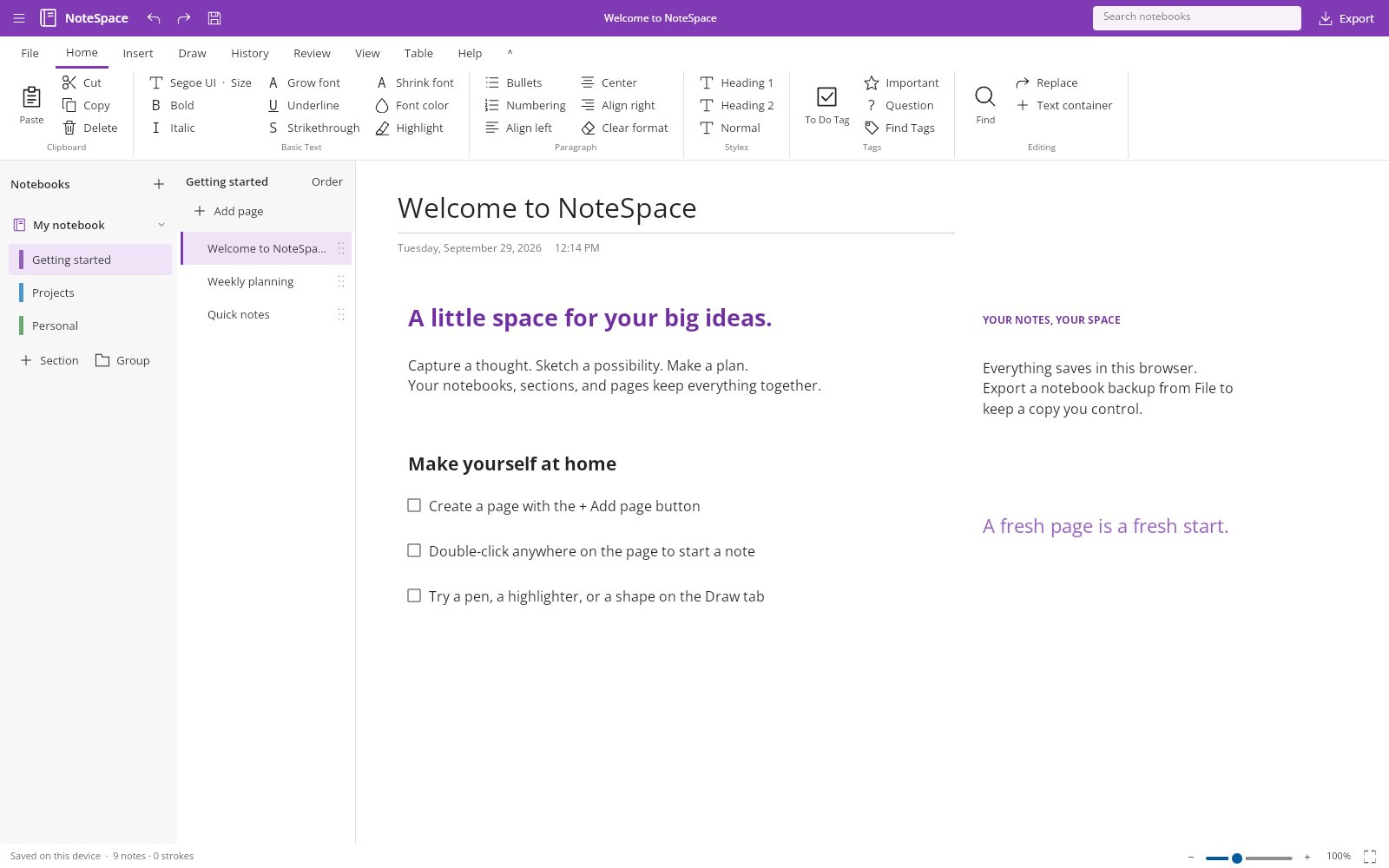
NoteSpace is a notebook app with a purple desktop shell, grouped ribbon, notebook/section/page navigation and free-form pages rendered with SkiaSharp. It combines rich-text notes, tables, attachments and pressure-aware ink with scoped search and replace, autosave and validated backups — all written in C#, with JavaScript used only for browser storage, file/clipboard transfer and diagnostics.
What makes NoteSpace special
Familiar if you know Microsoft OneNote-style notebooks — but original, local‑first and written end‑to‑end in C#.
Free-form pages
Double-click anywhere on the paper to add a note, then drag its grip to move it or its corner to resize.
Deep organization
Notebooks, sections, nested section groups and two subpage levels with drag/drop, favorites and a recycle bin.
Rich text formatting
Fonts, sizes, bold/italic/underline/strike, colors, highlights, headings, lists, links, tags and checklists.
Ink and shapes
Pressure-aware pen where the device provides it, highlighter, stroke eraser, rectangles, ellipses and lines.
Tables in notes
Edit cells in place, tab between them, insert, delete or transpose, and copy/paste quoted TSV.
Scoped search and replace
Search a page, section, notebook or everything, filter tags and to-dos, and replace text in one undoable step.
Safe autosave
IndexedDB and desktop stores reject stale writes, and failed loads open a non-saving recovery session.
Page versions
Chronological undo/redo plus manually saved page versions let you step back through your work.
28 capabilities, 7 areas
Organization
- Notebooks, sections, nested section groups and two subpage levels
- Subtree drag/drop and reordering with before, after and inside placement
- Cross-section page moves and cross-notebook section/group moves
- Favorites, persistent collapse, page duplication and recycle-bin recovery
- Non-destructive ungrouping that never deletes pages
Notes and formatting
- Free-form text containers with move/resize grips and title editing
- Mixed-style ranges with font family, size, bold, italic, underline and strike
- Colors, highlights, headings, lists and alignment
- Links, tags and checklists
Tables and attachments
- In-place plain-text cell editing with keyboard traversal and row append
- Row/column insert and delete, clear cell and transpose
- Quoted TSV clipboard transfer preserving tabs, newlines and quotes
- Whole-table editor, images and embedded file attachments
Drawing
- Pressure-aware pen input where the device provides it
- Highlighter and stroke eraser
- Rectangles, ellipses and lines
- Gesture-level undo
Search and history
- Notebook, section and page search scopes
- Case and whole-word matching with tag and to-do filters
- Scoped, style-preserving Replace All as one undoable transaction
- Chronological undo/redo and manually saved page versions
View and storage
- Light/dark chrome, paper color and ruled, grid or dotted paper
- Zoom, fit, full-page view and collapsible ribbon/navigation
- Section tabs, autosave and optimistic stale-write protection
Interchange
- Validated .notespace JSON backups
- Plain text and basic Markdown import
- Markdown and escaped HTML export
- Rendered PNG page export including ink
Run NoteSpace right here
The live build creates a sample notebook on first visit, so you can start writing, drawing and organizing pages right away. Switch viewports, go fullscreen and tick off the guided tour as you explore.
Try NoteSpace live
The live build creates a sample notebook on first visit, so you can start writing, drawing and organizing pages right away.
Real C# · Uno WebAssembly · runs locally in your browser5 libraries you can embed
NoteSpace is assembled from independently reusable libraries, each published on NuGet.org. Hover the graph to trace dependencies; click a node to jump to its package, and open a card for install and usage.
NoteSpace.Core
Notebook, rich-text and ink model, geometry, source-generated JSON and validation
NoteSpace.Editor
Transactions and history, organization operations, scoped search/replace, rich-text and table edits, spatial indexes
NoteSpace.Storage
Persistence contract, atomic file storage, conflict handling and import/export formats
NoteSpace.Rendering.Skia
Page composition, text layout, viewport culling, bounded native caches and PNG export
NoteSpace.Controls
Note surface, ribbon, notebook/page navigation, search, table editor, themes, backstage and status controls
5 packages on NuGet.org
All five libraries are MIT-licensed, versioned together with the app and published to NuGet.org on tagged releases, with symbol packages (.snupkg) and SourceLink. Every package targets net10.0. NoteSpace.Core, NoteSpace.Editor and NoteSpace.Storage have no UI dependency, and NoteSpace.Rendering.Skia needs only SkiaSharp. NoteSpace.Controls is an Uno Platform library (Uno.Sdk, Skia renderer) that depends on Uno.WinUI and SkiaSharp.Views.Uno.WinUI. No library references the app. The app supplies the storage, file and clipboard platform adapters and composes the controls.
dotnet add package NoteSpace.Core<PackageReference Include="NoteSpace.Core" Version="0.1.0" />
<PackageReference Include="NoteSpace.Editor" Version="0.1.0" />
<PackageReference Include="NoteSpace.Storage" Version="0.1.0" />
<PackageReference Include="NoteSpace.Rendering.Skia" Version="0.1.0" />
<PackageReference Include="NoteSpace.Controls" Version="0.1.0" /><!-- Directory.Packages.props -->
<ItemGroup>
<PackageVersion Include="NoteSpace.Core" Version="0.1.0" />
<PackageVersion Include="NoteSpace.Editor" Version="0.1.0" />
<PackageVersion Include="NoteSpace.Storage" Version="0.1.0" />
<PackageVersion Include="NoteSpace.Rendering.Skia" Version="0.1.0" />
<PackageVersion Include="NoteSpace.Controls" Version="0.1.0" />
</ItemGroup> Published with NuGet Trusted Publishing from GitHub Actions, with symbols (.snupkg) and SourceLink. Release v0.1.0 ↗
Dependencies follow the project references: Editor and Storage → Core; Rendering.Skia → Editor + SkiaSharp; Controls → Editor + Rendering.Skia + Uno Platform. To build packages locally, run dotnet pack src/<Project> -c Release -o artifacts/packages.
The portable notebook model: workspaces, notebooks, nested section groups, sections, pages with subpage levels, free-form note blocks (text, headings, checklists, tables, images, attachments), rich-text marks, ink strokes and page versions, plus source-generated JSON serialization with full validation. No dependencies and no UI.
dotnet add package NoteSpace.CoreKey types namespace NoteSpace.Core
Workspace/Notebook/NoteSection/SectionGroup/NotePage– the organization tree.NoteBlock– positioned content withKind,Text,Format,Marks,Tags,Cellsand attachmentData.TextFormat,TextMark,InkStroke/InkPoint,NoteRect– formatting, ink and geometry.DocumentJson–Serialize,Deserialize(validating),Validate,Clone,PageJson/ReadPage.NotebookGroups/SampleWorkspace– section-group outline helpers and the sample notebook.
Basic usage
using NoteSpace.Core;

var page = new NotePage { Title = "Kickoff", Paper = PaperStyle.Ruled };
page.Blocks.Add(new NoteBlock { Kind = BlockKind.Heading, Text = "Agenda", Format = new TextFormat { FontSize = 24, Bold = true } });
page.Blocks.Add(new NoteBlock { Kind = BlockKind.Checklist, Text = "Book a room", Y = 200, Height = 42, Tags = ["todo"] });
page.Ink.Add(new InkStroke { Points = [new InkPoint(40, 320), new InkPoint(120, 340, 0.8f)] });

var workspace = new Workspace { Notebooks = [new Notebook { Title = "Research", Sections = [new NoteSection { Title = "Ideas", Pages = [page] }] }] };
DocumentJson.Validate(workspace);
string json = DocumentJson.Serialize(workspace);          // source-generated, trimming-friendly
Workspace restored = DocumentJson.Deserialize(json); // validates identities, geometry and limitsThe headless editing engine: an undoable EditorSession over a workspace with page, subpage, section and section-group operations, scoped literal search and style-preserving replace, rich-text range formatting, table/TSV operations, ink geometry and spatial page indexes. Depends on NoteSpace.Core; no UI.
dotnet add package NoteSpace.EditorKey types namespace NoteSpace.Editor
EditorSession–EditPage,Execute,AddPage/AddSubpage/AddSection,Undo/Redo,SelectedPage,Changed.NoteSearchQuery/SearchHit– scoped search (Search) andReplaceAllwith case/whole-word/tag/to-do filters.RichText–Apply,GetRuns,ReplaceRangeover mixed-style ranges.NoteTable– cell edits, row/column insertion,Transpose,ToTsv/ParseTsv.PageOutline,LiteralTextSearch,PageContentIndex,InkGeometry– reusable helpers.
Basic usage
Editing contract: the session is single-writer. A successful EditPage replaces that page DTO, so keep IDs and resolve current objects after edits; its callback must mutate only the supplied detached page. Use Execute for cross-page and organization operations. Hosts that change collections outside transactions must call InvalidateIndexes(), and such changes get no undo or autosave notification. SearchHit.Start/Length are UTF-16 offsets and Cell identifies table matches.
using NoteSpace.Core;
using NoteSpace.Editor;

var session = new EditorSession(SampleWorkspace.Create());
session.Changed += (_, change) => Console.WriteLine(change.Description);

var page = session.AddPage(session.Pages.First().Section.Id, "Draft notes");
session.AddBlock(page.Id, SampleWorkspace.Text("First draft of the plan", 48, 140, 520, 80));
session.EditPage(page.Id, "Bold first word", p => RichText.Apply(p.Blocks[0], 0, 5, f => f.Bold = true));

var query = new NoteSearchQuery("draft") { Scope = NoteSearchScope.Page, ScopeId = page.Id, WholeWord = true };
var hits = session.Search(query).ToList();
NoteReplaceResult result = session.ReplaceAll(query, "reviewed");   // one undoable transaction
Console.WriteLine($"{hits.Count} hits, {result.Matches} replaced; undo: {session.UndoDescription}");
session.Undo();Persistence and interchange: the IWorkspaceStore contract with optimistic tokens, a desktop/CLI FileWorkspaceStore (exclusive lock, same-directory temporary file, atomic replace), validated immutable WorkspaceSnapshots for fast autosave, and text/limited-Markdown import plus Markdown and escaped HTML export. Depends on NoteSpace.Core; no UI.
dotnet add package NoteSpace.StorageKey types namespace NoteSpace.Storage
IWorkspaceStore/IWorkspaceSnapshotStore–LoadAsync,SaveAsync,SaveSnapshotAsyncwith expected tokens.FileWorkspaceStore– atomic file-backed store for desktop and CLI hosts.WorkspaceSnapshot–Capture(workspace)and validatingParse(json).StorageConflictException– thrown when another window saved first.NoteExport–Markdown,Html,ImportText,SafeFileName.
Basic usage
using NoteSpace.Core;
using NoteSpace.Storage;

var store = new FileWorkspaceStore(Path.Combine(AppContext.BaseDirectory, "workspace.notespace"));
StoredWorkspace? stored = await store.LoadAsync();
Workspace workspace = stored?.Document ?? SampleWorkspace.Create();
try
{
    string token = await store.SaveSnapshotAsync(WorkspaceSnapshot.Capture(workspace), stored?.Token);
}
catch (StorageConflictException) { /* Changed elsewhere: export, then reload before saving. */ }

var page = workspace.Notebooks[0].Sections[0].Pages[0];
File.WriteAllText("page.md", NoteExport.Markdown(page));
NotePage imported = NoteExport.ImportText("Shopping\n\n[ ] Milk", "Imported");An independent SkiaSharp page renderer: paper styles, rich text layout, tables, images, attachments and ink with per-line/per-cell viewport culling, revision-keyed layout reuse, bounded image caches and PNG export. Use it for headless thumbnails and exports or inside any Skia canvas. Depends on NoteSpace.Editor and SkiaSharp; no Uno dependency. Include the Skia native-assets package for your platform.
dotnet add package NoteSpace.Rendering.SkiaKey types namespace NoteSpace.Rendering.Skia
PageRenderer–Render(canvas, page, width, height, options),ExportPng(page, scale),RegisterTypeface,Layout(block).RenderOptions–Zoom, offsets,Dark, selection/editing state andContentRevisionfor cache reuse.RendererStatistics– cache hits, layout builds and drawn blocks/cells for diagnostics.TextLayout/TextFragment– measured text lines for hit testing.
Basic usage
using NoteSpace.Core;
using NoteSpace.Rendering.Skia;
using SkiaSharp;

var page = SampleWorkspace.Create().Notebooks[0].Sections[0].Pages[0];
using var renderer = new PageRenderer();                  // dispose to release native caches
File.WriteAllBytes("page.png", renderer.ExportPng(page, scale: 2));

using var surface = SKSurface.Create(new SKImageInfo(1024, 768));
renderer.Render(surface.Canvas, page, 1024, 768, new RenderOptions { Zoom = 1.25f, ContentRevision = 1 });
Console.WriteLine($"{renderer.Statistics.BlocksDrawn} blocks drawn");Reusable Uno Platform notebook UI: the interactive NoteSurface (text editing, move/resize grips, ink and shapes, tables), a Skia NoteCanvas, RibbonControl, NotebookNavigator, PageListControl with drag/drop, search options/results, the table editor, backstage, status bar, light/dark OfficeTheme and original icons. Depends on NoteSpace.Editor and NoteSpace.Rendering.Skia; requires Uno Platform.
dotnet add package NoteSpace.ControlsKey types namespace NoteSpace.Controls
NoteSurface–Session,Tool,PenColor,FormatSelection,ApplyTableCommand,RevealSearchResult,Error.RibbonControl–Configure(tabs, theme, collapsed)withRibbonTab/RibbonGroup/RibbonCommand,CommandInvoked.NotebookNavigator/PageListControl–Bind(...)to a workspace or section, selection and command events.SearchOptionsControl,SearchResultsControl,NoteTableEditor,BackstageControl,NoteStatusBar.OfficeTheme–Light/Darkpalettes and brush helpers.
Basic usage
using Microsoft.UI.Xaml;
using Microsoft.UI.Xaml.Controls;
using NoteSpace.Controls;
using NoteSpace.Core;
using NoteSpace.Editor;

var session = new EditorSession(SampleWorkspace.Create());
var surface = new NoteSurface { Session = session };
surface.Error += (_, message) => Console.WriteLine(message);

var ribbon = new RibbonControl();
ribbon.Configure([new RibbonTab("Draw", [new RibbonGroup("Tools", [new RibbonCommand("pen", "Pen", "pen"), new RibbonCommand("select", "Select", "page")])])], OfficeTheme.Light, collapsed: false);
ribbon.CommandInvoked += (_, id) => surface.Tool = id == "pen" ? DrawingTool.Pen : DrawingTool.Select;

var root = new Grid { RowDefinitions = { new RowDefinition { Height = GridLength.Auto }, new RowDefinition() } };
Grid.SetRow(surface, 1);
root.Children.Add(ribbon); root.Children.Add(surface);
window.Content = root;
window.Closed += (_, _) => surface.Dispose(); // subscribe to session.Changed for persistenceFrom engine to workbench
Layers build bottom‑up: each one depends only on those beneath it.
Defines notebook data, rich text, ink and geometry with source-generated JSON and validation.
NoteSpace.CoreUI-independent transactions, search and organization operations, plus token-checked atomic persistence.
NoteSpace.EditorNoteSpace.StorageTurns model state into pixels with SkiaSharp and never references Uno.
NoteSpace.Rendering.SkiaAdapts the renderer and editing session to Uno input, layout and accessibility as reusable controls.
NoteSpace.ControlsEmbed, script, extend
using NoteSpace.Controls;
using NoteSpace.Core;
using NoteSpace.Editor;

var session = new EditorSession(SampleWorkspace.Create());
var editor = new NoteSurface { Session = session };
window.Content = editor;
// Subscribe to session.Changed for your host's persistence and command UI.
// Dispose the surface when its host is permanently closed.

var query = new NoteSearchQuery("draft") {
    Scope = NoteSearchScope.Page,
    ScopeId = session.SelectedPage!.Id,
    WholeWord = true
};
var hits = session.Search(query).ToList();
var result = session.ReplaceAll(query, "reviewed");git clone https://github.com/wieslawsoltes/NoteSpace.git
cd NoteSpace
dotnet workload install wasm-tools
dotnet run --project tests/NoteSpace.Tests -c Release
dotnet run --project tests/NoteSpace.Rendering.Tests -c Release
dotnet run --project src/NoteSpace.App -f net10.0-browserwasm
dotnet run --project src/NoteSpace.App -f net10.0-desktop
dotnet publish src/NoteSpace.App -c Release -f net10.0-browserwasm \
-o artifacts/publish -p:WasmShellWebAppBasePath=/NoteSpace/dotnet pack src/NoteSpace.Core -c Release -o artifacts/packages
dotnet pack src/NoteSpace.Controls -c Release -o artifacts/packagesFile formats
Keyboard essentials
Continuously verified
Each push runs through GitHub Actions. The public browser build is deployed only from successful pipelines.


Toolchain
Third‑party NuGet packages
git clone https://github.com/wieslawsoltes/NoteSpace.git
cd NoteSpace
dotnet workload install wasm-tools
dotnet run --project src/NoteSpace.App -f net10.0-browserwasmWhat it doesn’t claim
The project documents its limits as carefully as its features.
- Does not read .one/.onepkg files or synchronize with OneDrive or Microsoft 365
- No OCR, handwriting recognition, equations, audio/video or web clipping
- Browser notes are local to the profile and not encrypted; export .notespace backups regularly
- Table cells are plain text with uniform sizing; merged or rich cells are not supported
- Stale tabs are stopped rather than merged; there is no live collaboration