PresentationSpace
Office-style slide editing in C#, one engine for browser and desktop
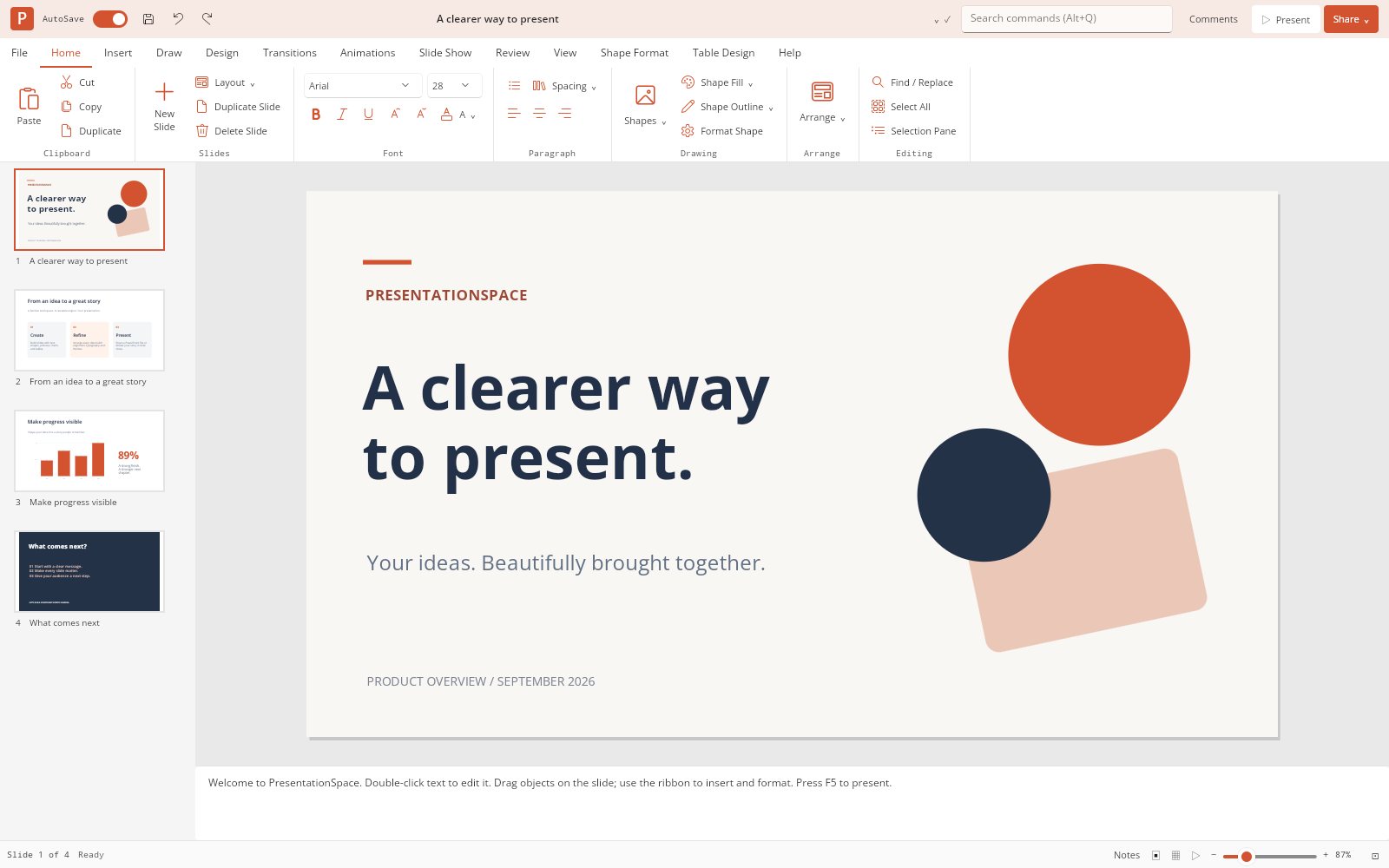
PresentationSpace is an Office-style presentation workspace built with Uno Platform and SkiaSharp, with a tabbed ribbon, filmstrip, notes, slide sorter and slide show. The browser runs the same .NET application compiled to WebAssembly, not an HTML mock-up. Underneath sits an independent, reusable engine for immutable documents, rich text, merged tables, native charts and a documented PPTX subset, plus PNG and vector PDF export.
What makes PresentationSpace special
Familiar if you know the PowerPoint desktop workflow — but original, local‑first and written end‑to‑end in C#.
Familiar ribbon workspace
Home, Insert, Draw, Design, Transitions, Animations, Slide Show, Review, View, Shape Format, Table Design and Help tabs, plus the File workspace.
Direct Skia canvas
The editor viewport, slide previews and player draw straight onto Uno's SKCanvasElement compositor canvas, with retained drawing and picture caches.
Mixed rich text
Character styles, bullets, paragraph alignment and spacing survive editing, native files, supported PPTX interchange and PNG/PDF export.
Merged, styled tables
Merge and split cells, insert or delete tracks, and apply Table Design palette presets, banding and ten border scopes.
Native charts
Six categorical chart types with multi-series data, exported as native chart parts with editable embedded XLSX workbooks.
PPTX interchange
Import and export a documented PPTX subset: text runs, preset shapes, pictures, tables, charts, notes and basic transitions.
Slide show
Present from the beginning or current slide with fade/push/wipe transitions, appear/fade/fly-in effects and black or white screen.
Deck-scale virtualization
Virtualized filmstrip and sorter views recycle only visible tiles; open the 1,000-slide sample to try it.
34 capabilities, 8 areas
Slides
- New, duplicate, delete, reorder and hide slides
- Non-destructive predefined layouts that retain unmatched content
- Backgrounds, slide sizing and slide numbers
- Resizable filmstrip and slide sorter
Objects and arrangement
- Text, basic geometric shapes, lines/arrows and raster pictures
- Multi-selection, marquee, eight resize handles and rotation
- Aspect constraints, snapping, nudging, pan and zoom
- Selection groups, front/back ordering, alignment and distribution
- Object locking and visibility
Text
- Mixed character styles with bold, italic and underline on selected ranges
- Bullets, paragraph alignment and spacing
- Wrapping and vertical alignment
- Find and replace that preserves styles between matches
Tables
- Rectangular merges and splits, row/column insertion and deletion
- Cell fills, margins and solid/dashed/dotted borders
- Table Design: four palette presets, first/last-column emphasis and column banding
- Ten border scopes that update both sides of shared edges
- Up to 100 rows, 100 columns and one million characters per table
Charts
- Column, bar, line, area, pie and doughnut charts
- Multi-series data with nullable values and grouping options
- Standalone chart data editor with spreadsheet copy/paste
- Native chart parts with editable embedded XLSX workbooks on PPTX export
Presentation
- Basic fade, push and wipe transitions
- Appear, fade and fly-in object effects
- Hidden-slide skipping and black/white screen
- Present from the beginning (F5) or current slide (Shift+F5)
Workflow
- Transactional undo/redo and an internal clipboard
- Command search with Alt+Q
- Speaker notes and local comments
- Device-local AutoSave recovery with no account or server
Files
- Native .pspace preserving mixed text, notes, comments and animation settings
- Documented PPTX import and export subset
- Slide PNG and vector PDF export
- Bounded ZIP/XML input checks: DTDs prohibited, no external-relationship retrieval
Run PresentationSpace right here
The live build is the same .NET editor compiled to WebAssembly, so you can build, format and present a deck right in the browser with no account or server. Switch viewports, go fullscreen and tick off the guided tour as you explore.
Try PresentationSpace live
The live build is the same .NET editor compiled to WebAssembly, so you can build, format and present a deck right in the browser with no account or server.
Real C# · Uno WebAssembly · runs locally in your browser6 libraries you can embed
PresentationSpace is assembled from independently reusable libraries, each published on NuGet.org. Hover the graph to trace dependencies; click a node to jump to its package, and open a card for install and usage.
PresentationSpace.Core
Immutable documents, rich text, layouts, tables, chart data, geometry, commands and undo
PresentationSpace.Formats
Bounded PPTX ZIP/XML, native chart/table parts and embedded chart workbooks
PresentationSpace.Rendering.Skia
Slides, tables, six chart types, mixed text, images, thumbnails, selection, PNG/PDF
PresentationSpace.Ribbon.Uno
Ribbon tabs, overflow scrolling, groups, buttons, compact toggle and Office-style palette
PresentationSpace.Controls.Uno
Viewport, filmstrip, sorter, inspector, table/chart data editors, notes and slide show
PresentationSpace.Editor.Uno
Embeddable complete editor with an injectable IWorkspaceStorage contract
6 packages on NuGet.org
All six libraries are MIT-licensed and published on NuGet.org. PresentationSpace.Core, PresentationSpace.Formats and PresentationSpace.Rendering.Skia target net10.0 and have no UI-framework dependency (the renderer needs only SkiaSharp). The *.Uno packages target net10.0-desktop and net10.0-browserwasm on Uno Platform 6.7 with the Skia renderer. Every package is versioned together with the app, and symbols ship on NuGet.org as .snupkg with SourceLink.
dotnet add package PresentationSpace.Core<PackageReference Include="PresentationSpace.Core" Version="0.6.0" />
<PackageReference Include="PresentationSpace.Formats" Version="0.6.0" />
<PackageReference Include="PresentationSpace.Rendering.Skia" Version="0.6.0" />
<PackageReference Include="PresentationSpace.Ribbon.Uno" Version="0.6.0" />
<PackageReference Include="PresentationSpace.Controls.Uno" Version="0.6.0" />
<PackageReference Include="PresentationSpace.Editor.Uno" Version="0.6.0" /><!-- Directory.Packages.props -->
<ItemGroup>
<PackageVersion Include="PresentationSpace.Core" Version="0.6.0" />
<PackageVersion Include="PresentationSpace.Formats" Version="0.6.0" />
<PackageVersion Include="PresentationSpace.Rendering.Skia" Version="0.6.0" />
<PackageVersion Include="PresentationSpace.Ribbon.Uno" Version="0.6.0" />
<PackageVersion Include="PresentationSpace.Controls.Uno" Version="0.6.0" />
<PackageVersion Include="PresentationSpace.Editor.Uno" Version="0.6.0" />
</ItemGroup> Published with NuGet Trusted Publishing from GitHub Actions, with symbols (.snupkg) and SourceLink. Release v0.6.0 ↗
Dependencies follow the layers: Core ← Formats, Core ← Rendering.Skia, Core + Rendering.Skia + Ribbon.Uno ← Controls.Uno ← Editor.Uno (+ Formats). Ribbon.Uno depends only on Uno. PresentationSpace.App is the executable host; no library references the app.
The document engine: immutable PresentationDocument/Slide/SlideShape records, mixed-style rich text, merged and styled tables, multi-series chart data, layouts, geometry, selection and a transactional EditorSession with undo/redo. Use it standalone to generate or transform decks on a server or in tests. No dependencies and no UI requirement.
dotnet add package PresentationSpace.CoreKey types
EditorSession: current document, slide and selection;Insert,Apply,EditSlide,AddSlide,Undo/Redo,Changedevent.SlideFactory:Text(...)shapes,Create(layout)slides and theWelcome()sample deck.RichText: character-range formatting (Format,Replace,Segments).TableModel/TableSpec: create, merge/split, insert/delete tracks, style presets and borders (limits: 100 rows, 100 columns, one million characters).ChartModel/ChartSpec/ChartTabularData: six chart kinds, validation and spreadsheet-style copy/paste text.DocumentSerializer: native.pspaceJSON with schema validation.
Basic usage
using PresentationSpace.Core;

var session = new EditorSession(SlideFactory.Welcome());
session.AddSlide("Title only");

var title = SlideFactory.Text("Hello, slides", 80, 100, 900, 130, 56);
title = RichText.Format(title, 0, 5, style => style with { Bold = true, Color = "#D35230" });
session.Insert(title);                 // one undoable transaction
session.ApplyLayout("Title slide");    // unmatched content is retained

var table = TableModel.Create(rows: 4, columns: 3);
table = TableModel.SetText(table, 0, 0, "Quarterly results");
table = TableModel.Merge(table, new TableRange(0, 0, 1, 3));
table = TableModel.ApplyStyle(table, TableStylePreset.Blue);
session.Insert(TableModel.Apply(new SlideShape { Name = "Results", Bounds = new(100, 260, 960, 320) }, table));

session.Undo();
string json = DocumentSerializer.Serialize(session.Document); // native .pspace
TableModel.Apply and ChartModel.Apply maintain legacy projection fields (Cells, TableColumns, Values, Labels); edit the table/chart model rather than those projections. TableLayout supplies normalized edges, merge-origin bounds and hit-testing. Sessions are single-thread-affine.
Bounded PresentationML (PPTX) import and editable PowerPoint export: real text runs, preset shapes, pictures, merged/styled native tables, native multi-series charts with embedded workbooks, notes and basic transitions. ZIP/XML sizes are bounded, DTDs are prohibited and external relationships are never fetched. Depends on Core only; no UI requirement.
dotnet add package PresentationSpace.FormatsKey types
PptxCodec.Import(byte[]): returns anImportResultwith theDocumentandWarnings.PptxCodec.Export(PresentationDocument): returns anExportResultwith the.pptxDataandWarnings.ImportResult/ExportResult: report unsupported content instead of silently dropping it.
Basic usage
using PresentationSpace.Core;
using PresentationSpace.Formats;

ImportResult imported = PptxCodec.Import(File.ReadAllBytes("deck.pptx"));
foreach (var warning in imported.Warnings)
    Console.WriteLine(warning);        // unsupported parts are reported, not silently kept

var session = new EditorSession(imported.Document);
session.ReplaceText("2025", "2026");

ExportResult exported = PptxCodec.Export(session.Document);
File.WriteAllBytes("deck-2026.pptx", exported.Data);
Import is not lossless for arbitrary PPTX files, and valid OOXML output does not guarantee visual equivalence. See Compatibility.
Draws slides, mixed-style text, images, merged/styled tables and the six chart types to any SKCanvas, with picture/scene caching, thumbnails and PNG/vector PDF export. Use it headlessly for exports or inside any Skia-based UI. Depends on Core and SkiaSharp 3.119; headless hosts must also reference the operating system's SkiaSharp native-assets package.
dotnet add package PresentationSpace.Rendering.SkiaKey types
SlideRenderer:Render,ExportPng,ExportPdf,RenderTable,RenderChart,DrawRichTextandAutoFitTableRows.SlideRenderer.CacheStatistics/RenderCacheStatistics: picture and scene cache counters.TypefaceRegistry/ITypefaceResolver: register embedded font files and resolve typefaces perTextStyle.
Basic usage
using PresentationSpace.Core;
using PresentationSpace.Rendering.Skia;
using SkiaSharp;

var document = SlideFactory.Welcome();
using var renderer = new SlideRenderer();
File.WriteAllBytes("slide-1.png", renderer.ExportPng(document, document.Slides[0], width: 1920));
File.WriteAllBytes("deck.pdf", renderer.ExportPdf(document));

// Draw a chart onto any SKCanvas, without a document or editor.
var chart = new ChartSpec
{
    Kind = ChartKind.Line,
    Title = "Quarterly performance",
    Categories = ["Q1", "Q2", "Q3"],
    Series = [new() { Name = "Actual", Color = "#D35230", Values = [10, null, 25] }]
};
using var surface = SKSurface.Create(new SKImageInfo(640, 360));
renderer.RenderChart(surface.Canvas, chart, new RectF(0, 0, 640, 360), new TextStyle());
Renderers are single-thread-affine: use one per concurrent worker and dispose it.
A self-contained Office-style ribbon for any Uno Platform app: tabs, captioned groups, large/small command buttons, overflow scroll arrows, collapse on double-click and an accessible compact toggle switch. It has no dependency on the presentation engine. Requires Uno Platform.
dotnet add package PresentationSpace.Ribbon.UnoKey types
RibbonControl:SetTabs,SelectTab,ToggleCollapsed,SelectedTaband theTabChangedevent.RibbonTab(Title, Build): a tab whose groups are built on selection.RibbonGroup(title, params UIElement[] items)andRibbonGroup.Column(...)for stacked small buttons.RibbonCommandButton(id, label, glyph, action, large, shortcut): sets automation name/ID and tooltip.CompactToggleSwitchandOfficePalette(shared brushes andBrush(hex)).
Basic usage
using PresentationSpace.Ribbon.Uno;
var ribbon = new RibbonControl();
ribbon.SetTabs([
new RibbonTab("Home", () => [
new RibbonGroup("Clipboard",
new RibbonCommandButton("paste", "Paste", "", Paste, shortcut: "Ctrl+V"),
RibbonGroup.Column(
new RibbonCommandButton("cut", "Cut", "", Cut, large: false),
new RibbonCommandButton("copy", "Copy", "", Copy, large: false)))
]),
new RibbonTab("View", () => [new RibbonGroup("Zoom", new RibbonCommandButton("fit", "Fit", "", Fit))])
]);
ribbon.TabChanged += (_, tab) => System.Diagnostics.Debug.WriteLine($"Selected {tab}");
myPage.Content = ribbon;The reusable editing surfaces behind the workspace, each bound to a shared EditorSession: a Skia slide viewport with selection, handles, snapping and in-place text editing; virtualized filmstrip and sorter; the Format/Selection/Comments inspector; standalone table and chart data editors; notes; status bar; and a slide-show player. Depends on Core, Rendering.Skia, Ribbon.Uno and Uno's Skia canvas; requires Uno Platform.
dotnet add package PresentationSpace.Controls.UnoKey types
SlideViewport: interactive canvas (Session,SetZoom,Fit,ShowGrid,EditText,CommitText).SlideFilmstrip/SlideSorter: recycled slide navigators (Session,SlideInvoked).FormatPane(Mode=InspectorMode.Format/Selection/Comments),NotesPane,PresentationStatusBar.TableDataEditor/ChartDataEditor:SetValue(...)plus aValueChangedevent that emits validatedTableSpec/ChartSpecsnapshots.PresentationPlayer: full-screen show withStart(document, from),Next,Previous,Close.
Basic usage
using Microsoft.UI.Xaml;
using Microsoft.UI.Xaml.Controls;
using PresentationSpace.Controls.Uno;
using PresentationSpace.Core;

var session = new EditorSession(SlideFactory.Welcome());
var filmstrip = new SlideFilmstrip { Session = session };
var viewport = new SlideViewport { Session = session };

var root = new Grid();
root.ColumnDefinitions.Add(new ColumnDefinition { Width = new GridLength(200) });
root.ColumnDefinitions.Add(new ColumnDefinition());
Grid.SetColumn(viewport, 1);
root.Children.Add(filmstrip);
root.Children.Add(viewport);
window.Content = root;

// Standalone chart data editor: apply each validated snapshot to the selected shape.
var chartEditor = new ChartDataEditor();
chartEditor.SetValue(new ChartSpec { Categories = ["Q1", "Q2"], Series = [new() { Values = [4, 7] }] });
chartEditor.ValueChanged += (_, chart) => session.Apply("Edit chart", shape => ChartModel.Apply(shape, chart));The complete workspace in one control: title bar, quick access, ribbon, filmstrip, canvas, notes, inspector panes, sorter, slide show, command search (Alt+Q), PPTX/PNG/PDF commands and device-local recovery. Embed it in any Uno app and supply storage through IWorkspaceStorage. Depends on Controls.Uno and Formats; requires Uno Platform.
dotnet add package PresentationSpace.Editor.UnoKey types
PresentationEditor(EditorSession?, IWorkspaceStorage?): the embeddableUserControl; exposesSession,Viewport,RibbonandStorage.PresentationEditor.RestoreRecoveryAsync(),StartShow(fromBeginning),ShowSorter(),ShowNormal(),ShowInspector(mode).IWorkspaceStorage: host pickers, saves and recovery (OpenAsync,SaveAsync,ReadRecoveryAsync,WriteRecoveryAsync).WorkspaceFile(Name, Data): a file returned fromOpenAsync.
Basic usage
using PresentationSpace.Core;
using PresentationSpace.Editor.Uno;

var editor = new PresentationEditor(new EditorSession(SlideFactory.Welcome()), new HostStorage());
window.Content = editor;               // or a Page's Content
await editor.RestoreRecoveryAsync();

sealed class HostStorage : IWorkspaceStorage
{
    public Task<WorkspaceFile?> OpenAsync(IReadOnlyList<string> extensions) => Task.FromResult<WorkspaceFile?>(null); // show a picker
    public Task<bool> SaveAsync(string suggestedName, byte[] data, string mimeType) => Task.FromResult(false);      // false when canceled
    public Task<string?> ReadRecoveryAsync() => Task.FromResult<string?>(null);
    public Task WriteRecoveryAsync(string json) => Task.CompletedTask;
}
Return false from SaveAsync when the user cancels; recovery must not imply that a portable file was saved. The app supplies a device-local Uno implementation (LocalWorkspaceStorage).
From engine to workbench
Layers build bottom‑up: each one depends only on those beneath it.
Immutable documents, slides, shapes, rich text, tables and charts with an EditorSession command boundary and bounded undo.
PresentationSpace.CoreDependency-free PPTX import/export alongside a SkiaSharp renderer for the canvas, thumbnails, PNG and vector PDF.
PresentationSpace.FormatsPresentationSpace.Rendering.SkiaAn Office-style ribbon plus slide viewport, filmstrip, sorter, inspectors, data editors and slide show controls.
PresentationSpace.Ribbon.UnoPresentationSpace.Controls.UnoThe complete embeddable editing workspace, with storage injected through IWorkspaceStorage.
PresentationSpace.Editor.UnoEmbed, script, extend
using PresentationSpace.Core;
using PresentationSpace.Editor.Uno;

var session = new EditorSession(SlideFactory.Welcome());
var editor = new PresentationEditor(session, myStorageService);
myPage.Content = editor;using PresentationSpace.Core;
using PresentationSpace.Formats;
using PresentationSpace.Rendering.Skia;
var session = new EditorSession();
var title = SlideFactory.Text("Hello, slides", 80, 100, 900, 130, 56);
title = RichText.Format(title, 0, 5,
style => style with { Bold = true, Color = "#D35230" });
session.Insert(title);
session.ApplyLayout("Title only"); // Unmatched content is retained.
using var renderer = new SlideRenderer();
byte[] png = renderer.ExportPng(session.Document, session.CurrentSlide);
ExportResult pptx = PptxCodec.Export(session.Document);
// Display pptx.Warnings; valid OOXML is not a guarantee of visual equivalence.var data = new ChartSpec
{
Kind = ChartKind.Line,
Title = "Quarterly performance",
Categories = ["Q1", "Q2", "Q3"],
Series = [
new() { Name = "Actual", Color = "#D35230", Values = [10, null, 25] },
new() { Name = "Plan", Color = "#4472C4", Values = [15, 18, 22] }
]
};
var shape = ChartModel.Apply(new SlideShape
{
Name = "Performance chart", Bounds = new(100, 180, 960, 540)
}, data);
session.Insert(shape);
// Or draw directly on an existing Skia canvas, without an editor or document.
renderer.RenderChart(canvas, data, new RectF(0, 0, 640, 360), new TextStyle());File formats
Keyboard essentials
Continuously verified
Each push runs through GitHub Actions. The public browser build is deployed only from successful pipelines.


Toolchain
Third‑party NuGet packages
git clone https://github.com/wieslawsoltes/PresentationSpace.git
cd PresentationSpace
dotnet workload install wasm-tools
dotnet run --project src/PresentationSpace.App -f net10.0-browserwasmWhat it doesn’t claim
The project documents its limits as carefully as its features.
- Development preview: not a complete or pixel-exact PowerPoint implementation
- PPTX import is not lossless: unsupported OOXML parts are dropped, so keep the original file
- AutoSave is device-local recovery only, not cloud backup or coauthoring
- Inline text input is a plain TextBox; mixed styling appears on the canvas after commit
- SmartArt, media, full master/theme inheritance, second-display presenter view and .ppt/.pptm remain unfinished