TextSpace
A local-first word processor with paginated paper, built in C#
TextSpace is an independent, local-first word processor built in C#, Uno Platform, SkiaSharp and HarfBuzz. Its ribbon, paginated editing surface, navigation panes, review tools and file workflows are reusable .NET controls—not an embedded web editor. Documents are processed locally with rolling recovery snapshots, and interchange covers native .textspace, bounded DOCX, PDF/PNG, HTML and plain text.
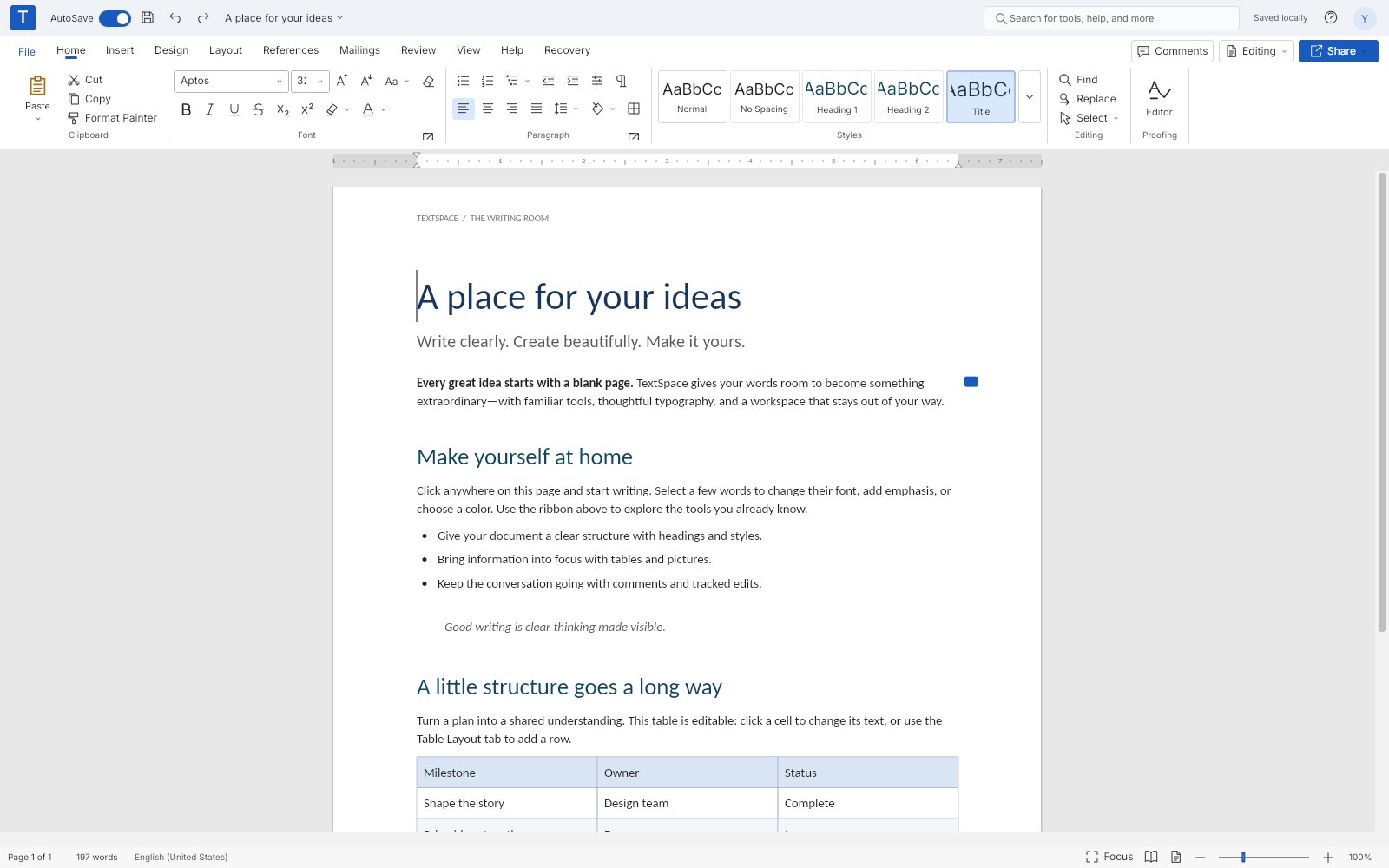
What makes TextSpace special
Familiar if you know Word-style word processors — but original, local‑first and written end‑to‑end in C#.
Paginated paper
Mixed-size sections, columns, per-section numbering, first/even/default headers and footers, paragraph keeps and widow control.
A familiar ribbon
A custom ribbon with Home, Insert, Design, Layout, References, Mailings, Review, View and Help, plus contextual table and picture tabs.
HarfBuzz typography
HarfBuzz metrics with aligned tab stops and leaders, styles, paragraph spacing and discretionary or nonbreaking characters.
Live fields and contents
Seventeen field types with F9 updates, locks, sequences and REF/PAGEREF, plus a linked, rebuildable table of contents.
Merged and nested tables
Rectangular merges, split-to-grid, nested tables, header-row repetition, vertical alignment and row splitting.
Navigation and review
Heading outline, page previews, search/replace, bookmarks, safe links, comments with replies and guarded change rejection.
Real interchange
Native .textspace, bounded DOCX import/export, PDF and PNG rendering, HTML and plain text, and CSV mail merge.
Recovery Center
Rolling IndexedDB/native snapshots, previewed repair and checksum-verified protected originals—without clearing your data.
31 capabilities, 7 areas
Editing
- Rich runs with paragraph splitting and joining
- Grapheme-safe selections and transactional editing
- Bounded undo/redo and native platform text input
- Templates, import/export and rolling local history in the File backstage
Typography
- Font metadata, emphasis, colors and paragraph styles
- Left, center, right, decimal and bar tabs with six leader styles
- Discretionary and nonbreaking characters via Insert → Special Characters
- Rich-run-aware wrapping without artificial break opportunities
Layout and sections
- Next, odd, even-page, continuous and next-column section starts
- Per-section paper size, orientation, margins, columns and numbering
- First/even/default plain-text headers and footers with placeholders
- Widow/orphan control, keep with next, keep lines together, page break before
- Balanced paragraph-only column bands on shared pages
Fields and contents
- 17 allowlisted field types including PAGE, NUMPAGES, SEQ, REF and PAGEREF
- F9 updates, Manage Fields, locking and unlinking
- Numeric switches for Arabic, Roman and alphabetic display
- Generated table of contents with linked entries and dot leaders
Tables and pictures
- Rectangular cell merges and split-to-grid
- Nested tables and in-cell or in-flow pictures
- First-header-row repetition, row splitting and minimum heights
- Top/middle/bottom vertical alignment in cells
Navigation and review
- Heading outline and page previews
- Search and replace
- Bookmarks with atomic internal-link rename
- Safe HTTP/HTTPS/mailto links and internal #bookmark links
- Comments, replies and resolution with guarded local change rejection
Recovery
- Rolling IndexedDB (browser) or native snapshots
- Actionable Recovery Center at startup instead of a reload-only error
- Preview tab-stop repair before protecting the original
- SHA-256-addressed protected originals that are never automatically evicted
- Recovery → Open and Repair for native files
Run TextSpace right here
The live browser build is the full C#/Skia word processor—write, paginate and export without an account or upload. Switch viewports, go fullscreen and tick off the guided tour as you explore.
Try TextSpace live
The live browser build is the full C#/Skia word processor—write, paginate and export without an account or upload.
Real C# · Uno WebAssembly · runs locally in your browser10 libraries you can embed
TextSpace is assembled from independently reusable libraries, each published on NuGet.org. Hover the graph to trace dependencies; click a node to jump to its package, and open a card for install and usage.
TextSpace.Core
Rich document model, typography, blocks, tables, anchors and text indexing
TextSpace.Documents
Native serialization/validation, repair plans, templates, HTML and CSV merge
TextSpace.Editing
Atomic editing, selections, formatting, structure and history
TextSpace.Layout
Renderer-independent pagination, caret queries, section regions and hit testing
TextSpace.Skia
HarfBuzz metrics, font registration, page rendering and PDF/PNG export
TextSpace.OpenXml
Bounded, dependency-light DOCX import/export
TextSpace.Storage
Recovery contracts, atomic files, protected archives and verified transport
TextSpace.Controls
Custom ribbon, galleries, menus, icons, palettes, dialogs and panes
TextSpace.Editor
Embeddable paginated editor, native input bridge, rulers and previews
TextSpace.Workbench
Composable office shell, commands, backstage, recovery, navigation and review
10 packages on NuGet.org
TextSpace ships as ten MIT-licensed packages, all versioned together. Seven target plain net10.0 and have no UI dependency: TextSpace.Core, Storage, Documents, Layout, Editing and OpenXml are pure .NET, and TextSpace.Skia adds only SkiaSharp and HarfBuzz. The three Uno Platform packages (Controls, Editor, Workbench) target net10.0-desktop and net10.0-browserwasm. Symbols are published to nuget.org as .snupkg with SourceLink, so you can step into the library source while debugging.
dotnet add package TextSpace.Core --prerelease<PackageReference Include="TextSpace.Core" Version="0.5.1-alpha.1" />
<PackageReference Include="TextSpace.Storage" Version="0.5.1-alpha.1" />
<PackageReference Include="TextSpace.Documents" Version="0.5.1-alpha.1" />
<PackageReference Include="TextSpace.Layout" Version="0.5.1-alpha.1" />
<PackageReference Include="TextSpace.Editing" Version="0.5.1-alpha.1" />
<PackageReference Include="TextSpace.OpenXml" Version="0.5.1-alpha.1" />
<PackageReference Include="TextSpace.Skia" Version="0.5.1-alpha.1" />
<PackageReference Include="TextSpace.Controls" Version="0.5.1-alpha.1" />
<PackageReference Include="TextSpace.Editor" Version="0.5.1-alpha.1" />
<PackageReference Include="TextSpace.Workbench" Version="0.5.1-alpha.1" /><!-- Directory.Packages.props -->
<ItemGroup>
<PackageVersion Include="TextSpace.Core" Version="0.5.1-alpha.1" />
<PackageVersion Include="TextSpace.Storage" Version="0.5.1-alpha.1" />
<PackageVersion Include="TextSpace.Documents" Version="0.5.1-alpha.1" />
<PackageVersion Include="TextSpace.Layout" Version="0.5.1-alpha.1" />
<PackageVersion Include="TextSpace.Editing" Version="0.5.1-alpha.1" />
<PackageVersion Include="TextSpace.OpenXml" Version="0.5.1-alpha.1" />
<PackageVersion Include="TextSpace.Skia" Version="0.5.1-alpha.1" />
<PackageVersion Include="TextSpace.Controls" Version="0.5.1-alpha.1" />
<PackageVersion Include="TextSpace.Editor" Version="0.5.1-alpha.1" />
<PackageVersion Include="TextSpace.Workbench" Version="0.5.1-alpha.1" />
</ItemGroup> Published with NuGet Trusted Publishing from GitHub Actions, with symbols (.snupkg) and SourceLink. Release v0.5.1-alpha.1 ↗
Dependencies (from project references): Core ← Documents ← Editing, Documents ← OpenXml, Core ← Layout ← Skia, Core ← Controls; Controls + Editing + Skia ← Editor; Editor + OpenXml + Storage ← Workbench. Storage stands alone. TextSpace.App (not packaged) supplies the browser and native desktop hosts.
The document model every other package builds on: blocks (paragraphs, tables, pictures, page/section/column breaks), immutable character and paragraph formatting, page and section settings, comments, tracked edits, fields and bookmarks. Use it alone to build or inspect documents in code. No dependencies and no UI.
dotnet add package TextSpace.Core --prereleaseKey types
DocumentModel– root object:Blocks,Page,Comments,Fields,Bookmarks,PlainText,WordCountParagraph,TextRun,TableBlock.Create(rows, columns),ImageBlock,SectionBreakBlock– content blocksTextStyle,ParagraphFormat,PageSettings– immutable records using typographic pointsDocumentStyles.BuiltIn/DocumentStyles.Find(name)– Normal, Heading 1–3, Title, Quote, Caption…TextIndex– UTF-16 coordinate index with paragraph lookup and grapheme snapping (At,Snap,Next)
Basic usage
using TextSpace.Core;

var heading = DocumentStyles.Find("Heading 1");
var document = new DocumentModel { Title = "Quarterly report", Page = new PageSettings().Landscape() };
document.Blocks.Clear();
document.Blocks.Add(new Paragraph("Summary", heading.Character, heading.Paragraph));

var body = new Paragraph("Revenue grew ");
body.Runs.Add(new TextRun("12%", new TextStyle { Bold = true, Color = "#107C10" }));
document.Blocks.Add(body);
document.Blocks.Add(TableBlock.Create(rows: 3, columns: 2));

var index = new TextIndex(document);          // UTF-16 text coordinates, grapheme-safe
var address = index.At(10);                   // paragraph containing offset 10
Console.WriteLine($"{document.WordCount} words; offset 10 is in \"{address.Paragraph.Text}\"");Local persistence primitives for document apps: an atomic latest-snapshot store with bounded rolling history, a content-addressed archive of protected originals that is never evicted automatically, and a checksum-verified envelope for moving original text across interop boundaries. It has no dependency on the document model and no UI.
dotnet add package TextSpace.Storage --prereleaseKey types
IRecoveryStore/FileRecoveryStore–WriteLatestAsync,ReadLatestAsync,ListVersionsAsync,ReadVersionAsyncIRecoveryArchiveStore/FileRecoveryArchiveStore–ProtectAsync,ListProtectedAsync,ReadProtectedAsyncRecoveryArchiveTransport–Encode/Decodewith SHA-256 and byte-count verificationRecoveryArchiveLimits– entry, per-original and total byte budgets
Basic usage
using TextSpace.Storage;

var root = Path.Combine(Environment.GetFolderPath(Environment.SpecialFolder.LocalApplicationData), "MyApp");

using var recovery = new FileRecoveryStore(Path.Combine(root, "Recovery"));
await recovery.WriteLatestAsync("Draft", json);          // atomic replace + rolling history
string? latest = await recovery.ReadLatestAsync();
foreach (var version in await recovery.ListVersionsAsync())
    Console.WriteLine($"{version.Title} {version.SavedAt:u} ({version.Bytes} bytes)");

var originals = new FileRecoveryArchiveStore(Path.Combine(root, "ProtectedOriginals"));
RecoveryArchive archive = await originals.ProtectAsync(originalText); // SHA-256 addressed
string envelope = RecoveryArchiveTransport.Encode(originalText);
string verified = RecoveryArchiveTransport.Decode(envelope, expectedId: archive.Id);Everything that turns a DocumentModel into files and back without a renderer: native .textspace JSON with strict size/structure validation, explicit tab-stop repair plans, sample templates, field evaluation, sanitized HTML export, CSV mail merge and offline writing checks. Depends on TextSpace.Core; no UI.
dotnet add package TextSpace.Documents --prereleaseKey types
DocumentJson–Save,Load(validating),Clone,FromText,ValidateDocumentRecovery.PrepareTabRepair– non-destructiveRecoveryRepairPlanfor invalid saved filesHtmlExporter.Export– escaped HTML with a restrictive content-security policyMailMerge–ParseCsvandMergefor«Field»placeholdersFieldEngine.Evaluate,FieldInstruction.Parse– DATE, PAGE, SEQ, REF/PAGEREF and other supported fieldsWritingAnalysis–Statisticsand repetition/spacing/long-sentenceCheck
Basic usage
using TextSpace.Documents;

var template = DocumentJson.FromText("Dear «Name»,\nYour order ships on «Date».", "Letter");
string json = DocumentJson.Save(template);        // native .textspace JSON
var reloaded = DocumentJson.Load(json);           // bounded + validated

var recipients = MailMerge.ParseCsv("Name,Date\nAda,Monday\nGrace,Friday");
foreach (var record in recipients.Records)
{
    var letter = MailMerge.Merge(reloaded, record);
    File.WriteAllText($"letter-{record["Name"]}.html", HtmlExporter.Export(letter));
}

var stats = WritingAnalysis.Statistics(reloaded);
Console.WriteLine($"{stats.Words} words, ~{stats.ReadingMinutes} min");
foreach (var issue in WritingAnalysis.Check(reloaded)) Console.WriteLine(issue.Message);Deterministic, point-based layout: line breaking with tab stops, pagination with keeps and widow control, sections and columns, repeating table headers and row splitting, plus caret geometry and hit testing. It measures text through the ITextMetrics interface, so it runs headless (tests, servers) or with the real shaper from TextSpace.Skia. Depends on TextSpace.Core; no UI.
dotnet add package TextSpace.Layout --prereleaseKey types
PageLayoutEngine–Layout(document)with a boundedParagraphLayoutCacheDocumentLayout–Pages,Caret,HitTest,VerticalMove,VisiblePages,NoticesLayoutPage,LayoutLine,LayoutCell,LayoutRegion– positioned output for renderersITextMetrics/MonospaceTextMetrics– measurement contract and a deterministic stand-in
Basic usage
using TextSpace.Documents;
using TextSpace.Layout;

var document = DocumentJson.FromText(string.Join('\n', Enumerable.Repeat("Lorem ipsum dolor sit amet.", 200)));

// Any ITextMetrics works; MonospaceTextMetrics is a deterministic stand-in (TextSpace.Skia provides real shaping).
var engine = new PageLayoutEngine(new MonospaceTextMetrics());
DocumentLayout layout = engine.Layout(document);
Console.WriteLine($"{layout.Pages.Count} pages, {layout.Pages[0].Lines.Count} lines on page 1");

CaretGeometry caret = layout.Caret(position: 120);
double x = layout.PageLeft(caret.PageIndex) + caret.X, y = layout.PageTop(caret.PageIndex) + caret.Y;
int hit = layout.HitTest(x, y + caret.Height / 2);   // back to a text position
int below = layout.VerticalMove(hit, deltaY: caret.Height);(TextSpace.Documents is used here only for DocumentJson.FromText.)
A UI-independent editing session: every command is an atomic, undoable transaction over the model, with grapheme-safe selections, typing style, paragraph styles, lists, tables (including merge/split), sections, fields, bookmarks, comments and tracked changes. Use it to script edits or to drive your own editor view. Depends on TextSpace.Documents (and Core); no UI.
dotnet add package TextSpace.Editing --prereleaseKey types
EditorSession–Document,Selection,SetSelection,InsertText,Replace,Undo/Redo,IsDirty- Formatting –
ToggleBold,SetFont,SetFontSize,ApplyStyle,FormatParagraph,ToggleList - Structure –
InsertTable,InsertPicture,InsertSectionBreak,MergeTableCells,InsertField,SetBookmark EditorSession.Changed/EditorChangedEventArgs– document, selection and view notificationsSessionTextProjection– revision-bound presentation text for input synchronization
Basic usage
using TextSpace.Documents;
using TextSpace.Editing;

var session = new EditorSession(DocumentJson.FromText("Introduction\nDetails", "Example"));
session.Changed += (_, e) => Console.WriteLine($"{e.Kind}: {e.Label}");

session.SetSelection(0, 12);            // "Introduction"
session.ApplyStyle("Heading 1");
session.SetSelection(13, 20);           // "Details"
session.ToggleBold();
session.SetBookmark("Details");
session.SetSelection(session.Index.Length, session.Index.Length);
session.InsertText(" follow.");
session.InsertTable(rows: 2, columns: 3);

Console.WriteLine($"{session.Find("details").Count} match(es); dirty: {session.IsDirty}");
session.Undo();                         // each command is one transaction
string json = DocumentJson.Save(session.Document);Bounded DOCX import and export written directly against the OOXML package (no Open XML SDK at runtime): paragraphs and runs, styles, lists, tab stops, tables with real gridSpan/vMerge, pictures, comments, bookmarks, fields, sections, headers and footers. Imports cap package sizes, prohibit DTDs and never fetch external relationships; unsupported content is reported as warnings. Depends on TextSpace.Documents; no UI.
dotnet add package TextSpace.OpenXml --prereleaseKey types
DocxReader.Read(bytes)– returns aDocxImportResultDocxImportResult– the importedDocumentplusWarningsfor anything droppedDocxWriter.Write(document)–.docxbytes
Basic usage
using TextSpace.OpenXml;

DocxImportResult result = new DocxReader().Read(File.ReadAllBytes("input.docx"));
foreach (var warning in result.Warnings)
    Console.WriteLine($"Not imported: {warning}");

var document = result.Document;              // TextSpace.Core.DocumentModel
document.Title = "Round-tripped";
File.WriteAllBytes("output.docx", new DocxWriter().Write(document));The rendering backend: HarfBuzz-shaped text metrics with glyph caches, explicit font registration, and page painting (selection, caret, formatting marks, comments, tracked changes) onto any SKCanvas, plus PDF and PNG export. Use it headless for server-side PDF/PNG generation. Depends on TextSpace.Layout, SkiaSharp and SkiaSharp.HarfBuzz; no UI framework.
dotnet add package TextSpace.Skia --prereleaseKey types
DocumentRenderer–Layout,DrawPage,ExportPdf,ExportPng,MetricsSkiaTextMetrics–Register(family, bold, italic, data), HarfBuzzMeasure/CaretPositions, shaped-run cacheRenderOptions– selection, caret, formatting marks, comments, changes and boundaries
Basic usage
using SkiaSharp;
using TextSpace.Documents;
using TextSpace.Skia;

var document = SampleDocument.Report();
using var renderer = new DocumentRenderer();

// Register faces before layout; the built-in styles use "Aptos".
var regular = File.ReadAllBytes("fonts/Carlito-Regular.ttf");
renderer.Metrics.Register("Aptos", bold: false, italic: false, regular);

var layout = renderer.Layout(document);
File.WriteAllBytes("report.pdf", renderer.ExportPdf(document, layout));
File.WriteAllBytes("page1.png", renderer.ExportPng(document, layout, pageIndex: 0, scale: 2));

// Or draw a page onto any SKCanvas (units are points).
using var surface = SKSurface.Create(new SKImageInfo(612, 792));
renderer.DrawPage(surface.Canvas, document, layout, pageIndex: 0, new RenderOptions { ShowFormatting = true });Custom Uno Platform office chrome drawn with the Skia renderer: a tabbed RibbonBar with lazy groups, ribbon/office buttons with bindable appearance properties, vector icons, style gallery, table picker, color palette, menus, dialogs, task panes, zoom slider and scroll bars. Useful for any Uno app that wants an Office-style command surface. Depends on TextSpace.Core (for style definitions) and Uno Platform (Skia renderer).
dotnet add package TextSpace.Controls --prereleaseKey types
RibbonBar–AddTab,InsertGroup(extend a tab without replacing its factory),SelectTab,AddFileTabRibbonGroup,RibbonButton,OfficeButton(IsSelected,IsPrimary,RestBackgrounddependency properties)OfficeIcon,StyleGallery,TablePicker,ColorPalette(AsFlyout)OfficeMenu,OfficeDialog,OfficeTaskPane,OfficeZoomSlider,OfficeScrollBarOfficeTheme– palette constants,Font, andText/Rows/Columnslayout helpers
Basic usage
using TextSpace.Controls;

var status = OfficeTheme.Text("Ready", 12, OfficeTheme.Muted);
var ribbon = new RibbonBar();
ribbon.AddTab("Home", () =>
{
    var clipboard = new RibbonGroup("Clipboard");
    clipboard.Body.Children.Add(new RibbonButton("paste", "Paste", () => status.Text = "Pasted", large: true, showLabel: true));
    clipboard.Body.Children.Add(new RibbonButton("copy", "Copy", () => status.Text = "Copied"));
    return [clipboard];
});

var zoom = new OfficeZoomSlider { Value = 1 };
zoom.ValueChanged += value => status.Text = $"{value:P0}";
window.Content = OfficeTheme.Rows((ribbon, 0), (status, -1), (zoom, 0)); // 0 = auto, -1 = starThe embeddable paginated editor: DocumentSurface renders an EditorSession with Skia, bridges native text input, handles mouse/keyboard selection, zoom and scrolling, and shows a horizontal ruler with indent handles. DocumentPreview draws page thumbnails. Depends on TextSpace.Controls, TextSpace.Editing, TextSpace.Skia and Uno Platform (Skia renderer).
dotnet add package TextSpace.Editor --prereleaseKey types
DocumentSurface–DocumentSurface(session),Session,Renderer,Layout,Relayout,SetZoom,FitPageWidth,FocusEditorDocumentSurfaceevents –Error,ViewChanged,CommandRequested,ContextRequestedPageRuler– ruler withIndentChangedDocumentPreview– page thumbnail for navigation panes
Basic usage
using TextSpace.Documents;
using TextSpace.Editing;
using TextSpace.Editor;

var session = new EditorSession(DocumentJson.FromText("Hello from TextSpace", "Hello"));
var surface = new DocumentSurface(session) { ShowRuler = true };
surface.Renderer.Metrics.Register("Aptos", false, false, fontBytes); // register faces, then relayout
surface.Relayout();
surface.Error += message => System.Diagnostics.Debug.WriteLine(message);

window.Content = surface;
window.Closed += (_, _) => surface.Dispose();
surface.FocusEditor();The complete Word-style shell: ribbon tabs (Home, Insert, Design, Layout, References, Mailings, Review, View, Help plus contextual table/picture tabs), File backstage, navigation/review panes, dialogs, recovery tools and status bar around a DocumentSurface. All platform services go through IWorkspaceHost (files, clipboard, printing, URI launching and IRecoveryStore AutoSave); wrap it in RecoveryWorkspaceHost with an IRecoveryArchiveStore to enable the Recovery tab. Dispose owned workbenches when their host closes. Depends on TextSpace.Editor, TextSpace.OpenXml, TextSpace.Storage and Uno Platform.
dotnet add package TextSpace.Workbench --prereleaseKey types
WordWorkbench–WordWorkbench(session, host),Session,Surface,Ribbon,ExecuteCommandAsync(id),StateChangedIWorkspaceHost– host contract;OpenedFileresultRecoveryWorkspaceHost– adds protected originals to any hostWordWorkbench.EnableRecoveryTools/ShowRecoveryNotice– recovery UI
Basic usage
using TextSpace.Controls;
using TextSpace.Documents;
using TextSpace.Editing;
using TextSpace.Storage;
using TextSpace.Workbench;

// MyWorkspaceHost implements IWorkspaceHost (file pickers, clipboard, printing, URIs, AutoSave).
IWorkspaceHost host = new RecoveryWorkspaceHost(new MyWorkspaceHost(),
    new FileRecoveryArchiveStore(Path.Combine(appData, "ProtectedOriginals")));

var workbench = new WordWorkbench(new EditorSession(SampleDocument.Create()), host);
workbench.EnableRecoveryTools();
workbench.Ribbon.InsertGroup("Home", 0, () => new RibbonGroup("My tools"));
workbench.Surface.Renderer.Metrics.Register("Aptos", false, false, fontBytes);
workbench.Surface.Relayout();

window.Content = workbench;
window.Closed += (_, _) => workbench.Dispose();From engine to workbench
Layers build bottom‑up: each one depends only on those beneath it.
UI-independent rich document model with persistent paragraph IDs and typographic-point geometry.
TextSpace.CoreSerialization, transactional editing, deterministic pagination, bounded DOCX and recovery storage without UI dependencies.
TextSpace.DocumentsTextSpace.EditingTextSpace.LayoutTextSpace.OpenXmlTextSpace.StorageSkiaSharp and HarfBuzz implement text metrics and paint the same geometry on screen and in PDF/PNG.
TextSpace.SkiaCustom ribbon and office controls plus the embeddable paginated editor with native text input.
TextSpace.ControlsTextSpace.EditorAssembles commands, backstage, recovery, navigation and review behind the IWorkspaceHost abstraction.
TextSpace.WorkbenchEmbed, script, extend
using TextSpace.Documents;
using TextSpace.Editing;
using TextSpace.OpenXml;
using TextSpace.Skia;

var document = DocumentJson.FromText("Introduction\nDetails", "Example");
var editor = new EditorSession(document);
editor.SetSelection(13, 20);
editor.SetBookmark("Details");
File.WriteAllBytes("Example.docx", new DocxWriter().Write(document));

using var renderer = new DocumentRenderer();
// Register required faces before layout for predictable typography.
var layout = renderer.Layout(document);
File.WriteAllBytes("Example.pdf", renderer.ExportPdf(document, layout));dotnet workload install wasm-tools
dotnet publish src/TextSpace.App -f net10.0-browserwasm -c Release \
-p:WasmShellWebAppBasePath=/TextSpace/ -o artifacts/publish
python3 scripts/collect-site.py artifacts/publish site
python3 scripts/serve-site.py site --port 4173File formats
Keyboard essentials
Continuously verified
Each push runs through GitHub Actions. The public browser build is deployed only from successful pipelines.


Toolchain
Third‑party NuGet packages
git clone https://github.com/wieslawsoltes/TextSpace.git
cd TextSpace
dotnet workload install wasm-tools
dotnet run --project src/TextSpace.App -f net10.0-browserwasmWhat it doesn’t claim
The project documents its limits as carefully as its features.
- Not Microsoft Word: no identical pagination, pixel-identical appearance or lossless DOCX round-tripping
- Footnotes/endnotes, equations, floating drawings and rich independent header/footer stories are unfinished
- No collaboration, macros or add-ins; the offline Editor checks style, not full spelling or grammar
- AutoSave is device-local and abrupt termination can lose debounced edits—keep independent backups
- Browser tests use Chromium; Safari, Firefox, mobile, IME and screen-reader parity need more validation