VideoSpace
Local-first nonlinear video editing with GPU composition in-browser
VideoSpace is a nonlinear video editor running as a real Uno WebAssembly and native desktop app, built on a frame-addressed C# editing engine, reusable custom controls and a local browser media pipeline. It supports transitions, editable nested sequences, multicamera sources and offline VP8/VP9 + Opus WebM export, all without a media upload service. The engine ships as ten packable libraries, six of which do not depend on Uno.
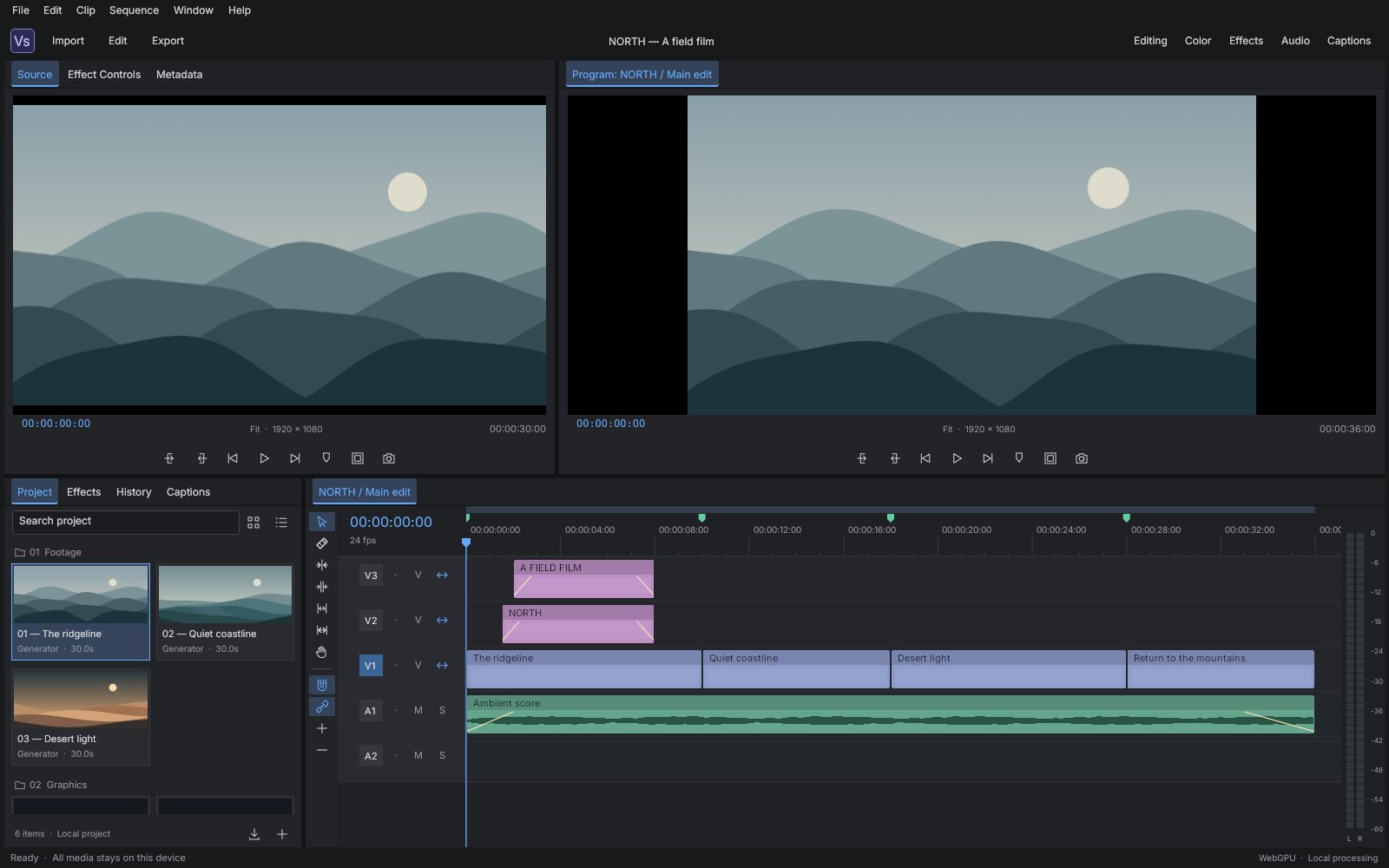
What makes VideoSpace special
Familiar if you know Adobe Premiere Pro-style nonlinear editors — but original, local‑first and written end‑to‑end in C#.
Real NLE editing
Razor, trim, guarded ripple, roll, slip, rate stretch, insert/overwrite and linked selection, with invalid edits rolled back atomically.
Transitions with real handles
Cross dissolve, dips to black/white, directional wipes and audio crossfades with centered, start or end-at-cut alignment.
Editable nested sequences
Nest a selection and keep its tracks, effects, transitions, captions, markers and audio editable, with guarded unnesting.
Multicamera cuts
Combine 2–16 manually offset sources and cut between angles with keys 1–9 or Effect Controls.
GPU composition
Hardware WebGPU preferred, WebGL2 fallback and reduced Canvas preview, with nested sequences and transitions rendered in one context.
Offline WebM export
Offline export to VP9/VP8 + Opus WebM that renders every output frame, with explicit frame timestamps and sample-clock stereo audio.
Keyframed effects
Effect Controls with typed or scrubbed values, keyframe diamonds, editable color presets and curves that survive split and trim.
Local-first by design
Media stays on your device: IndexedDB recovery in the browser and portable .videospace manifests, no upload service.
24 capabilities, 6 areas
Workspace
- Source and Program monitors, project bins and multitrack timeline
- Effect Controls, color presets, captions, history and metering
- Editing, Color, Effects, Audio and Captions layouts
- Resizable panel dividers and custom-styled Uno controls
Timeline editing
- Selection, razor, guarded ripple, roll, slip, rate stretch and hand tools
- Insert/overwrite from Source with In/Out marks, or drag onto a track
- Snapping, clipboard, track lock/visibility/mute/solo and sync-lock
- Transactional undo/redo; invalid operations roll back rather than half-apply
Transitions
- Cross dissolve and dips to black or white
- Directional wipes
- Constant-gain and constant-power audio crossfades
- Centered, start-at-cut and end-at-cut alignment using real source handles
Nesting and multicam
- Nest a complete temporal selection into an editable child sequence
- Open, edit and return from nested sequences; saves always keep the root
- Multicamera sources from 2–16 video/image/generated assets with manual offsets
- Fixed-angle audio or audio-follow-video; camera cuts via keys 1–9
Rendering and performance
- Hardware WebGPU → WebGL2 → reduced Canvas preview in the browser
- Host-owned Skia canvas on native desktop
- Prepared per-revision indexes replace full-timeline scans
- No extra evaluations, uploads or frames while the editor is idle
Media and output
- Import local video, audio and images via Import or file drop (browser-supported sources)
- Indexed VP8/VP9 WebM/Matroska source decoding
- Offline VP9/VP8 + Opus WebM export
- PNG frame capture, SRT captions, cuts-only EDL and generated/nested WAV
Run VideoSpace right here
The browser editor opens the original NORTH sample with generated landscapes, titles, synthesized audio, markers and captions ready to edit. Switch viewports, go fullscreen and tick off the guided tour as you explore.
Try VideoSpace live
The browser editor opens the original NORTH sample with generated landscapes, titles, synthesized audio, markers and captions ready to edit.
Real C# · Uno WebAssembly · runs locally in your browser10 libraries you can embed
VideoSpace is assembled from independently reusable libraries, each published on NuGet.org. Hover the graph to trace dependencies; click a node to jump to its package, and open a card for install and usage.
VideoSpace.Core
Media/sequence model, rational time, validation and prepared indexes
VideoSpace.Editing
Atomic edits, transitions, nesting, camera cuts, clipboard and history
VideoSpace.Timeline
Indexed timeline geometry, hit testing, snapping and anchored zoom
VideoSpace.Effects
Keyframed evaluation and prepared recursive frame plans
VideoSpace.Audio
Prepared sample-clock mixing, waveform reduction, metering and WAV
VideoSpace.Documents
Validated native manifests, SRT captions and guarded cuts-only EDL
VideoSpace.Rendering
Skia layer/transition/sequence composition, procedural footage and PNG
VideoSpace.Media
Browser storage, GPU graph, local media, packet indexing and codecs
VideoSpace.Controls
Custom timeline, monitors, bins, panels, icons and editing fields
VideoSpace.Workbench
Embeddable nonlinear editing workspace, effects inspector and workflows
10 packages on NuGet.org
The editor is built from ten MIT-licensed packages that are versioned and released together. Seven of them (Core through Rendering) target plain net10.0 and have no UI dependency; only VideoSpace.Rendering pulls in SkiaSharp. Media, Controls and Workbench are Uno Platform libraries targeting net10.0-desktop and net10.0-browserwasm. Every package ships symbols to NuGet.org (.snupkg) with SourceLink.
dotnet add package VideoSpace.Core --prerelease<PackageReference Include="VideoSpace.Core" Version="0.3.0-alpha.1" />
<PackageReference Include="VideoSpace.Editing" Version="0.3.0-alpha.1" />
<PackageReference Include="VideoSpace.Timeline" Version="0.3.0-alpha.1" />
<PackageReference Include="VideoSpace.Effects" Version="0.3.0-alpha.1" />
<PackageReference Include="VideoSpace.Audio" Version="0.3.0-alpha.1" />
<PackageReference Include="VideoSpace.Documents" Version="0.3.0-alpha.1" />
<PackageReference Include="VideoSpace.Rendering" Version="0.3.0-alpha.1" />
<PackageReference Include="VideoSpace.Media" Version="0.3.0-alpha.1" />
<PackageReference Include="VideoSpace.Controls" Version="0.3.0-alpha.1" />
<PackageReference Include="VideoSpace.Workbench" Version="0.3.0-alpha.1" /><!-- Directory.Packages.props -->
<ItemGroup>
<PackageVersion Include="VideoSpace.Core" Version="0.3.0-alpha.1" />
<PackageVersion Include="VideoSpace.Editing" Version="0.3.0-alpha.1" />
<PackageVersion Include="VideoSpace.Timeline" Version="0.3.0-alpha.1" />
<PackageVersion Include="VideoSpace.Effects" Version="0.3.0-alpha.1" />
<PackageVersion Include="VideoSpace.Audio" Version="0.3.0-alpha.1" />
<PackageVersion Include="VideoSpace.Documents" Version="0.3.0-alpha.1" />
<PackageVersion Include="VideoSpace.Rendering" Version="0.3.0-alpha.1" />
<PackageVersion Include="VideoSpace.Media" Version="0.3.0-alpha.1" />
<PackageVersion Include="VideoSpace.Controls" Version="0.3.0-alpha.1" />
<PackageVersion Include="VideoSpace.Workbench" Version="0.3.0-alpha.1" />
</ItemGroup> Published with NuGet Trusted Publishing from GitHub Actions, with symbols (.snupkg) and SourceLink. Release v0.3.0-alpha.1 ↗
Dependencies (from project references):
Core ← Editing, Timeline, Documents, Effects
Effects ← Audio, Rendering (+ SkiaSharp), Media (Uno)
Editing + Timeline + Rendering + Media ← Controls
Controls + Documents + Audio ← Workbench
The browser media pipeline also contains standalone JavaScript modules (packet indexing, decoding, GPU compositing) that are not NuGet packages; docs/libraries.md explains their ownership and revision boundaries.
The document model every other package builds on: VideoProject, assets, tracks, clips, transitions, keyframes and captions, with exact rational frame rates and SMPTE timecode. Use it alone to generate, inspect or validate projects. No dependencies beyond .NET; no UI.
dotnet add package VideoSpace.Core --prereleaseKey types
VideoProject/Track/TimelineClip/MediaAsset— the serializable sequence model (timeline coordinates are integer frames).FrameRate— exactNumerator/Denominatorrate withSeconds/Framesconversion.Timecode—Format/Parse, including 29.97/59.94 drop-frame.ProjectIndex/TrackIndex— prepared per-revision indexes forAt,TransitionAtandVisiblequeries.ProjectValidation.Validate,ProjectSnapshot.Write/Read/Clone— limits, invariants and JSON manifests.
Basic usage
using VideoSpace.Core;

var project = SampleProject.Create();                 // validated NORTH sample, 24 fps
FrameRate rate = project.FrameRate;
string tc = Timecode.Format(240, rate);               // "00:00:10:00"
long frame = Timecode.Parse("00:00:10:00", rate);     // 240

var index = new ProjectIndex(project);                // read index for this revision
TimelineClip? clip = index.Tracks[0].At(300);         // O(log n) active clip on V1
Console.WriteLine($"{tc}: {clip?.Name}, sequence ends at frame {index.Duration}");

project.Markers.Add(new Marker(frame, "Coast"));       // mutate, then re-validate
ProjectValidation.Validate(project);                  // throws InvalidDataException
string json = ProjectSnapshot.Write(project);Atomic editing on top of Core: every EditorSession.Execute call validates the whole document and either commits one undo step or restores the previous state. Includes insert/overwrite, razor, ripple, roll, slip, rate stretch, transitions, nesting and multicamera cuts. Depends on VideoSpace.Core; no UI.
dotnet add package VideoSpace.Editing --prereleaseKey types
EditorSession—Execute,Undo/Redo,Selection,Playhead,Index,OpenSequence/NavigateUp,Changedevent.TimelineEdits—Insert,Split,Move,Trim,Delete,Slip,Roll,RateStretch,Link.TransitionEdits—Add/Removetwo-sided transitions withTransitionAlignment.SequenceEdits—Nest/Unnest,CreateMulticam,SwitchCamera.TimelineClipboard— value-ownedCopy/Pastepreserving gaps, links and transitions.
Basic usage
using VideoSpace.Core;
using VideoSpace.Editing;

var session = new EditorSession(SampleProject.Create());
session.Execute("Dissolve", p => TransitionEdits.Add(p, "ridge-cut", TransitionKind.CrossDissolve, 48));
session.Execute("Razor", p => TimelineEdits.Split(p, ["dunes-cut"], 540));

string[] nested = [];
session.Execute("Nest", p => nested = SequenceEdits.Nest(
    p, p.Tracks.SelectMany(t => t.Clips).Select(c => c.Id), "Main edit"));
session.OpenSequence(session.Project.Clip(nested[0]).AssetId); // edits now target the child
session.NavigateUp();                                          // RootProject stays authoritative

session.Undo();
Console.WriteLine(string.Join(", ", session.History)); // Dissolve, RazorPixel/frame mapping for building your own timeline UI: indexed hit testing of heads, tails and bodies, snapping to edit points and markers, and zoom anchored under the pointer. Depends on VideoSpace.Core; renderer-agnostic, no UI.
dotnet add package VideoSpace.Timeline --prereleaseKey types
TimelineGeometry—X/Frame/Ymapping,PixelsPerFrame,ScrollFrame,HeaderWidth,TrackHeight.TimelineGeometry.Prepared— attach aProjectIndexfor logarithmic hit tests and snapping.TimelineGeometry.Hit,Snap,ZoomAt,DisplayTracks.TimelineHit/HitPart—Ruler,Track,Body,Head,Tailresults with frame, track and clip IDs.
Basic usage
using VideoSpace.Core;
using VideoSpace.Timeline;

var project = SampleProject.Create();
var geometry = new TimelineGeometry { PixelsPerFrame = 2, HeaderWidth = 148, TrackHeight = 52 };
geometry.Prepared = new ProjectIndex(project);

TimelineHit hit = geometry.Hit(project, x: 700, y: 90);
if (hit.Part is HitPart.Head or HitPart.Tail)
    Console.WriteLine($"Trim handle of {hit.ClipId} on {hit.TrackId}");

long snapped = geometry.Snap(project, geometry.Frame(705), exclude: [], playhead: 96);
geometry.ZoomAt(1.25, anchorX: 705);   // keeps the frame under the pointer fixed
double x = geometry.X(snapped);Evaluates a project at a frame into a FramePlan: resolved layer transforms, color, crop, opacity envelopes, transitions, nested-sequence subplans and audio voices. Plans are plain records, so any backend (Skia, WebGPU, WebGL2) can draw them. Depends on VideoSpace.Core; no UI.
dotnet add package VideoSpace.Effects --prereleaseKey types
PreparedFramePlanner— per-revision planner with a memoized last frame;Evaluate(frame).FramePlanner.Evaluate— one-shot convenience wrapper.FramePlan,LayerPlan,TransitionPlan,AudioPlan— the backend-independent plan records.EffectPresets—NamesandApplyfor built-in looks and animations.FramePlanBudget— bounds expanded graphs before serialization or GPU allocation.
Basic usage
using VideoSpace.Core;
using VideoSpace.Effects;

var project = SampleProject.Create();
var clip = project.Clip("coast-cut");
EffectPresets.Apply(clip, "Golden hour", project.FrameRate);
clip.Effects.Opacity.SetKey(0, 0);
clip.Effects.Opacity.SetKey(24, 1, Interpolation.Smooth);

var planner = new PreparedFramePlanner(project);   // reuse until the project changes
FramePlan plan = planner.Evaluate(250);
foreach (LayerPlan layer in plan.Layers)
    Console.WriteLine($"{layer.ClipId}: {layer.Kind} at {layer.SourceTime:0.00}s, opacity {layer.Opacity:0.00}");
foreach (AudioPlan voice in plan.Audio)
Console.WriteLine($"{voice.ClipId}: gain {voice.Gain:0.00}");A deterministic stereo mixer that compiles gain, pan, fades, transitions, nesting and camera audio into an interval-indexed graph, then mixes arbitrary sample blocks. The host supplies decoded PCM, so no codec is pulled in. Depends on VideoSpace.Effects; no UI.
dotnet add package VideoSpace.Audio --prereleaseKey types
PreparedAudioMixer— compile once per revision;Mix(sources, firstSample, sampleRate, stereo).PcmAudio— caller-owned interleaved float samples with interpolatedAt.Waveform—Reduceto peaks,Rms,Decibels.WavWriter.Write— 16-bit PCM WAV bytes.
Basic usage
using VideoSpace.Audio;
using VideoSpace.Core;

var project = SampleProject.Create();
var mixer = new PreparedAudioMixer(project);
const int rate = 48000;
var stereo = new float[rate * 2 * 5];              // five seconds, interleaved L/R

// The sample score is a generated tone. For imported media, pass decoded PcmAudio keyed by asset ID.
mixer.Mix(new Dictionary<string, PcmAudio>(), firstSample: 0, sampleRate: rate, stereo);

var pcm = new PcmAudio(rate, 2, stereo);
float[] peaks = Waveform.Reduce(pcm, buckets: 512);
double level = Waveform.Decibels(Waveform.Rms(stereo));
File.WriteAllBytes("mix.wav", WavWriter.Write(pcm));File interchange: validated .videospace manifests, SubRip captions and a guarded cuts-only CMX3600 EDL writer that rejects what it cannot represent (transitions, nests, multicam, speed changes). Depends on VideoSpace.Core; no UI.
dotnet add package VideoSpace.Documents --prereleaseKey types
ProjectFile—Save/Openand the.videospaceExtension.SubRip—Read/WriteSRT captions at aFrameRate.EdlWriter.Write— CMX3600 export of one video track.
Basic usage
using VideoSpace.Core;
using VideoSpace.Documents;

var project = SampleProject.Create();
string manifest = ProjectFile.Save(project);             // validates before writing
File.WriteAllText("north" + ProjectFile.Extension, manifest);
VideoProject reopened = ProjectFile.Open(manifest);     // validates on read

string srt = SubRip.Write(project.Captions, project.FrameRate);
List<Caption> captions = SubRip.Read(srt, project.FrameRate);
string edl = EdlWriter.Write(project, trackId: "v1");Draws a FramePlan into a host-owned SKCanvas (GPU or raster): transforms, color matrix, crop, vignette, dissolves/dips/wipes, nested plans, titles, captions and the procedural sample footage. Use it for native previews, thumbnails or PNG stills. Depends on VideoSpace.Effects and SkiaSharp; no UI framework.
dotnet add package VideoSpace.Rendering --prereleaseKey types
FrameRenderer—Draw(canvas, area, plan, safeAreas),Png(plan),SetImage,SetTypeface;IDisposable.ProceduralFootage.Draw— the deterministic NORTH landscape generator.Palette— hex color parsing and paint helpers.
Basic usage
using SkiaSharp;
using VideoSpace.Core;
using VideoSpace.Effects;
using VideoSpace.Rendering;

FramePlan plan = FramePlanner.Evaluate(SampleProject.Create(), frame: 96);

using var renderer = new FrameRenderer();
// renderer.SetImage(assetId, File.ReadAllBytes("still.png")) supplies image assets.
File.WriteAllBytes("frame-96.png", renderer.Png(plan));

using var surface = SKSurface.Create(new SKImageInfo(1280, 720));
renderer.Draw(surface.Canvas, new SKRect(0, 0, 1280, 720), plan, safeAreas: true);The platform boundary used by the controls: local import and project pickers, recovery storage, browser GPU presentation, Web Audio output and WebM export. In the browser it drives the bundled JavaScript modules; on desktop it provides image import, file pickers and recovery in application storage. Depends on VideoSpace.Effects; requires Uno Platform.
dotnet add package VideoSpace.Media --prereleaseKey types
MediaServices—InitializeAsync,Poll,ImportAsync,OpenAsync,SaveTextAsync,ExportVideo,SetProject;IDisposable.MediaMessage— queued host events (Type,Text,Asset,Bytes).BrowserState— browser meter levels and monitor visibility.
Basic usage
using VideoSpace.Core;
using VideoSpace.Media;

var project = SampleProject.Create();
var media = new MediaServices();
await media.InitializeAsync();          // restores recovery and starts browser services
await media.ImportAsync();              // opens the platform picker

// Results arrive asynchronously; poll from a DispatcherTimer tick.
foreach (MediaMessage message in media.Poll())
{
    if (message.Type == "asset" && message.Asset is { } asset) project.Assets.Add(asset);
    else if (message.Type == "error") Console.Error.WriteLine(message.Text);
}
media.SetProject(project);              // browser: keep the media pipeline in sync
In a browser head, include every VideoSpace.Media/Web/*.js file as an embedded WasmScripts resource, as src/VideoSpace.App/VideoSpace.App.csproj does.
The custom editing controls — timeline, Source/Program monitors, project bin, dockable panels, split handles, timecode/value fields, meters and vector icons — usable individually in any Uno app. Depends on Editing, Timeline, Rendering and Media; requires Uno Platform (Skia renderer).
dotnet add package VideoSpace.Controls --prereleaseKey types
StudioTheme— resource dictionary to merge afterXamlControlsResources.TimelineView— multitrack timeline bound to anEditorSession;Geometry,Fit,Zoom,AssetDropped.MonitorView— frame monitor;Update(plan, total, rate, playing, playbackRate),Seek,Command.ProjectBinView— asset bin;Update(project),AssetSelected,ImportRequested.PanelHost,SplitHandle,TimecodeField,AudioMeterView,Studiolayout/brush helpers.
Basic usage
<ResourceDictionary.MergedDictionaries>
  <XamlControlsResources xmlns="using:Microsoft.UI.Xaml.Controls" />
  <studio:StudioTheme xmlns:studio="using:VideoSpace.Controls" />
</ResourceDictionary.MergedDictionaries>using VideoSpace.Controls;
using VideoSpace.Core;
using VideoSpace.Editing;
using VideoSpace.Effects;
using VideoSpace.Media;
using VideoSpace.Rendering;
var session = new EditorSession(SampleProject.Create());
var timeline = new TimelineView(session);
var program = new MonitorView("program", new MediaServices(), new FrameRenderer());
var planner = new PreparedFramePlanner(session.Index);
var layout = Studio.Rows(Studio.Star(), Studio.Star());
Studio.At(layout, program);
Studio.At(layout, timeline, row: 1);
window.Content = layout; // your Uno Window
program.Update(planner.Evaluate(session.Playhead), session.Index.Duration,
session.Project.FrameRate, playing: false, playbackRate: 1);The complete embeddable editor — menus, workspaces, Source/Program monitors, bins, timeline, Effect Controls, captions, history, playback and project/export workflows — as one UserControl. Depends on Controls, Documents and Audio; requires Uno Platform (Skia renderer).
dotnet add package VideoSpace.Workbench --prereleaseKey types
StudioWorkbench(EditorSession, MediaServices)— the workspace control;IDisposable.StudioWorkbench.Session/Timeline— the shared session and timeline control.SetTypeface,ShowStatus— host customization.
Basic usage
using VideoSpace.Core;
using VideoSpace.Editing;
using VideoSpace.Media;
using VideoSpace.Workbench;

protected override void OnLaunched(LaunchActivatedEventArgs args)
{
    var window = new Window { Title = "VideoSpace" };
    var workbench = new StudioWorkbench(new EditorSession(SampleProject.Create()), new MediaServices());
    window.Content = workbench;
    window.Closed += (_, _) => workbench.Dispose();
    window.Activate();
}
Merge StudioTheme into the application resources as shown for Controls, and embed the Media scripts in the browser head.
From engine to workbench
Layers build bottom‑up: each one depends only on those beneath it.
Frame-based project model with rational time and prepared indexes, plus validated manifests, SRT and EDL.
VideoSpace.CoreVideoSpace.DocumentsTransactional editing, timeline geometry, prepared frame plans and sample-clock audio mixing, all without Uno.
VideoSpace.EditingVideoSpace.TimelineVideoSpace.EffectsVideoSpace.AudioSkia composition on native hosts and a single-context WebGPU/WebGL2 graph with WebM indexing and codecs in the browser.
VideoSpace.RenderingVideoSpace.MediaCustom Uno timeline, monitors and bins composed into an embeddable editing workspace.
VideoSpace.ControlsVideoSpace.WorkbenchEmbed, script, extend
git clone https://github.com/wieslawsoltes/VideoSpace.git
cd VideoSpace
python3 scripts/fetch-assets.py
dotnet run --project tests/VideoSpace.Tests -c Release
dotnet run --project tests/VideoSpace.Parity.Tests -c Release

dotnet workload install wasm-tools --skip-manifest-update
dotnet publish src/VideoSpace.App -f net10.0-browserwasm -c Release \
  -o artifacts/publish -p:WasmShellWebAppBasePath=/VideoSpace/
python3 scripts/collect-site.py artifacts/publish artifacts/site
python3 scripts/serve-site.py --directory artifacts/site --port 4173dotnet run --project src/VideoSpace.App -f net10.0-desktop \
-p:VideoSpaceDesktopOnly=trueFile formats
Keyboard essentials
Continuously verified
Each push runs through GitHub Actions. The public browser build is deployed only from successful pipelines.
build.yml Desktop
desktop.yml Engine
engine.yml GPU diagnosis
gpu-probe.yml Media
Mediamedia.yml Release
release.yml
Toolchain
Third‑party NuGet packages
git clone https://github.com/wieslawsoltes/VideoSpace.git
cd VideoSpace
dotnet workload install wasm-tools
dotnet run --project src/VideoSpace.App -f net10.0-browserwasmWhat it doesn’t claim
The project documents its limits as carefully as its features.
- Implemented NLE subset, not complete or pixel-identical Adobe Premiere Pro parity
- Native desktop lacks imported video/audio playback, video export and live audio output
- No automatic multicam sync or simultaneous angle grid; no .prproj/AAF/Final Cut XML interchange
- Export is limited to a ten-minute range with explicit memory budgets; arbitrary VFR accuracy not claimed
- Saved manifests omit media bytes; IndexedDB recovery is quota-dependent and not a backup